When a Swedish private equity firm spun Reverse out of WithSecure in a corporate divestiture, the company’s cloud security team inherited an unexpected problem: they had to build an entire AWS organization from zero. No dedicated infrastructure team. No AWS specialists. No external consulting budget. Just two offensive security consultants who knew exactly how cloud environments get breached — and now had to build one that wouldn’t.
Nick Jones and Mohit Gupta’s talk at fwd:cloudsec North America 2025 is a detailed postmortem of that build: what they chose, why, what broke, and what they’d do differently. It is not a vendor pitch or a theoretical framework. It is an opinionated, technically dense account of the trade-offs that emerge when pentesters become platform engineers for their own shop — and it is one of the most practically useful conference talks on cloud security architecture published in 2025.
Key Takeaways
- Account segregation — one account per client engagement — is the single highest-value data security control in an offense-oriented cloud environment.
- Keeping the AWS management account outside SSO federation severs the most common Entra-to-management-account pivot chain attackers use against clients.
- Custom KMS keys rarely prevent real breaches; attackers gain decrypt rights by compromising the workload's IAM role — strong IAM design delivers more value per hour of engineering effort.
- SCPs should be tiered by OU risk profile: full hardening for production, minimal guardrails for research (no org exit, no root, no accidental $36K API calls).
- IAM trust policy conditions in OIDC-based CI/CD are more constrained than they appear — only a small fixed set of JWT claims are evaluable, so design CI/CD role scoping accordingly.
Why Pentesters Were Handed the Keys to AWS
Secure AWS organization setup rarely begins with a clean slate handed to the right team. For Reverse — an offensive security consultancy — it began with a corporate sale. The company formerly known as F-Secure Consulting rebranded to WithSecure Consulting, and then its Finnish parent company sold the consulting arm to a Swedish private equity firm. WithSecure Consulting became Reverse, and with that came the inevitable burden of a divestiture: stand up an entirely new IT estate from scratch.
That meant new finance systems, new HR tooling, and — most critically — a new AWS organization. From zero.
The Wrong Team for the Job (and Why That Turned Out Fine)
Most organizations going through a divestiture lean on a dedicated infrastructure or cloud operations team. Reverse didn’t have one. What they had:
- Three IT staff with limited AWS experience and no deep cloud background
- No budget to bring in external consultants or AWS specialists
- No Series A or venture backing — just cash flow from a consulting business
What filled the gap was a cloud security team — the kind that runs AWS penetration tests, design reviews, and purple team exercises for clients, not the kind that provisions and maintains cloud infrastructure for their own organization. Nick Jones and Mohit Gupta, both primarily penetration testers and red teamers, ended up owning the build.
The Design Constraint That Shaped Everything
The defining constraint was not security posture or cost — it was low maintenance overhead. With no dedicated ops team, and consultants picking up infrastructure work between client engagements, the entire AWS organization had to run with minimal day-to-day management burden.
That constraint immediately ruled out AWS Control Tower[1]. Despite providing a useful baseline, Control Tower’s opinionated design made it difficult to customize for Reverse’s unusual workload mix. The team borrowed some SCPs from the Control Tower ecosystem but built the rest of the organization structure independently.
The secondary constraint was defensibility. Because Reverse’s clients include organizations with strong AWS expertise, any security decision had to be one the team could justify in a technical conversation with a security-literate customer. AWS Organizations security hardening decisions weren’t just about protection — they were about being able to explain every trade-off under scrutiny.
The team that built this environment thinks like attackers. They know what a compromised IAM role can reach. They know what happens when an SCP is missing from a research account. They know the SSO federation pivot chains their clients get hit with. That adversarial perspective — combined with budget pressure and a lean headcount — shaped every architectural decision covered in this talk.
Actionable Takeaways
- When a divestiture or merger forces an IT rebuild, identify your actual constraints early — headcount, budget, and maintenance capacity — before selecting tooling. AWS Control Tower may be the default recommendation, but its opinionated design can conflict with non-standard workload requirements. Evaluate fit before committing.
- If your infrastructure team lacks deep cloud expertise, design for minimal operational overhead as a first-order constraint. Prioritize automation and sensible defaults that reduce the surface area for human error during day-to-day management — especially when consultants or non-specialists will be operating the environment.
Common Pitfalls
- Assuming a cloud security team and a cloud operations team have equivalent skills. Knowing how to attack AWS misconfigurations does not automatically translate into knowing how to provision, maintain, and automate a production AWS organization. The gap is real and should factor into resourcing decisions during any IT rebuild.
Three Diametrically Opposed Workload Buckets
When designing a secure AWS organization setup for an offensive security consultancy, the hardest constraint isn’t budget or headcount — it’s workload diversity. Reverse faced a problem most AWS environment guides never address: their workloads don’t just differ in scale, they differ in security philosophy. Three fundamentally incompatible profiles had to coexist inside a single AWS organization.
Bucket 1: Client Delivery — High Freedom, Hard Isolation
The first workload type covers everything consultants spin up to support live engagements. This includes:
- Command-and-control (C2) infrastructure for malware and implants
- Phishing redirectors and credential-harvesting proxies
- Port-scanning hosts and other internet-facing offensive tooling
Consultants need broad freedom here — they can’t predict what a given engagement will demand, and friction in spinning up resources translates directly to slower, less effective delivery. But freedom doesn’t mean lawlessness. Because these accounts hold client assessment data, the data isolation requirements are production-grade. A breach of client engagement data is a company-ending event for a consultancy whose entire value proposition is trustworthiness.
Bucket 2: Research Sandboxes — Maximum Permissiveness
The second bucket is pure offensive R&D. When consultants aren’t on client engagements, many spend downtime researching new attack techniques, building proof-of-concepts, and developing tooling. This environment needs to be as close to unrestricted as possible — consultants should be able to call almost any AWS API, create and destroy infrastructure without approval workflows, and experiment with unconventional configurations.
There are hard limits even here — experimenting with AWS Organizations itself requires a separate organization, not just a separate account. But the design goal is permissiveness first, with only a minimal set of guardrails (no organization exit, no root usage, and a block on expensive API calls to prevent accidental five-figure bills).
Bucket 3: Production Systems — Full Hardening Required
The third bucket looks like what most organizations mean when they say “cloud infrastructure”: client data stores, internal reporting tools, source code hosting, CI/CD pipelines. These systems hold the business’s most sensitive long-term assets and require production-grade hardening equivalent to what Reverse would recommend to their own clients, plus audit defensibility — because clients sometimes bring their own AWS experts to verify Reverse’s security posture before signing contracts.
Why This Drives Every Architectural Decision
The existence of all three buckets simultaneously ruled out any single-policy, single-template approach. You cannot apply production hardening to research accounts — consultants would be unable to do their work. You cannot apply research-level permissiveness to production accounts — client data would be exposed. And client delivery accounts sit in a middle ground that doesn’t naturally map to either extreme.
This is why account segregation became the foundational design principle. Rather than reconciling these profiles within a single account using resource-level policies, the team adopted strict OU-based separation with differentiated service control policies per OU.
Rejecting AWS Control Tower was a direct consequence of this requirement. Control Tower is opinionated about how accounts are configured, and those opinions don’t accommodate the research and client delivery profiles without significant friction. The team borrowed specific SCPs from Control Tower’s model but built the organization structure themselves to preserve the flexibility all three buckets required.
Actionable Takeaways
- Map your workloads to security profiles before touching AWS. Identify every workload type your organization runs, categorize each by its freedom vs. isolation requirements, and use that map to define your OU structure. Different profiles should live in different OUs with different SCP stacks — never try to reconcile fundamentally opposed requirements within a single account using only resource-level policies.
- Set a minimum SCP guardrail for every account, regardless of how permissive it needs to be. Even the most open research accounts should deny organization exit, deny root usage, and block a curated list of expensive API calls. These three controls prevent the most catastrophic failure modes (data exfiltration, undetected root compromise, and accidental budget destruction) without meaningfully restricting legitimate research activity.
Common Pitfalls
- Applying a single policy tier across all accounts because it simplifies management. The temptation to use one SCP stack everywhere — or to rely on AWS Control Tower's defaults — is strong when you're under-resourced. But for organizations with genuinely divergent workload profiles, a uniform policy tier either over-restricts the permissive accounts (breaking research and delivery workflows) or under-restricts the sensitive ones (exposing production data). The maintenance overhead of differentiated policies is lower than the cost of a single client data breach.
- Treating client delivery accounts as equivalent to research accounts because both need "freedom." Client delivery accounts hold live client assessment data, which means data isolation must be production-grade even when operational freedom is high. Conflating the two profiles results in environments where compromising a delivery account exposes client data across multiple engagements — exactly the blast radius that per-client account segregation is designed to prevent.
OU Structure and Account Segregation Strategy
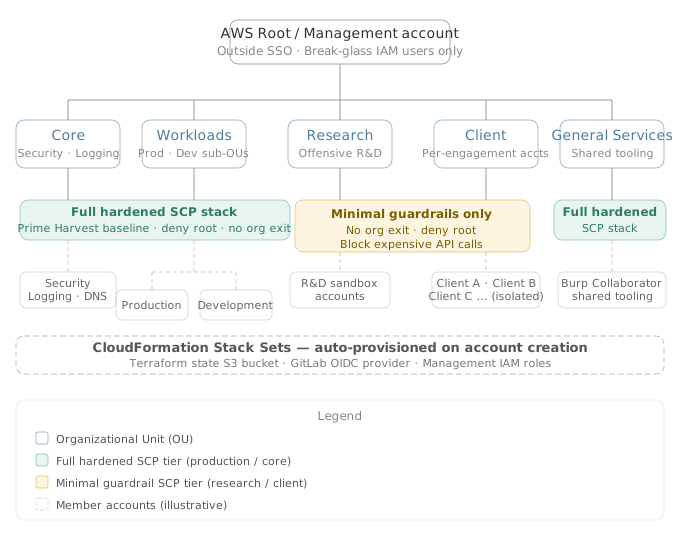
Designing a secure AWS organization starts with getting the OU structure right, because every SCP, guardrail, and policy you attach follows that hierarchy. Reverse’s AWS multi-account architecture is built around five top-level OUs under root, each mapped to a distinct risk profile and operational purpose.
The Five-OU Model
- Core — Essential infrastructure accounts needed to operate the organization itself: security, logging, identity, networking, and DNS. These accounts form the backbone of the environment and receive the highest level of hardening.
- Workloads — Split into production and development sub-OUs. Encompasses all internal and public-facing applications hosted for the business. Standard production-grade security controls apply here.
- Research — A deliberately lax sandbox for consultants conducting offensive R&D. The goal is maximum freedom; constraints are kept to the bare minimum required to prevent catastrophic events (org exit, root usage, and accidentally expensive API calls).
- Client — One account per client engagement. When a consultant needs to run command-and-control infrastructure, phishing redirectors, or port scanning hosts for an engagement, they operate from an account in this OU scoped to that single client. If an account is compromised, the blast radius is contained to that one client’s data and resources — no lateral movement across engagements.
- General Services — Added after the initial design to handle shared tooling that doesn’t cleanly fit elsewhere. A Burp Collaborator instance used across multiple clients is the canonical example: it’s consulting infrastructure, but it serves all clients simultaneously, so it belongs neither in the Client OU nor in Workloads.
Liberal Account Creation as a Security Control
The team takes a deliberately liberal approach to creating new accounts. Even GitLab and its CI/CD runners live in separate accounts. Account boundaries are the strongest isolation AWS provides. When a workload is compromised, the attacker inherits only the permissions and data within that account. Keeping GitLab runners isolated from the GitLab instance itself means that a runner compromise does not automatically grant access to the GitLab server, its secrets, or its repositories.
Account Creation via Terraform[2] Locals
All accounts are defined in Terraform using a locals-based module. The minimal required inputs for creating a new account are:
- Account name and target OU
- (Optional) A GitLab repository path for CI/CD deployment permissions
- (Optional) The owner of the Entra groups that will manage access to the account
This deliberately minimal interface keeps account creation accessible to team members who aren’t deep AWS experts. Dynamic account creation via Lambda API endpoints was considered and rejected — the team wanted Terraform’s drift detection and resource lifecycle management to apply to all resources provisioned alongside each new account.
Stack Sets: Auto-Provisioning at Account Creation
When a new account is created, a set of global CloudFormation Stack Sets[3] automatically provision a baseline of resources:
- Terraform state S3 bucket — Pre-configured, security-controlled S3 bucket for Terraform state. Eliminates the chicken-and-egg problem of needing to deploy a state bucket before running Terraform.
- OIDC provider for GitLab — Registered in every account at creation, even if CI/CD isn’t immediately configured. Any team member can create OIDC-scoped IAM roles on demand without manual setup steps.
- Management IAM roles — Standard roles for network management, security access, backup and restore, and other operational functions.
CI/CD roles (a read role and a deploy-admin role) are provisioned as a bespoke stack set during account creation, but only when a GitLab repository is specified. The trust policy on these roles is scoped to the specific repository and branch provided at creation time.
Actionable Takeaways
- Map your OU structure to distinct risk profiles before deploying any SCPs or guardrails. Each OU should have a clear answer to: what data lives here, who accesses it, and what happens if it's compromised? Reverse's five-OU model (Core, Workloads, Research, Client, General Services) works because each OU has an unambiguous profile — design yours with the same clarity before you start attaching policies.
- Use account boundaries as a first-class security control, not just an organizational convenience. Create dedicated accounts for workloads that have meaningfully different blast radii (per-client engagement accounts, runner accounts separated from CI/CD servers). The overhead is real but manageable with Terraform locals-based modules and stack set automation — and the isolation benefit compounds across every future incident.
- Automate the full account provisioning chain, not just account creation. Pre-provision the Terraform state bucket, OIDC provider, and baseline IAM roles via global stack sets so that a new account is immediately usable without manual setup steps. This removes friction for non-AWS-expert team members and ensures security controls on sensitive resources (like state buckets) are consistent across every account.
Common Pitfalls
- Treating the OU hierarchy as a naming exercise rather than a policy enforcement boundary. If your OU structure doesn't reflect meaningfully different SCP stacks, you lose the primary security benefit of multi-account AWS organizations. Research and client OUs should have explicitly lighter SCPs by design — not because you forgot to harden them, but because maximum freedom is a deliberate requirement for those workloads. Collapsing workloads with different risk profiles into a single OU forces you to choose between over-restricting high-freedom accounts or under-restricting production ones.
- Relying on dynamic account creation APIs (Lambda/HTTP endpoints) without accounting for the full resource lifecycle. If you create accounts via API and then provision supporting resources through a separate process, you lose Terraform's drift detection on those resources. Secrets, OIDC providers, IAM roles, and state buckets created outside of Terraform's state graph can drift, be deleted, or be misconfigured without detection. Define the entire account and its required baseline resources as a single Terraform module so that drift detection applies to the full set.
Service Control Policies, Resource Control Policies, and Root Handling
AWS service control policies are one of the highest-leverage hardening controls available at the organization level — but applying them uniformly across radically different workload profiles is a category error. Reverse’s three-OU risk model (production, research, client) demanded a tiered SCP strategy where the controls applied to each OU matched the actual threat model and operational requirements of the accounts within it.
Production OU: Full Hardened SCP Stack
For the production and core OUs, the team applied a well-hardened SCP set drawn heavily from Chris Farris’s open-source Prime Harvest[4] collection — a curated, opinionated set of deny-based SCPs covering the standard hardening baseline: blocking dangerous IAM actions, preventing organization exit, restricting expensive or dangerous services, and enforcing guardrails around root usage. Rather than building from scratch, the team adopted this set as a starting point and adapted it for their environment.
Research and Client OUs: Intentionally Permissive, Minimally Constrained
The minimal SCP set applied to research and client OUs covers exactly three categories of concern:
- No organization exit. An SCP prevents any account from leaving the AWS organization. This foundational control costs nothing in terms of consultant freedom but closes an obvious privilege escalation path.
- No root usage. Root access is blocked by SCP in all OUs, including research.
- Block expensive API calls. A dedicated “block expensive services” SCP prevents consultants from accidentally invoking AWS APIs that generate five-figure bills. The team credited Ian McKay’s[5] publicly documented list of expensive AWS API calls as the basis for this deny list.
No tagging enforcement, no service restriction beyond the above, and no data perimeter controls are applied to research or client OUs.
The $36,000 AWS Bill: Why a Block-Expensive-Services SCP Matters
A real-world incident — a consultant (Nick Fett) made a wrong AWS API call in an unrestricted account and received a $36,000 bill — directly drove the decision to deploy a block-expensive-services SCP across research and client OUs.
Proof of Concept
-
Context — the unrestricted research OU design constraint. Research accounts were intentionally configured with minimal SCPs. The design philosophy was maximum freedom: consultants conducting offensive R&D need to spin up arbitrary resources, test exotic AWS service configurations, and experiment without guardrails blocking their work.
-
The triggering incident. A single unintentional API call to a service billed at extreme rates resulted in a $36,000 AWS bill, triggering significant internal escalation. The environment had no financial guardrail in place.
-
Root cause — no deny-list SCP for expensive API calls. Without a block-expensive-services SCP attached to the OU, any IAM principal in the account could invoke any AWS API with no organizational-level enforcement preventing it. IAM policies within the account are insufficient here because consultants in research accounts are typically granted broad permissions, and there is no mechanism inside the account to systematically deny all high-cost service calls without an SCP.
-
The SCP solution — Ian McKay’s expensive-API deny list. The team used McKay’s curated list of AWS API calls that generate outsized costs as the basis for a dedicated SCP attached to Research and Client OUs. The SCP structure is a
Denyeffect with anActionblock enumerating specific API calls known to generate outsized costs. -
Enforcement logic — SCP as a hard stop. Because SCPs are evaluated before IAM policies in the AWS authorization model, the deny on expensive API calls is absolute within the affected OUs. Even if a consultant’s IAM role grants
Action: "*"(full access), the SCPDenyoverrides it. There is no way for a principal within the account to override an SCP — it requires a management account administrator to modify the policy at the OU level. -
Key design insight — SCPs as financial controls. The team’s application of SCPs extends beyond the conventional security use case. Here, the SCP functions as a cost management enforcement mechanism at the AWS Organizations layer — a pattern applicable to any multi-account environment where developer or researcher accounts operate with broad IAM permissions.
Resource Control Policies: Promising in Theory, Broken in Practice
Resource Control Policies[6] (RCPs) apply principal-agnostic restrictions to resource access — denying access to a resource regardless of what IAM identity is making the request, including cross-account identities. AWS has positioned RCPs as the foundation of a strong data perimeter.
The team found RCPs conceptually sound but operationally problematic. Reverse’s consultant workflows break the standard data-perimeter assumption: consultants routinely perform cross-organization IAM role assumptions and cross-account S3 data transfers as part of client engagements. Applying data perimeter RCPs to S3 would block these workflows entirely.
The result: only one RCP was deployed — a policy restricting OIDC assumption to trusted identity providers. All other RCP examples examined were shelved because breaking consultant cross-organization workflows was unacceptable.
Root Account Handling: Discard the Password, Block the Principal
The team made a deliberate choice that departs from conventional AWS security guidance: root passwords are discarded immediately after account creation. No MFA is configured on root accounts.
This is not an oversight. The reasoning:
- Root is already inaccessible without MFA. The only way to regain root access after discarding the password is an AWS Support request for a password reset — a slow, auditable, manual process. Not something an attacker can do silently.
- An SCP denies root usage organization-wide. Even if an attacker somehow recovered root credentials, an SCP explicitly denying root API usage blocks any action taken as root across all accounts.
- Assume Root is also blocked by SCP. AWS’s “assume root” capability — which allows privileged accounts to temporarily assume root privileges in member accounts — is blocked via SCP organization-wide.
- Very few operations actually require root. The actions that genuinely require root access in AWS (closing an account, changing root email, some billing operations) are things Reverse does not expect to encounter in normal operations.
The no-MFA decision follows directly: if root is intentionally inaccessible, adding MFA to an inaccessible account adds operational complexity without adding meaningful security.
Actionable Takeaways
- Apply SCPs in tiers matched to OU risk profile rather than uniformly. Production OUs should receive a full hardened SCP stack (Chris Farris's Prime Harvest set is a proven starting point). Research and client OUs should be restricted only to the minimum set that prevents existential risks: organization exit, root usage, and accidentally expensive API calls. Applying production SCPs to research accounts destroys their utility without meaningful security gain.
- Discard root passwords at AWS account creation time and enforce a deny-root SCP organization-wide, including blocking assume-root. This eliminates root credentials as an attack surface without sacrificing operational capability, since the use cases requiring root access in a typical consultancy or workload environment are vanishingly rare. Document this decision explicitly so future team members understand it is deliberate and not an oversight.
- Before deploying Resource Control Policies, map every cross-account access pattern your organization relies on against the proposed RCP deny conditions. RCPs apply to all principals including external ones, which means data perimeter RCPs will break any workflow that involves cross-organization role assumptions or S3 data transfers. Deploy only the RCPs whose deny conditions are verifiably safe for your specific access patterns — start with OIDC assumption restrictions before attempting broader data perimeter controls.
Common Pitfalls
- Treating RCPs as a drop-in data perimeter solution without auditing existing cross-account access patterns first. AWS's documented RCP examples assume an environment where all legitimate access originates from within a single organization. In environments where consultants, contractors, or tooling regularly perform cross-organization access (role assumptions into client accounts, S3 transfers from external orgs), blanket data perimeter RCPs will break production workflows silently.
- Maintaining root credentials "just in case" without a compensating deny-root SCP, on the assumption that storing MFA tokens securely is sufficient protection. Credentials that exist can be stolen, socially engineered, or recovered via AWS Support. If root is not operationally needed, the correct posture is to make root inaccessible by design (discard the password) and enforce that inaccessibility in policy (deny-root SCP) rather than relying solely on credential hygiene.
IAM and Identity Center Architecture
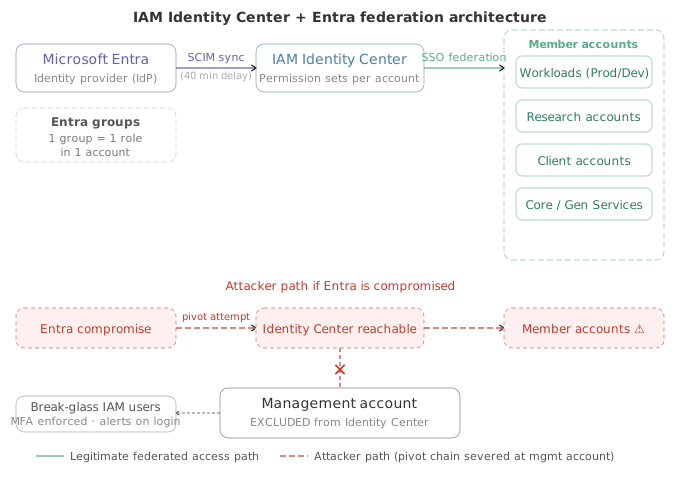
The IAM strategy for AWS environments built by Reverse reflects the team’s offensive security background: every design decision was stress-tested against attack paths they had personally used against clients. The result is an identity architecture that prioritizes breaking blast-radius chains over following AWS prescriptive guidance to the letter.
Federation Model: Identity Center + Microsoft Entra
All accounts — except the management account — are accessed through AWS IAM Identity Center federated with Microsoft Entra (formerly Azure AD). The key structural decision is the one-to-one mapping between Entra groups and IAM Identity Center permission sets on a per-account basis:
- Each Entra group is scoped to a single role in a single account — not org-wide roles.
- This granularity means access grants are explicit and minimal by design.
- Adding a consultant to an account is as simple as adding them to the appropriate Entra group.
Automated Group and Role Provisioning via Terraform
Group creation and permission set association are fully automated through Terraform:
- When a new account is created, the Terraform account-creation module automatically creates the corresponding Entra groups.
- Default admin and read-only roles are provisioned in Identity Center for every new account with no manual steps required.
- Custom permission sets can be added on a per-account basis where the workload demands it.
One notable operational quirk: after Terraform creates the Entra groups, there is a 40-minute synchronization delay before those groups are available in AWS Identity Center for association. The Terraform workflow has to pause and wait for this sync to complete before the second phase — associating groups to permission sets — can run.
The Management Account: Deliberately Outside SSO
Breaking the Entra to Management Account Pivot Chain
The most consequential architectural decision is the explicit exclusion of the AWS management (root) account from Entra federation and Identity Center entirely.
Proof of Concept
-
Recognize the standard federation attack path. In typical enterprise AWS setups, the management account is federated into AWS IAM Identity Center alongside all other accounts. If Microsoft Entra is compromised — via phished credentials, an over-privileged service principal, or a misconfigured conditional access policy — an attacker can authenticate into IAM Identity Center and assume a permission set in the management account. From there they can modify SCPs, remove org-wide guardrails, create new accounts, or disable CloudTrail across the entire organization.
-
Confirm the threat model from client engagements. The Reverse team stated explicitly: “We also have had enough experience of compromising entire AWS estates through Entra or some other federation that we wanted to ensure some level of separation.” This is not a theoretical threat — they have executed this pivot path against real client environments.
-
Exclude the management account from IAM Identity Center federation. The primary control is architectural: the root/management account is never added to AWS IAM Identity Center as an assignable account. All other accounts — production, workloads, research, client, core — are accessible via SSO federation through Entra groups mapped one-to-one with Identity Center permission sets. The management account is intentionally left out.
-
Preserve SCP management authority inside the management account. SCP modifications require management account access, which is now unreachable via the Entra pivot path. The team deliberately did not delegate SCP management down to a member account — accepting the operational trade-off that a compromised Entra wouldn’t let an attacker modify SCPs to remove restrictions or kill access to everything in the org.
-
Replace SSO access with break-glass IAM users. Because the management account is outside SSO, it needs an alternative access mechanism. The team created a small number of long-term IAM users — explicitly acknowledging this is one of the very few remaining legitimate use cases for IAM users in modern AWS environments. Each break-glass user has MFA enforced.
-
Alert on every management account authentication event. Because legitimate use of these IAM users is rare and clearly defined (emergency break-glass only), any authentication event is by definition anomalous or intentional. The team wired alerts for all activity on these accounts, creating a high-signal, near-zero-false-positive detection layer for management account access.
-
Isolate the management account’s CI/CD pipeline completely. The team runs a completely separate GitLab instance and dedicated runner set for the management/root account. This severs the CI/CD attack surface from the same OIDC provider used by all other accounts.
-
Accept the residual risk explicitly. The team does not claim this design eliminates all risk from an Entra compromise. They acknowledge that compromising Entra would still grant access to most critical business applications within AWS. The control is scoped specifically to the management account blast radius — preventing an attacker from using federation to dismantle SCPs, create new org accounts, or disable GuardDuty delegation.
Outcome: An attacker who fully compromises the Entra tenant can authenticate into all non-management AWS accounts via IAM Identity Center — but cannot reach the management account, cannot modify SCPs, cannot alter the organizational structure, and cannot disable org-wide CloudTrail or GuardDuty. The pivot chain from Entra compromise to AWS management account takeover is architecturally severed, not just rate-limited or monitored.
Actionable Takeaways
- Exclude the AWS management account from SSO federation entirely and gate access to it behind long-term IAM users with MFA and high-fidelity alerting on every login. This severs the most commonly exploited Entra-to-management-account pivot path and ensures that SCP management cannot be reached through a federated identity compromise.
- Automate Entra group creation and Identity Center permission set association as part of your account-creation Terraform module. Default admin and read-only roles should be provisioned on every new account without any manual wiring — this eliminates the gap between account creation and usable, auditable access controls. Account for the Identity Center sync delay (up to 40 minutes for Entra group propagation) in your pipeline design.
- Map each Entra group to a single role in a single account rather than using broad org-wide permission sets. This keeps access grants explicit, minimal, and aligned with the account-per-workload isolation model — reducing the value of any individual group compromise.
Common Pitfalls
- Federating the management account into SSO alongside all other accounts. This is the default posture if you stand up Identity Center without explicitly excluding the management account. Attackers who compromise an Entra tenant can immediately leverage that access to reach the management account, modify SCPs, and escalate to full-organisation compromise. The management account must be treated as categorically separate from every other account in the organisation.
- Relying on permission sets scoped at the organisation level rather than per-account. Broad permission sets that grant access across multiple accounts substantially increase the blast radius of a compromised identity. A single Entra group membership should grant access to one account and one role — not a horizontal slice across every account in an OU.
Networking: Shared VPCs, Tailscale, and Isolated Research Networks
Networking an AWS organization that simultaneously hosts production workloads, offensive R&D sandboxes, and client delivery infrastructure requires more than one model. Reverse uses two distinct networking patterns — shared VPC for controlled corporate workloads and fully isolated VPCs for research and client environments — stitched together with Tailscale[7] instead of transit gateways.
Two Networking Models, One Organization
The primary corporate VPC is shared with accounts that need to deploy workloads into it via AWS RAM[8] (shared VPC model). Terraform assigns each workload a number, using that number as an offset from the base CIDR range to automatically create subnets in both availability zones. Each workload can declare the type of subnets it needs (public, private, or internal), and Terraform provisions those subnets with bespoke routing tables.
Because RAM doesn’t copy tags when sharing subnets (a known AWS quirk), Terraform assumes a networking management role in each target account to copy tags post-share. This keeps resource tracking consistent across accounts without manual intervention.
Tailscale as the VPN Layer: Dual-Gate Access Control
Rather than relying on AWS VPN or transit gateway for internal access, Reverse deployed Tailscale with a subnet router inside the main corporate VPC. This creates a dual-gate access model: a connection must satisfy both a Tailscale ACL and an AWS security group rule before it is permitted.
This layering is significant. An overly permissive security group doesn’t automatically grant access — the Tailscale ACL still blocks it. Conversely, a valid Tailscale session doesn’t bypass AWS-level network controls. Operators must get both right, which raises the bar for both accidental misconfiguration and deliberate lateral movement.
Isolated VPCs for Research and Client OUs
For research and client OUs, Reverse takes the opposite approach: fully isolated VPCs with no connection to the corporate network. The concern is clear: if a security group is completely misconfigured in a research VPC, there should be no path back into corporate infrastructure.
Even the Tailscale subnet routers deployed in these isolated VPCs are configured for one-way access only. Operators can reach into the research or client network from the corporate side, but the research network cannot initiate connections back. This mirrors the logical model of a transit gateway but uses Tailscale rather than AWS-native routing, keeping costs down and sidestepping the complexity of transit gateway routing tables.
Shared Prefix List for SSH Access Control
One operational challenge with fully isolated VPCs is maintaining consistent access control without a shared network boundary. Reverse solves this by distributing a shared prefix list — containing all of Reverse’s public IP ranges — to every account in the organization via AWS RAM.
Even in a completely isolated client or research account, a consultant spinning up an EC2 for port scanning can trivially restrict SSH access to Reverse’s public IPs by referencing the shared prefix list in their security group. The prefix list is centrally maintained and automatically reflected everywhere it’s referenced.
Centralized DNS with IAM-Constrained Delegation
DNS architecture went through four complete rebuilds before landing on a model the team was comfortable with. The final architecture uses a central DNS account where all domains and their records are defined in Terraform. When another account needs to manage specific records within a zone, Terraform generates an IAM role in the DNS account with a trust relationship to the target account.
These delegated IAM roles are tightly scoped using two IAM conditions:
- Which subdomains the role can manage (constrained to specific FQDNs)
- Which record types the role can set (defaulting to A, AAAA, and CNAME only)
This prevents a delegated account from setting an NS record on a subdomain and hijacking an entire subzone — a real attack vector when DNS delegation is handled loosely.
The ACM Validation Regex Trick: ACM certificate DNS validation requires setting a CNAME record whose subdomain starts with an underscore followed by 32 random hexadecimal characters. The team solved this using IAM condition string matching with a pattern of an underscore followed by 32 single-character wildcards (?), which matches any single character in IAM’s limited pattern syntax. This matches the ACM validation subdomain format exactly without encoding a specific value.
An early version used one policy per domain, which caused delegated accounts managing many parked domains to hit IAM policy size limits. The fix was consolidating all conditions into a single policy statement — one policy, all conditions, all zones.
Actionable Takeaways
- Deploy Tailscale subnet routers with both Tailscale ACL and AWS security group requirements enforced simultaneously. A valid Tailscale session alone should not grant network access — require both controls to pass. This dual-gate model means a misconfigured security group does not automatically create an exploitable path, and a Tailscale ACL bypass does not automatically reach AWS resources.
- For research and client OUs, deploy fully isolated VPCs with no transit gateway or VPC peering connections to the corporate network. Use Tailscale subnet routers configured for one-way access only — corporate to research, never research to corporate. Distribute a centrally managed shared prefix list via AWS RAM to all accounts so security group SSH restrictions remain consistent without per-account IP list maintenance.
- Implement centralized DNS with IAM-constrained delegation. The delegating IAM roles must specify both the exact subdomains being delegated and the permitted record types — and NS records should be excluded from the permitted set by default. Consolidate all IAM conditions into a single policy statement per delegated account to avoid hitting IAM policy size limits when managing many domains.
Common Pitfalls
- Treating shared VPC security groups as the only network isolation control. In a shared VPC model, a misconfigured security group is the primary failure mode — Reverse explicitly acknowledges having seen multiple clients fail at this. Mitigate by enforcing security group standards at deployment time through Terraform modules, not audits after the fact, and layer Tailscale ACLs as a second gate so a single misconfigured security group is not sufficient for unauthorized access.
- Granting DNS delegation via NS record or broad IAM permissions, which allows a compromised or over-trusted account to hijack an entire subdomain zone. Delegated IAM roles must be constrained to specific record types (A, AAAA, CNAME — never NS) and specific subdomains. Without this constraint, a delegated account can set NS records and redirect all resolution for a subdomain to an attacker-controlled nameserver, which is invisible to the central DNS account.
CI/CD, Terraform Automation, and GitLab Structure
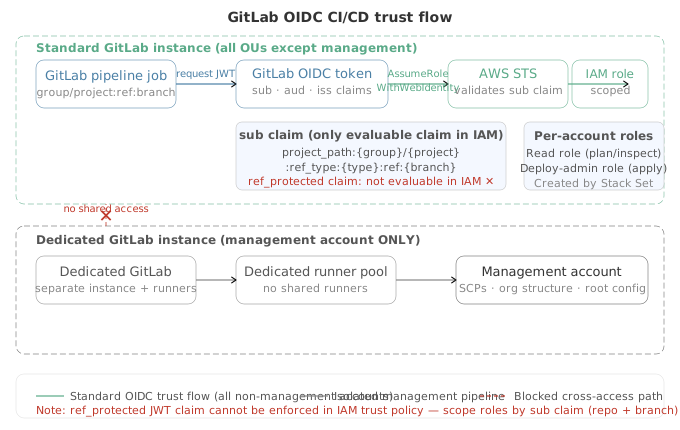
Infrastructure as Code security is only as strong as the CI/CD system that deploys it. For Reverse, getting automation right was not optional — two security consultants moonlighting as engineers could not afford to manually manage dozens of AWS accounts.
GitLab Group Structure Mirrors the AWS OU Hierarchy
The team deliberately structured their GitLab[9] group hierarchy to mirror the AWS OU structure. Every OU (Core, Workloads, Research, Client, General Services) has a corresponding GitLab group, and every account within that OU has a corresponding repository under that group. This one-to-one mapping solves a discoverability problem that grows painful fast in a multi-account environment: when you need to find the Terraform that manages a given account, you know exactly where to look.
OIDC-Based CI/CD Roles Scoped at Account Creation
Rather than managing long-lived IAM credentials for CI/CD pipelines, the team uses OIDC federation between GitLab and AWS. When a new account is created through the Terraform account creation module, a CloudFormation Stack Set automatically provisions two CI/CD IAM roles:
- A read role for inspection and plan operations
- A deploy admin role for apply operations that make infrastructure changes
Both roles are created with custom OIDC trust relationships that explicitly scope which GitLab repository and which branch can assume them. CI/CD roles are locked to a specific repo-branch combination from day one — a pipeline from a different repository or an unauthorized branch cannot assume the role.
The Management Account Gets Its Own Isolated GitLab Instance
The root management account is completely isolated from the rest of the GitLab infrastructure. It runs on a dedicated GitLab instance with its own separate runner pool. If a GitLab runner or a compromised pipeline job in the main GitLab instance were able to reach the management account’s Terraform state or assume a management role, an attacker with access to any repository could escalate to full organizational control.
GitLab OIDC JWT Claim Limitation in IAM Trust Policies
One of the most operationally significant discoveries the team made was a constraint in how AWS IAM evaluates OIDC JWTs.
Proof of Concept
-
Set up GitLab as an OIDC provider in AWS accounts. The team automatically provisioned GitLab as an OIDC identity provider in every account via CloudFormation Stack Sets. This enables CI/CD pipelines to assume IAM roles without storing long-lived credentials.
-
Create per-repository CI/CD IAM roles with scoped trust relationships. For each AWS account with a designated GitLab CI/CD repository, the account creation Terraform module deploys two IAM roles — a read role and a deploy-admin role. The IAM trust policy condition is configured to restrict role assumption to a specific GitLab repository and branch, using OIDC claim values extracted from the JWT issued by GitLab’s identity provider.
-
Attempt to enforce protected-branch restrictions via OIDC claims. The team attempted to add a trust policy condition that would only allow role assumption when the pipeline was triggered from a GitLab protected branch. In GitLab OIDC tokens, the
ref_protectedclaim carries a boolean indicating whether the triggering ref is protected. The assumption was that IAM trust policyConditionblocks could evaluate this arbitrary JWT claim directly. -
Discover AWS IAM’s fixed claim evaluation table. When reviewing the AWS documentation, the team found a specific table listing which JWT claims can be mapped to IAM condition keys. The list is deliberately small — AWS does not expose arbitrary JWT claims to IAM condition evaluation. Only the claims AWS explicitly maps to IAM condition keys (such as
sub,aud, andiss) can be referenced in a trust policy condition. -
Cross-reference GitLab OIDC token claims against the IAM-supported list. The team compared the full set of claims present in a GitLab CI/CD JWT — which includes fields such as
namespace_path,project_path,ref,ref_type,ref_protected,pipeline_source, andenvironment— against the IAM-supported condition key table. The result: the only GitLab claim that maps to a usable IAM condition key issub. -
Understand the
subclaim structure and its limitations. By default, the GitLab OIDCsubclaim is formatted asproject_path:{group}/{project}:ref_type:{type}:ref:{branch_or_tag}. This encodes the repository path and branch name, sufficient for most per-repo, per-branch scoping scenarios. However, it does not encode whether the ref is a protected branch. -
Confirm: protected-branch enforcement in IAM trust policies is not achievable with GitLab OIDC. Because
ref_protectedis absent from the IAM-evaluable claim set, there is no way to construct an IAM trust policy condition that allows role assumption only when triggered from a protected branch. Any pipeline job on any branch matching thesubpattern can assume the role, regardless of protection status. -
Identify an unpatched OIDC trust issue requiring coordinated disclosure. Separately, the team identified a distinct OIDC trust issue severe enough to require coordinated disclosure before public release. Details were withheld at the time of the talk as the patch had not yet been released.
-
Design implication: scope CI/CD roles defensively within the
subclaim constraint. The practical mitigation is to encode as much specificity as possible into thesubclaim pattern — scoping to an exact repository path and an exact branch name (e.g.,mainorrelease/*) rather than using wildcard patterns.
Actionable Takeaways
- Mirror your GitLab (or GitHub organization) group hierarchy to your AWS OU structure. One-to-one mapping between CI/CD groups and OUs eliminates ambiguity about which repository manages which account and reduces operator error when wiring up OIDC trust policies during account creation.
- Before designing OIDC-based CI/CD role scoping, audit the specific JWT claims your identity provider includes in its tokens and cross-reference them against the IAM condition keys your cloud provider actually supports. Do not assume arbitrary JWT claims are evaluable in trust policy conditions — for GitLab on AWS, only the sub claim is reliably usable, which constrains what access controls you can enforce at the IAM boundary.
- Isolate CI/CD infrastructure for your highest-privilege accounts (management, root, break-glass) from the CI/CD systems used by the rest of your environment. Shared runners or shared GitLab instances create lateral movement paths from any compromised repository to your most sensitive accounts.
Common Pitfalls
- Assuming IAM trust policy conditions can evaluate any claim in an OIDC JWT. This is a widespread misconception. AWS restricts evaluable claims to a small, documented fixed set. For GitLab OIDC tokens, this means protected-branch status, pipeline source, and other GitLab-specific claims cannot be enforced at the IAM level — leaving a gap if your access model depends on those checks.
- Treating the management account's CI/CD as equivalent to any other account's CI/CD. Running management account Terraform through the same GitLab instance and runners as workload accounts creates a privilege escalation path: a compromised pipeline job or runner in any repository could potentially pivot to organizational control. Dedicated, isolated CI/CD infrastructure for the management account is not over-engineering — it is a direct response to the blast radius of that account.
Encryption, Data Security, and the KMS Skeptic’s Position
For a consultancy whose clients include major financial institutions, data security is existential — a leaked vulnerability report is a trust-ending event. Yet the Reverse team’s encryption posture is deliberately minimal, and the reasoning is grounded in practical attack path analysis rather than checkbox compliance.
Account isolation is the primary data security control. The team’s most important decision was running per-client AWS accounts. A breach in one engagement account cannot pivot laterally to another client’s data because the AWS account boundary acts as a hard barrier. Every other encryption control layers on top of that foundational choice.
Default Encryption: On, Everywhere That Matters
The team enabled default encryption for S3 and EBS across all production accounts. This is handled at the account level through SCPs and Stack Sets, so every new resource inherits encrypted-at-rest behavior without requiring individual engineers to remember to tick the box. S3 public access blocks are similarly enforced on all production and client accounts via account-level configuration.
Research accounts are explicitly exempted from the public access blocks. The rationale: research accounts should contain no sensitive data by design, and consultants conducting offensive R&D occasionally need a publicly accessible S3 bucket.
Why Custom KMS Keys Are Skipped
The argument is straightforward: custom KMS[10] keys with tight key policies do not prevent the breaches that actually happen.
Nick’s position, aligned with Chris Farris’s public writing on the topic, is that in every real-world breach or red team engagement he has observed, custom KMS key policies were never the control that would have stopped the attack. The attack chain is almost always:
- Attacker targets the application or workload.
- Attacker compromises an IAM role or credential associated with that application.
- That IAM role has
kms:Decryptpermissions on the keys protecting the application’s data — because it has to, in order to function. - Attacker calls the KMS API using the compromised role and decrypts the data.
Custom key policies restrict which principals can use a key, but if the attacker has already compromised the principal the application uses to decrypt data, those restrictions offer no additional protection. The attacker is not using a rogue principal — they are using the legitimate one.
The team’s conclusion: there is almost always a better IAM control that could have stopped the attacker before KMS ever became relevant. Running custom KMS keys for every resource also carries meaningful operational overhead: key rotation policies, key deletion windows, cross-account key sharing for shared services, and the risk of accidental key deletion permanently destroying encrypted data.
HTTPS Enforcement at the Bucket Level: Compliance Theater
The team explicitly dismissed the S3 bucket policy condition that denies HTTP requests (aws:SecureTransport: false). Within AWS, the HTTPS downgrade attack the control is theoretically protecting against is extremely difficult to execute. AWS SDK clients default to HTTPS. The scenarios where an application would send plaintext HTTP to S3 are almost entirely misconfigurations at the application layer — and those are caught by other means.
The team’s view: the enforce-HTTPS S3 bucket policy is primarily valuable for keeping auditors satisfied in regulated industries, not for addressing their actual threat model.
Actionable Takeaways
- Evaluate encryption controls against your actual attack paths before implementing them. Before deploying custom KMS keys or HTTPS enforcement policies, map out how an attacker would realistically reach your encrypted data. If the answer is "by compromising the IAM role with decrypt rights," tighten the IAM design first — key policies will not save you once that role is compromised.
- Enforce default S3 and EBS encryption at the account level using SCPs and Stack Sets, not per-resource configuration. This ensures every new resource is encrypted at rest without relying on individual engineers to remember the setting, and allows you to maintain a strong baseline without the operational overhead of managing custom key hierarchies.
Common Pitfalls
- Treating KMS key policies as a meaningful access boundary when the attacking principal is the legitimate application role. Organizations invest heavily in custom key policies while leaving the IAM roles that hold decrypt permissions over-permissioned or inadequately scoped. An attacker who compromises the workload's execution role — EC2 instance profile, Lambda role, ECS task role — inherits all of its KMS permissions. Key policies that block "external" principals provide no protection in this scenario because the attacker is operating as an internal one.
- Exempting research or sandbox accounts from public access blocks without a compensating data classification control. If sensitive data ever lands in a research account through a misconfigured pipeline or a consultant copying files manually, an absent public access block means that data could be exposed with a single PutBucketAcl call or a public bucket policy. Document clearly which accounts are exempt, why, and what compensating controls are in place.
Backups, Monitoring, and the Realities of a Lean Budget
Building a secure AWS organization from scratch on a lean budget forces brutal prioritization — nowhere is this more visible than in backup and monitoring strategy. Reverse’s approach is refreshingly honest: they shipped a working system, acknowledged its shortcomings openly, and are iterating toward best practice rather than pretending they started there.
Backups: From Tactical Hack to a Proper Architecture
Backups were among the last items properly addressed. The interim solution was pragmatic but imperfect: an Amazon EventBridge[11] cron job triggering EBS volume snapshots for accounts holding critical data. The team openly acknowledges this falls foul of the 3-2-1 rule — three copies of data, on two different media types, with one copy off-site.
The architecture being phased in centers on AWS Backup[12], with:
- Cross-region targets — protects against regional outages or data corruption isolated to a single AWS region
- Cross-account targets in a separate AWS organization — the critical design choice; a separate org means even a full management account compromise, org-level ransomware, or complete SCP bypass in the primary organization cannot reach the backup vault
The team connected AWS Backup to SNS and is wiring up Slack notifications so backup job failures surface immediately — treating the backup pipeline as a first-class monitored system.
Monitoring Strategy: Honest About What’s Good Enough
The monitoring philosophy is grounded in the organization’s actual risk profile. For internal tooling such as reporting platforms used by consultants, the team employs rage-based monitoring: watch Slack; when a system goes down, consultants complain loudly, and that complaint is the alert. This is a deliberate, rational choice for systems where the consequence of downtime is internal friction rather than client SLA breach. It costs zero engineering hours to maintain.
Security Monitoring: The Serious Stack
Detection and response is where the team makes no compromises. The detection engineering stack includes:
- CloudTrail[13] org-wide trail — a single trail covering all member accounts, centralized for audit and detection purposes
- GuardDuty[14] org-wide with delegated admin to the security account — threat detection findings are aggregated into the security account, keeping them accessible even if a workload account is compromised
- VPC flow logs on production VPCs only — research and testing VPCs are explicitly excluded; the cost and noise from unrestricted research activity would overwhelm the signal
- Managed Detection and Response (MDR) provider — the primary detection engine
- Internal consultant threat hunting — detection engineering consultants use the team’s own security data as a practice environment during downtime between client engagements
Prowler: Preventative Posture Monitoring
For preventative security posture monitoring, the team runs Prowler[15] as an ECS task, continuously scanning the organization and writing results to an S3 bucket. The key operational decision is aggressive tuning: Prowler’s default ruleset generates substantial noise across a large organization.
Rather than accepting the full default output, the team narrowed Prowler down to only the checks that reflect issues they actually care about given Reverse’s specific risk profile. This approach inverts a common failure mode — organizations that deploy security scanning tools and then stop looking at the results because the noise volume is unmanageable.
Actionable Takeaways
- Design backup targets to survive your worst-case threat scenario, not just hardware failure. If ransomware or full account compromise is in your threat model, cross-account targets in a separate AWS organization are the minimum viable architecture — an attacker with management account access can delete backups stored within the same org.
- Aggressively tune Prowler (or any posture scanning tool) before deploying it at organization scale. Accept only checks relevant to your actual threat model and workload types. A tool that generates unmanageable noise gets ignored; a tightly scoped tool with a high signal-to-noise ratio gets acted on.
- Wire backup job failures to a real-time alerting channel (SNS to Slack or equivalent) from day one. Backups that fail silently provide no protection — treat backup pipeline health as a first-class monitoring concern, even if you use rage-based monitoring for everything else.
Common Pitfalls
- Storing backups within the same AWS organization as the primary workload. An attacker who achieves org-level control — via management account compromise, SCP bypass, or ransomware deployment — can reach backup vaults in the same org. Cross-account is necessary but not sufficient; cross-organization is required to create a true administrative boundary.
- Deploying security posture scanning tools with default rulesets and no tuning. At organization scale, default Prowler output across dozens of accounts in OUs with intentionally permissive postures (research, client delivery) generates findings that are expected and acceptable. Untuned output buries real findings in noise, leading teams to either ignore the tool entirely or spend engineering hours triaging false positives instead of remediating genuine issues.
What’s Still on the To-Do List
No production AWS environment is ever truly finished, and the team at Reverse is candid about where their secure AWS organization setup still has gaps.
Proper CI/CD for Organization-Level Terraform
The single biggest outstanding item is automated pipeline coverage for the management account and the top-level organization Terraform. The management account is deliberately kept isolated from the standard GitLab CI/CD infrastructure — it runs its own separate GitLab instance with its own runner set — but that separation has a cost: changes to org-wide resources still involve more manual steps than they would like.
EC2 Instance Reaper (Cost Management Automation)
Budget pressure from leadership is a recurring theme. Consultants spin up EC2 instances for engagements and R&D, and not all of them get torn down promptly. The planned solution is what the team calls an “EC2 murderbot” — an automated reaper that identifies and terminates abandoned or long-running instances across client and research accounts. This is framed explicitly as a cost management response to ongoing pressure from upper management to justify AWS spend.
Security Data Lake
The team flags a security data lake as an aspirational goal — a single place to correlate and query all security telemetry across the organization. They are candid that this is currently well outside their implementation bandwidth. Given the current reliance on an MDR provider and aggressively tuned Prowler output, a centralized lake would eventually allow more sophisticated internal threat hunting and correlation at org scale.
Terraform Module Library for Consultants
A recurring tension throughout the talk is that most consultants are not AWS experts and yet need to spin up infrastructure quickly. The planned Terraform module library is intended to abstract away AWS complexity so that a consultant can deploy a standard workload without needing to understand the underlying account structure, IAM roles, or networking constructs. This also has a security benefit: if consultants provision resources through vetted modules rather than ad hoc click-ops, drift detection and policy enforcement remain intact.
RCPs and S3 Pre-Signed URL Controls
Two controls remain unresolved. Resource Control Policies proved difficult to deploy broadly without breaking consultant cross-account workflows — only a single trusted OIDC assumption RCP is currently live. The team wants to continue exploring what additional RCPs are safe to layer in.
S3 pre-signed URLs came up directly in the Q&A as an open question. The concern is insider threat or credential theft: if an attacker exfiltrates a pre-signed URL, they can download the referenced object without needing AWS credentials. The team’s current position is that requiring get-object access to generate a pre-signed URL already reduces the blast radius compared to direct API exfiltration, but they have not yet settled on a definitive control. S3 object-level logging (data trails) was discussed as a candidate, but the cost trade-off against the current budget constraints has kept it off the active roadmap.
Actionable Takeaways
- Build cost guardrails before they become urgent. An EC2 instance reaper is straightforward to implement with a Lambda function and tag-based lifecycle policies, but it is far easier to deploy proactively than after a surprise bill lands. Tag instances at creation time with owner, expiry, and engagement identifiers, then automate cleanup against those tags on a scheduled basis.
- Resolve your S3 pre-signed URL threat model in writing before it becomes an incident. Decide what you are protecting against — external exfiltration, insider access, or compromised application credentials — and select controls accordingly. S3 object-level logging (data trails) scoped to sensitive buckets only can keep costs manageable while providing the audit trail needed to detect and investigate unauthorized downloads.
Common Pitfalls
- Treating the management account as "low priority for automation" because it changes infrequently. Manual Terraform runs against the management account are a source of drift, undocumented changes, and potential errors. The very sensitivity of the management account makes automated, auditable pipelines more important there, not less — even if the pipeline itself must be architecturally isolated from the standard CI/CD infrastructure.
- Skipping Terraform module libraries because they feel like overhead. When consultants provision resources ad hoc outside of vetted modules, drift detection breaks, SCPs may be circumvented unintentionally, and security baselines erode over time. The friction of building modules upfront is far lower than the ongoing cost of auditing and remediating unmanaged resources scattered across dozens of accounts.
Conclusion
What makes this talk genuinely useful is what it refuses to be: a vendor pitch, a compliance checklist, or a theoretical framework. Reverse built a real AWS organization under real constraints — limited budget, no dedicated ops team, and a threat model shaped by their own experience attacking clients. Every decision documented here was validated against actual attack paths, not just best-practice documents.
The through-line across ten sections is simple: know your threat model, design for it explicitly, and be willing to depart from conventional guidance when the reasoning supports it. Discarding root passwords, skipping custom KMS keys, excluding the management account from SSO — these are defensible positions when you can explain exactly why they are correct for your environment. The Reverse team can, and that’s the difference between thoughtful architecture and security theater.
For engineers building or hardening multi-account AWS environments, this talk is a dense, opinionated reference. Read it alongside coverage of AWS Organizations and CI/CD security on this site. And if you are specifically working through a divestiture or acquisition, the IT rebuild scenario this architecture was built for maps directly to mergers and acquisitions security challenges — the design decisions here are transferable.
References & Tools
- AWS Control Tower — Managed service for multi-account AWS environment governance. Evaluated and rejected by Reverse due to opinionated design conflicting with three-OU workload model. ↩
- Terraform — Infrastructure as Code tool used for account creation, OIDC provider registration, IAM role provisioning, Entra group creation, and Identity Center permission set association. ↩
- AWS CloudFormation Stack Sets — Used to auto-provision baseline resources (Terraform state bucket, GitLab OIDC provider, management IAM roles) across accounts at creation time. ↩
- Prime Harvest SCP Set (Chris Farris) — Open-source collection of opinionated, deny-based AWS Service Control Policies covering the standard hardening baseline. Used as foundation for Reverse's production OU SCP stack. ↩
- Ian McKay's Expensive AWS API Call List — Publicly documented reference list of AWS API calls that can generate unexpectedly large bills. Used to inform the block-expensive-services SCP in research and client OUs. ↩
- AWS Resource Control Policies (RCPs) — Principal-agnostic resource-level restrictions at the AWS Organizations layer. Only one RCP (trusted OIDC assumption) was deployed; data perimeter RCPs were shelved due to consultant cross-organization workflow requirements. ↩
- Tailscale — VPN layer deployed with subnet routers in both the corporate VPC (dual-gate access control) and isolated research/client VPCs (one-way access only). ↩
- AWS RAM (Resource Access Manager) — Used to share VPC subnets with workload accounts and distribute the organization-wide public IP prefix list to all accounts for consistent security group SSH restrictions. ↩
- GitLab — Primary CI/CD and source code hosting platform. Group hierarchy mirrors the AWS OU structure. OIDC JWT used for keyless AWS authentication, with sub claim as the only evaluable claim in IAM trust policy conditions. ↩
- AWS KMS (Key Management Service) — The team chose not to extend with custom customer-managed keys. AWS-managed default encryption (SSE-S3, SSE-KMS with AWS-managed keys) provides the baseline without the operational overhead of custom key policies. ↩
- Amazon EventBridge — Used in the interim backup solution as a cron trigger for EBS snapshot tasks. Replaced by AWS Backup as the permanent backup architecture. ↩
- AWS Backup — Primary backup solution being phased in. Configured with cross-region and cross-account (separate AWS organization) vault targets to survive ransomware, regional failure, and full account or org-level compromise. ↩
- AWS CloudTrail — Org-wide trail capturing API activity across all member accounts, feeding into the MDR provider and available for internal threat hunting. ↩
- Amazon GuardDuty — Deployed org-wide with delegated admin to the security account, aggregating threat detection findings from all member accounts into a centralized location. ↩
- Prowler — Open-source cloud security posture management tool run as an ECS task, continuously scanning the organization and writing results to S3. Aggressively tuned to surface only checks relevant to Reverse's threat model. ↩
Questions from the audience
Related deep dives
The AI Security Larsen Effect - How to Stop the Feedback Loop | [un]prompted 2026
I SPy - Rethinking Entra ID research for new paths to Global Admin
Shared-GPU Security Learnings from Fly.io