When your cloud environment processes 25 terabytes of egress traffic every day across nearly 200 VPCs, implementing AWS egress controls is not a firewall checkbox — it is a full-scale engineering problem with real cost, operational, and security trade-offs. An attacker who knows your environment can trivially bypass naive domain-based filtering using SNI spoofing, Encrypted Client Hello, or DNS exfiltration tunnels, making your perimeter feel solid while data walks out the door.
This post breaks down the real-world challenges one engineer faced rolling out centralized egress filtering for Afterpay’s AWS environment at Block: the architecture that made it work, the log volume that almost made it unworkable, the allowlist pitfalls that take months to resolve, and the bypass techniques you need to understand before you ship any egress control to production.
Key Takeaways
- You'll learn how to architect centralized egress inspection for hundreds of VPCs using AWS Network Firewall and Transit Gateway — including why firewall placement before NAT gateways is critical for traffic attribution.
- You'll be able to identify the real cost drivers in a large-scale egress solution and apply PrivateLink offloading and Parquet log conversion to cut both egress and logging costs dramatically.
- Apply this to avoid the allowlist anti-patterns and firewall bypass techniques — SNI forging, Encrypted Client Hello, DNS exfiltration, and VPC endpoint abuse — that defeat naive egress controls.
Centralized Egress Architecture with AWS Network Firewall and Transit Gateway
The Threat Model: What Centralized Egress Controls Actually Defend Against
AWS egress controls exist to mitigate two primary threat categories: data exfiltration of sensitive customer data and command-and-control (C2) traffic. The mechanisms by which attackers accomplish either are mostly network-layer: raw TCP/UDP connections, DNS exfiltration tunnels, and abuse of VPC endpoints. Knowing this threat model up front matters because the architecture is purpose-built to intercept these vectors — and understanding the constraints of each vector determines which controls are worth layering.
At Afterpay (acquired by Block), the environment in scope was processing approximately 25 terabytes of egress traffic per day across nearly 200 VPCs in six AWS regions. That scale made naive per-VPC security group rules impractical to maintain and impossible to audit consistently. Centralized inspection became the only viable path.
Before the Architecture: The Baseline State
The pre-project VPC topology was typical of fast-growing cloud environments. Each workload VPC had its own NAT gateways for egress. Traffic from EKS pods or EC2 instances left through those per-VPC NAT gateways directly to the internet. The environment already had a pre-existing Transit Gateway network connecting VPCs for internal east-west communication. That existing Transit Gateway turned out to be the structural prerequisite that made the centralized egress design feasible.
The Architecture: Centralized Inspection VPCs
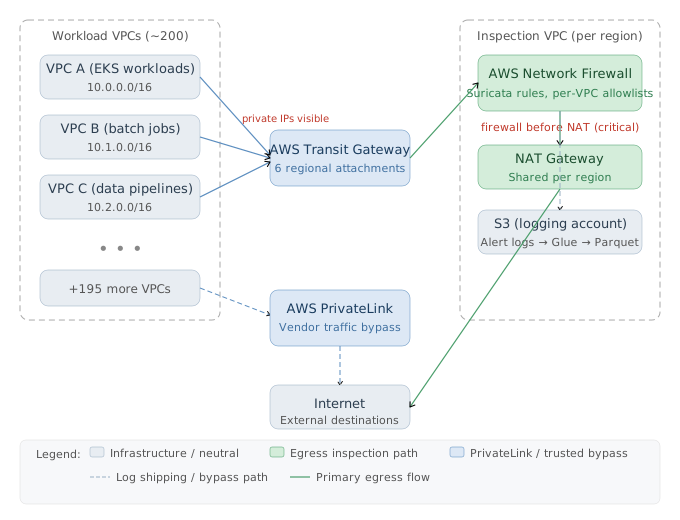
The redesigned architecture makes three concrete changes:
- Remove NAT gateways from workload VPCs. Every workload VPC that previously had direct NAT gateway egress has those gateways deleted.
- Redirect egress via Transit Gateway. Route tables in each workload VPC are updated to send all egress traffic into the Transit Gateway network rather than out a local NAT gateway.
- Deploy centralized inspection VPCs — one per region. Each inspection VPC contains an AWS Network Firewall[1] endpoint and NAT gateways. Traffic arrives from workload VPCs via Transit Gateway[2], passes through the firewall, then exits via NAT gateway to the internet. Firewall logs are shipped to an S3 bucket in a dedicated logging account, separate from production accounts.
With six regions, there are six inspection VPCs. Every byte of egress from any of the ~200 workload VPCs transits one of these six choke points.
Why Firewall Placement Before NAT Gateways Is Non-Negotiable
The ordering of components inside the inspection VPC is not an implementation detail — it is a fundamental design constraint. The firewall sits before the NAT gateways, not after.
This placement means the firewall sees the private IP addresses of originating traffic, not the post-NAT public IP. Two concrete capabilities depend on this:
- Source attribution: With private IPs visible, the firewall can identify which VPC, which EC2 instance, or which node originated a given flow. Post-NAT, all traffic from all workload VPCs would appear to come from the same NAT gateway public IP — attribution becomes impossible.
- Per-VPC rule sets: Because each VPC’s CIDR range is distinguishable at the firewall, you can maintain separate allowlists per VPC. A Kubernetes cluster VPC might need different external destinations than a batch processing VPC. Firewall-after-NAT collapses this granularity entirely.
The Kubernetes caveat is worth noting: pods on a single node share the node’s IP address from the firewall’s perspective. Mapping a node IP to a specific pod requires additional tooling — Datadog[3] was used in this environment to bridge that attribution gap.
AWS Network Firewall: Log Types and Suricata Underpinnings
AWS Network Firewall is built on the open-source Suricata[4] IDS/IPS engine. AWS exposes both Suricata’s full rule syntax and a simplified syntax suited for basic use cases. AWS documentation skews toward the simplified path; large-scale deployments benefit from Suricata’s full capabilities.
The firewall produces two log types:
- Flow logs: Similar to VPC Flow Logs but include a flow ID field. Volume is relatively low — approximately 3 GB per day in this environment on a peak traffic day.
- Alert logs: Protocol-aware records. For HTTPS connections, alert logs capture the SNI (Server Name Indication), TLS version, and server certificate. They also include a flow ID. On peak days this environment generated 280 GB per day of alert logs — nearly 100x the flow log volume.
The flow ID field in both log types makes correlation tractable: you can join flow logs and alert logs on flow ID to reconstruct the full picture of a connection without losing either layer’s data.
Actionable Takeaways
- Preserve pre-NAT firewall placement. If you insert the firewall after the NAT gateway, you lose source-IP attribution and the ability to apply per-VPC rule sets. This is the single most important architectural decision in a centralized egress design.
- Audit your existing Transit Gateway topology before designing egress. A pre-existing Transit Gateway dramatically simplifies centralized egress: you redirect route tables rather than re-architecting connectivity from scratch. If you don't have one, factor the Transit Gateway deployment cost and complexity into your project timeline.
- Plan for two log streams with very different volumes. Alert log volume is dominated by your rule set density, not traffic volume. A full-monitoring rule set (all traffic logged) will produce orders of magnitude more alert log data than flow log data. Size your log storage and query infrastructure against alert logs, not flow logs.
Common Pitfalls
- Placing the firewall after the NAT gateway. This eliminates source-IP attribution and prevents per-VPC rule enforcement — the two capabilities that justify the architecture's complexity. Once deployed this way, fixing it requires tearing down and rebuilding the inspection VPC topology.
- Underestimating alert log volume when planning storage and query infrastructure. Flow logs are small and predictable; alert log volume is rule-set-dependent and can be 100x larger. Teams that size infrastructure against VPC Flow Log baselines will be caught off guard when alert logs land at 280 GB/day on peak traffic days.
Managing Log Volume and Cost in Large-Scale Egress Filtering
When you deploy AWS Network Firewall as your egress inspection layer, you immediately inherit two problems that most architecture diagrams omit: a massive, largely unpredictable log volume, and the downstream cost and analysis challenges that come with it. At the Afterpay AWS environment described here — processing approximately 25 terabytes of egress traffic per day across nearly 200 VPCs — these were not theoretical concerns. They were the operational bottleneck that nearly made the project unworkable.
The 280 GB/Day Alert Log Problem
AWS Network Firewall produces two distinct log types: flow logs (structurally similar to VPC flow logs, with an added flow ID) and alert logs (protocol-aware records that include the TLS SNI, certificate details, TLS version, and other connection metadata for HTTPS, with equivalent depth for other protocols). Both log types include a flow ID, making it straightforward to join them for correlation.
The ratio between these log types was one of the first surprises. On a high-traffic day, the system was generating 280 gigabytes per day of alert logs against only around 3 gigabytes of flow logs. That ratio — roughly 90:1 in favor of alert logs — ran completely counter to the initial expectation that flow logs would dominate. The reason is the rule set in use at this stage: a fully monitoring rule set where all traffic is logged. This is the correct approach during the preparatory phase before enforcement, because observing traffic for several months is the only reliable way to build an accurate allowlist. But it produces enormous alert log volume because every connection event generates a rich protocol-level record.
The core problem is that Suricata — the open-source IDS/IPS engine that underlies AWS Network Firewall — supports a threshold feature that applies exponential backoff to repeated alert log entries. Because alert logs contain a high proportion of repetitive information (the same service hitting the same domain thousands of times per day), this threshold capability would dramatically reduce log volume without meaningful loss of security signal. AWS has not implemented this Suricata feature in Network Firewall. That single missing feature is a significant operational gap at large scale.
Why Athena Queries Timed Out and How Parquet Fixed It
The first attempt to analyze the alert logs used Amazon Athena[5] querying against the raw JSON logs stored in S3. The result was immediate: Athena could only query 12 hours of data before timing out. For an investigation or allowlist analysis that requires looking across weeks or months of traffic, a 12-hour query window is functionally useless.
The solution was converting the raw logs to Parquet format — a columnar storage format widely used in data engineering. Parquet’s column-oriented layout means that queries scanning only a few fields (which is the dominant pattern in security analysis: filter by source IP, destination domain, or time range) skip entire column chunks rather than deserializing every row. The result was a 30x improvement in query speed, which shifted the practical query window from 12 hours to approximately a month at a time. Month-scale queries are what you actually need for allowlist construction, anomaly detection, and traffic attribution.
This conversion was done using AWS Glue[6], which handled the ETL pipeline from raw JSON to Parquet. The Parquet conversion step also served as the natural point to enrich the data.
VPC-Name Annotation and Cost Attribution
The second enrichment step performed during the Parquet conversion was annotating each log record with the name of the VPC that originated the traffic. This single annotation transformed the usability of the logs for both investigation and cost attribution.
Without annotation, querying by source means filtering on raw CIDR blocks. This works acceptably for tightly bounded ranges like /16 or /24, but becomes unwieldy for allocations with irregular boundaries — which are common in environments that have grown organically across multiple acquisition and provisioning cycles. Filtering on a named VPC is both faster to write and semantically meaningful to anyone operating the environment.
The cost attribution use case was the more consequential one. With VPC-name-annotated logs and the source IP visibility provided by placing the firewall before the NAT gateways (so private IPs are preserved), it became possible to calculate exactly how much each traffic flow contributed to the cost of the egress solution. This was used actively: monthly charts of the most expensive traffic flows were published as an internal tool to encourage teams to rearchitect high-cost patterns.
Vendor Traffic as the Dominant Egress Cost Driver
The attribution analysis produced a finding with immediate cost implications. In the Kubernetes VPCs, 48% of all egress traffic was going to Datadog domains. Other vendors also appeared as significant contributors. This vendor traffic was flowing through the Network Firewall and NAT gateways, accumulating both firewall processing costs and NAT gateway data-transfer costs.
The remediation is architectural: route vendor traffic via AWS PrivateLink[7] instead. Because these are established vendors that have gone through a due diligence process, you already know the destination and you don’t need to route that traffic through a firewall for inspection. PrivateLink connections bypass the Network Firewall entirely, eliminating both the processing cost and the log volume associated with that traffic.
The financial outcome of applying this and other identified cost-saving opportunities was striking: if all optimizations were implemented, the total cost of the egress solution would fall below the cost of having no egress controls at all — below the baseline of just running NAT gateways without a firewall. The estimate was roughly half the cost of the NAT-gateway-only baseline. This inverts the usual framing of security controls as pure cost centers: the visibility the firewall provides enables cost reductions that more than offset the firewall’s operational expense.
PrivateLink Offloading: Eliminating Vendor Traffic from Network Firewall Inspection
Proof of Concept
- Identify vendor traffic as a cost driver: Deploy the centralized egress solution in monitoring mode (all-pass, all-log rule set). Query the alert logs — converted to Parquet format for practical querying — to attribute egress costs by destination domain. In this deployment, Datadog domains alone accounted for 48% of Kubernetes VPC egress traffic. Other vendors contributed additional significant shares.
- Assess vendor eligibility for PrivateLink bypass: For each high-volume vendor destination, determine whether the vendor has completed your organization’s due diligence and vendor onboarding process. Vendors that have gone through due diligence have a known, fixed set of endpoints. Because the destination is already validated, there is no security benefit to routing this traffic through the Network Firewall — the firewall cannot add assurance beyond what the vendor relationship already provides.
- Confirm vendor PrivateLink support: Check whether the vendor offers AWS PrivateLink (VPC endpoint services). Most major observability and security vendors — Datadog included — support PrivateLink connections for their agent traffic.
- Provision PrivateLink connections in workload VPCs: For each eligible vendor, create an Interface VPC Endpoint in the relevant workload VPCs pointing to the vendor’s PrivateLink service. Update the workload VPC route tables so that traffic destined for the vendor’s private DNS names resolves to the VPC endpoint rather than routing into the Transit Gateway toward the inspection VPC.
- Remove vendor domains from the Network Firewall allow list: Once PrivateLink is active and verified, vendor traffic no longer traverses the Network Firewall. Remove the corresponding domain entries from the per-VPC allow list. This reduces rule set complexity and eliminates the alert log volume associated with those destinations.
- Quantify the cost impact: After offloading vendor traffic to PrivateLink, re-run cost attribution queries against the remaining egress traffic. In this deployment, cumulative cost-saving opportunities reduced the total cost of the centralized egress solution to below the cost of the pre-existing NAT gateway architecture with no inspection — approximately half the no-firewall baseline.
- Maintain the cost visibility loop: Continue publishing monthly charts of the most expensive egress traffic destinations. This creates an organizational incentive for application and platform teams to rearchitect solutions, consolidate redundant external calls, and identify unnecessary data movement.
AWS Glue S3 Path Detection Breaking on Centralized Egress Deployment
Proof of Concept
- Baseline state — Glue working via local NAT gateway: A workload VPC contains AWS Glue jobs that extract data from a database within the same VPC. Egress traffic to S3 routes through a local NAT gateway in the workload VPC. Glue detects the NAT gateway, confirms an S3 path exists, and jobs run successfully.
- Migration to centralized egress: As part of the egress controls rollout, the local NAT gateway is deleted from the workload VPC. Route tables are updated to forward egress traffic into the Transit Gateway network, which carries traffic to a centralized inspection VPC containing AWS Network Firewall and a shared NAT gateway. Actual S3 connectivity is preserved — packets can still reach S3 via the centralized path.
- Glue path detection check fires: On the next execution cycle, each Glue job performs its internal S3 path detection check. This check does not issue a real network probe. It simply interrogates the VPC configuration: is there a NAT gateway attached to this VPC, or is there an S3 VPC endpoint configured in this VPC?
- Check fails — both conditions are false: The local NAT gateway has been removed. No S3 VPC endpoint has been added to the workload VPC. From Glue’s perspective, no valid S3 path exists. All Glue jobs immediately fail.
- Root cause confirmed — detection logic is topology-unaware: The failure is not a permissions issue, a firewall rule block, or a routing misconfiguration. The centralized egress path is fully operational. The failure is caused entirely by Glue’s static, topology-based S3 path detection heuristic, which was designed for standalone VPC deployments and does not account for centralized egress architectures.
- Resolution — add an S3 VPC endpoint to the workload VPC: To satisfy Glue’s detection check without restoring the local NAT gateway, create an S3 VPC Gateway Endpoint in the workload VPC. Its presence alone satisfies Glue’s check. Glue will detect the endpoint, conclude that an S3 path exists, and resume normal operation. Centralized egress inspection remains in place for all other traffic.
- Operational impact: This issue is not surfaced in AWS documentation covering centralized egress or AWS Glue deployment guides. It manifests silently as immediate job failure with no clear indication that the root cause is a VPC topology check rather than a network reachability problem, making it a significant time sink during egress migrations involving Glue workloads.
Estimating Log Costs Before Deployment
One practical challenge worth flagging: alert log volume is difficult to estimate before you deploy, because it depends heavily on the specific rule set you are using. The only reliable method is to deploy the rule set, send representative traffic through it, and observe the resulting log volume. You can then use traffic volume as a rough proxy to extrapolate across regions — but it is only an approximation. The ratio of alert log volume to traffic volume was not consistent across the six regions, confirming that rule-set specifics, traffic mix, and other factors introduce variance that a simple proportional model cannot fully capture.
Instrument log volume monitoring from day one of any pilot deployment, and plan your log storage, querying, and retention budget around observed data rather than pre-deployment estimates.
Actionable Takeaways
- Convert alert logs from raw JSON to Parquet format using AWS Glue before querying with Athena. At scale, this alone delivers a 30x improvement in query speed and makes month-range analysis practical. Budget the Glue ETL pipeline as a required component, not an optional optimization.
- Annotate each log record with the originating VPC name during the Parquet conversion step. This makes queries operationally readable and enables accurate per-VPC cost attribution — which in turn gives you the data to justify routing high-volume vendor traffic via PrivateLink and potentially cut the total cost of your egress solution below the baseline cost of NAT gateways alone.
- Publish monthly cost attribution charts of the highest-volume traffic flows to engineering teams. Visibility into which services drive the most egress cost is the most effective lever for encouraging teams to move vendor traffic to PrivateLink or adopt S3 VPC endpoints — producing cost reductions that can more than offset the firewall's operational costs.
Common Pitfalls
- Assuming flow logs will dominate alert log volume. At large scale with a full monitoring rule set, alert logs can reach 280 GB/day against only 3 GB/day of flow logs — a 90:1 ratio. Failing to account for this when sizing log storage, querying infrastructure, and budget will result in systems that cannot actually analyze the data they are collecting.
- Querying raw JSON alert logs directly in Athena without Parquet conversion. A 12-hour Athena timeout is not a configuration problem to tune around — it is a fundamental constraint of querying uncompressed columnar JSON at this scale. Without Parquet conversion, month-scale analysis (required for allowlist construction and traffic attribution) is not feasible.
Building and Maintaining Egress Allowlists Without Breaking Production
Why Application Owners Cannot Tell You What to Allowlist
One of the most common mistakes teams make when rolling out AWS egress controls is asking application owners to enumerate their external destinations. This approach sounds reasonable — the people who built the service should know where it talks — but it consistently fails in practice. As the engineer behind this deployment observed firsthand: “application owners seldom have an in-depth understanding of where their egress traffic is going.” They will identify the obvious integrations, but they will miss third-party SDKs phoning home, vendor agents making undocumented calls, and internal tooling that quietly reaches out to external endpoints.
The only reliable way to build an egress allowlist is to observe actual traffic for several months before enforcing anything. This is not a shortcut or a preference — it is a hard operational requirement. A month of logs is insufficient because some destinations appear only during quarterly batch jobs, deployment pipelines, or incident-response tooling that runs infrequently. Observation windows of several months capture the full envelope of legitimate traffic.
The Monitoring-First Approach
The correct sequence for an egress rollout is:
- Deploy in full monitoring mode first. Configure AWS Network Firewall with rules that log all traffic but block nothing. This gives you a complete picture of what your environment is actually doing.
- Audit surprising traffic. When you start looking at the logs, you will find things no one expected — services sending unencrypted traffic, applications reaching external endpoints that were never reviewed, vendor agents generating significant egress volume. Some of this traffic you will want to clean up before enforcement rather than allowlist it.
- Iterate on the allowlist with owners. Use the observed log data, not owner self-reporting, as the authoritative source. Present specific domains and ask owners to confirm or investigate, rather than asking them to enumerate from memory.
- Enforce only after several months of observation have confirmed the allowlist is complete.
Even after enforcement, you cannot simply freeze the allowlist and walk away. Allowlist maintenance requires ongoing visibility into allowed traffic. If you want to remove a domain from an allowlist — perhaps a vendor was decommissioned — you must confirm that no traffic has traversed that rule recently. Without logs of allowed traffic, you cannot safely remove any entry, and your allowlist will only grow over time.
The Strict Rule Ordering Prerequisite
This is where a subtle AWS Network Firewall default creates a serious operational problem. By default, Network Firewall groups rules by action type, and pass rules are evaluated before alert rules. Under default rule ordering, if a connection matches a pass rule, it is allowed silently — no log entry is generated for that connection. This means:
- You have no record that the domain was used
- You cannot safely prune stale allowlist entries
- Allowlist maintenance becomes guesswork
The fix is strict rule ordering, which evaluates rules in the explicit sequence you define. Under strict ordering, you can place a logging/alert rule before the pass rule, ensuring that every allowed connection generates a log entry. This is not optional if you intend to maintain your allowlists over time — it is a prerequisite.
The Terraform Provider Bug: Plan for a Full Teardown
Switching from default rule ordering to strict rule ordering in an existing AWS Network Firewall deployment is where teams hit a painful infrastructure-as-code trap. The Terraform AWS provider[8] has a documented bug: it cannot change rule ordering on an existing firewall resource in place. Attempting to update the rule_order attribute via a normal terraform apply will fail silently or error without completing the change.
The only reliable remediation is a full manual teardown and recreation of the firewall resource with the correct rule ordering specified from the start. This means:
- Planning downtime or a maintenance window for the affected inspection VPC
- Manually deleting the existing firewall and associated rule groups in the AWS console or via CLI
- Recreating the firewall with
STRICT_ORDERspecified in the Terraform resource before applying - Reattaching route tables and verifying traffic flow after recreation
The practical lesson is to decide on rule ordering before your first deployment, not after months of production operation. Default ordering is appropriate only for read-only monitoring phases where you are not yet maintaining an allowlist. The moment you intend to enforce and maintain allowlists, strict ordering must be in place — and retrofitting it carries a full teardown cost.
Allowlist Maintenance in Practice
Once strict ordering is enabled and enforcement is active, allowlist maintenance becomes an ongoing operational discipline:
- Review allowed traffic periodically to identify stale entries. Domains that have not appeared in logs for 60–90 days are candidates for removal, pending confirmation with application owners.
- Watch for new destinations in monitoring logs. New external connections that are not in the allowlist will generate deny events, which should trigger a review rather than an automatic allow.
- Coordinate application changes with security. Deployments that add new external integrations must include an allowlist update as part of the change process, not a post-incident fix when the deployment breaks.
Actionable Takeaways
- Never ask application owners to self-report their egress destinations. Deploy Network Firewall in full monitoring mode and observe actual traffic for several months before drafting any allowlist. Owner self-reporting will miss critical destinations and produce an incomplete allowlist that breaks production on enforcement.
- Configure strict rule ordering in AWS Network Firewall from the very first deployment — before enforcement begins. Under default rule ordering, pass rules generate no log entries, making it impossible to identify stale allowlist entries and safely prune them over time. Retrofitting strict ordering on an existing firewall requires a full manual teardown due to a Terraform provider bug.
- Treat allowlist maintenance as a continuous operational process, not a one-time configuration. Log all allowed traffic under strict ordering, review periodically for stale entries, and require application teams to include allowlist updates as part of any deployment that adds new external integrations.
Common Pitfalls
- Relying on application owner self-reporting to build the initial allowlist. Owners consistently underestimate the number of external destinations their services contact, leading to an allowlist that breaks production the moment enforcement is enabled. The only safe approach is months of passive observation using monitoring-mode rules.
- Deploying Network Firewall with default rule ordering and assuming logging is complete. Under default ordering, pass rules are evaluated before alert rules, meaning allowed connections generate no log entries. This makes it impossible to prune stale allowlist entries and causes the allowlist to grow indefinitely without the ability to safely remove anything.
Egress Control Bypass Techniques and Mitigations
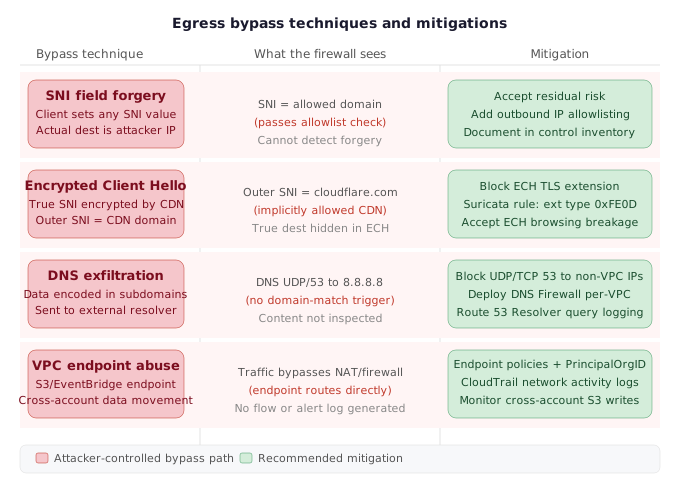
Deploying AWS Network Firewall gives you meaningful egress visibility, but it does not close every exfiltration path. A determined attacker — or a red teamer stress-testing your controls — can exploit several well-known weaknesses in how domain-based filtering works. Understanding each bypass and its concrete mitigation is essential before you treat any egress control as production-grade.
SNI Field Forgery
AWS Network Firewall makes domain-based allow-list decisions by inspecting the Server Name Indication (SNI) field in the TLS ClientHello handshake. The SNI field tells the firewall which hostname the client intends to reach — but the client controls that field entirely. Nothing in the TLS protocol prevents a client from sending a crafted SNI value that matches an allowed domain while the actual encrypted connection goes elsewhere.
In practice, this means an attacker or a compromised workload can:
- Pick any hostname that is on your egress allow-list (e.g.,
api.github.com). - Send a TLS ClientHello to an external attacker-controlled server with the SNI set to
api.github.com. - The firewall sees an allowed domain in the SNI, permits the connection, and logs it as legitimate traffic.
- The actual TLS session is established with the attacker’s server. The firewall never inspects the encrypted payload.
AWS Network Firewall cannot detect SNI forgery. This is a fundamental limitation of any SNI-based filtering system that does not perform full TLS inspection. If your threat model includes insider threats or post-compromise lateral movement, you must treat SNI-based domain filtering as a partial control, not a complete one.
Mitigation: Pair SNI-based filtering with outbound IP allow-listing where feasible, and use CloudTrail network activity logs[9] to detect anomalous connection patterns. At minimum, document the limitation in your control inventory so your risk posture reflects reality.
SNI Forgery and Encrypted Client Hello Bypassing AWS Network Firewall Domain Rules
Proof of Concept
- Understand the inspection surface: AWS Network Firewall is built on Suricata IDS/IPS. For HTTPS traffic it identifies destinations by reading the SNI field in the TLS ClientHello — the plaintext hostname the client announces before the encrypted handshake completes. Domain-based allow/deny rules rely entirely on this field being honest.
- SNI forgery — the bypass: A client initiating a TLS connection controls the SNI field in its own ClientHello. To bypass a domain allowlist, an attacker sets the SNI to an allowed domain (e.g.,
api.trustedvendor.com) while the actual TCP connection is directed to the attacker-controlled IP. AWS Network Firewall sees the SNI valueapi.trustedvendor.com, matches it against the allowlist, and passes the connection. The underlying TLS handshake then completes with the real destination — the firewall has no visibility into the certificate that the server returns. - Why detection is not available: The speaker explicitly states: “You can forge the SNI field. Network Firewall can’t detect that.” While AWS Network Firewall alert logs do record the SNI and the server certificate (providing forensic evidence after the fact), there is no inline enforcement mechanism within Network Firewall to cross-validate SNI against the presented certificate at the time of the connection.
- Encrypted Client Hello — the structural bypass: ECH is a TLS extension promoted by Cloudflare and adopted by modern browsers. In an ECH handshake, the entire ClientHello — including the SNI — is encrypted using a public key published by the outer SNI host (typically a CDN like Cloudflare). The outer SNI visible to the firewall points to the CDN (e.g.,
cloudflare.com), while the actual destination is encoded inside the encrypted inner ClientHello. - Impact on egress allowlists: An allowlist that permits
cloudflare.comor any ECH-capable CDN effectively becomes a passthrough for any destination hosted behind that CDN. An attacker exfiltrating data to a server fronted by Cloudflare would appear in logs as traffic to an allowed CDN domain. - Partial mitigation — block ECH traffic: The speaker’s only stated mitigation for ECH is categorical: block all ECH-bearing traffic at the firewall. This is the same approach taken by the Great Firewalls of Russia and China. In a Suricata-based rule set, this can be implemented by matching on the ECH TLS extension type in the ClientHello. The trade-off is that blocking ECH will break modern browsers and privacy-conscious clients; organizations must assess operational impact before enforcing this rule.
Encrypted Client Hello (ECH)
Encrypted Client Hello[10] is a TLS extension promoted by Cloudflare and other CDN providers as a privacy enhancement. Under standard TLS 1.3, the SNI field is sent in cleartext — ECH encrypts it, meaning the firewall sees only the outer SNI (typically pointing to the CDN’s own domain, such as cloudflare.com) rather than the real destination.
This is structurally identical to domain fronting — a technique long used by malware authors and nation-state actors to route C2 traffic through trusted CDN infrastructure. ECH formalizes and standardizes that capability at the protocol level.
The practical consequence for egress filtering is severe:
- Your firewall sees traffic destined for
cloudflare.com(which is almost certainly on your allow-list or implicitly trusted). - The actual destination — an attacker’s origin server or a data exfiltration endpoint — is hidden inside the encrypted ClientHello.
- Even if you are decrypting HTTPS traffic inline, ECH prevents you from recovering the true destination hostname.
As the speaker noted directly: “the only mitigation is to just block encrypted client hello traffic, which is what the great firewalls of Russia and China are doing.” There is no way to selectively allow legitimate ECH traffic while blocking malicious ECH traffic — the encryption is unconditional.
Mitigation: Block ECH at the firewall level by dropping TLS connections that include the ECH extension. This can be done with Suricata rule syntax in AWS Network Firewall by matching on the ECH TLS extension type (0xFE0D / 65037). Accept that this will break some privacy-oriented browsing from your workloads and may affect certain SaaS endpoints that have adopted ECH.
DNS Exfiltration via External Resolvers
DNS exfiltration is a well-established technique for covertly moving data out of a network by encoding payloads in DNS query names. A compromised workload encodes data as subdomains of an attacker-controlled domain (e.g., <base64-data>.exfil.attacker.com) and sends those queries to an external DNS resolver. The resolver forwards queries to the attacker’s authoritative nameserver, which decodes the data — all without any TCP connection that your egress controls would inspect.
AWS Network Firewall operates at layers 3–7 of the network stack, but DNS traffic over UDP port 53 to external resolvers can bypass domain-filtering rules that target HTTP/HTTPS. Two conditions allow DNS exfiltration to succeed even in a firewalled environment:
- Workloads can reach external DNS resolvers directly — if UDP/TCP port 53 egress to arbitrary IPs is permitted.
- DNS query content is not inspected — if the firewall allows DNS traffic without content filtering.
DNS Exfiltration via External Resolvers Evading Centralized Egress Controls
Proof of Concept
- Understand the control gap: In the described architecture, egress traffic from workload VPCs is routed through AWS Transit Gateway into centralized inspection VPCs, where AWS Network Firewall sits in front of NAT gateways. This inspection model depends on DNS traffic being resolved through a controlled, centralized resolver — not an arbitrary external one.
- Identify the attack vector: The speaker explicitly called out DNS exfiltration as one of the “primary mechanisms by which people might exfiltrate data out of AWS.” The mechanism works by encoding sensitive data (e.g., S3 object contents, environment variables, secrets) as subdomains of an attacker-controlled domain — for example,
c2aGVsbG8K.attacker-exfil.com. Each DNS query carries an encoded data chunk to the attacker’s authoritative DNS server. - Exploit the resolver misconfiguration: If workload VPCs are not locked down to use only the VPC’s internal resolver (the Amazon-provided DNS at the
.2address of the VPC CIDR), a compromised workload can configure an alternative resolver — for example,8.8.8.8or an attacker-owned resolver — and send DNS queries directly to it over UDP/TCP port 53. - Why this partially evades the egress control: AWS Network Firewall can match DNS query names if the DNS traffic passes through it on the expected path. However, if the firewall’s rule set is not explicitly configured to block outbound DNS traffic to all destinations except the internal resolver, DNS queries to external resolvers will pass through without triggering a domain-match alert.
- Mitigations described by the speaker:
- Block DNS to external resolvers at the Network Firewall layer: Create an explicit deny rule that blocks outbound UDP/TCP port 53 traffic to any destination other than the VPC’s internal resolver. This forces all DNS queries through the controlled resolver path.
- Enable DNS Firewall per-VPC: Deploy AWS DNS Firewall[11] in each source VPC and configure it with the same domain allow list used in the Network Firewall.
- Collect DNS Firewall logs from the VPC resolver: Capture DNS logs from the Route 53 Resolver so that suspicious subdomain patterns (high-entropy subdomains, unusually long query names, repeated queries to a single domain with varying subdomains) can be detected and investigated.
- Mirror the allow list across both controls: The per-VPC DNS Firewall allow list must be kept in sync with the per-VPC Network Firewall allow list to avoid inconsistency gaps.
VPC Endpoint Abuse and the EventBridge Exfiltration Vector
VPC endpoints are a subtler but significant exfiltration surface. They allow workloads in a VPC to communicate with AWS services (S3, SQS, EventBridge, etc.) without traffic traversing the public internet — and without that traffic passing through your centralized Network Firewall. From an exfiltration perspective, this means an attacker who gains execution inside your VPC can use any accessible VPC endpoint to move data to an external AWS account entirely outside your egress controls.
The obvious defense is to attach endpoint policies that restrict communication to resources within your own AWS organization. However, this approach has a well-documented and poorly-documented trap: many AWS-managed services rely on access to special Amazon-owned S3 buckets that are outside your organization’s account space. Restricting an S3 endpoint policy to aws:PrincipalOrgID == your-org will silently break services like:
- AWS Systems Manager (SSM) agent updates
- EC2 instance metadata bootstrapping
- Various managed service dependency downloads
The speaker was direct about this: “the obvious thing is to put something in the policy that only allows communication with other parts of your organization, but that will break a whole bunch of services, especially in an S3 endpoint because a lot of AWS services depend on being able to access special Amazon buckets and that is not very well documented.”
The EventBridge Vector
A colleague of the speaker published a blog post demonstrating that Amazon EventBridge can be used as a data exfiltration channel. The attack works because EventBridge supports cross-account event bus targets: an attacker with execution rights in your VPC can publish events containing exfiltrated data to an EventBridge event bus in an attacker-controlled AWS account. This traffic goes through the EventBridge VPC endpoint (if one exists) or through the public AWS API endpoints — bypassing your Network Firewall entirely in either case.
VPC Endpoint Abuse and EventBridge Data Exfiltration Bypassing Network Firewall
Proof of Concept
- Understand the bypass path: When a workload VPC has a VPC endpoint configured (e.g., for S3 or EventBridge), traffic destined for the associated AWS service is routed directly through the endpoint rather than through the Transit Gateway and centralized inspection VPC. AWS Network Firewall never sees this traffic.
- Identify the exfiltration surface: In an environment with S3 VPC endpoints, an attacker or malicious insider with the right IAM permissions can write sensitive data to an S3 bucket they control in a different AWS account. Because the data travels over the endpoint rather than through the NAT gateway and firewall, the egress control system generates no alert and no flow log entry.
- Attempt the obvious mitigation — endpoint policy restriction: The naive defense is to attach an endpoint policy that limits communication to resources within your own organization (e.g., using
aws:PrincipalOrgIDor specific account IDs as conditions). This prevents direct writes to external buckets via the endpoint. - Encounter the undocumented dependency problem: Restricting the endpoint policy to organization-owned buckets breaks a range of AWS-managed services that silently depend on accessing special Amazon-controlled S3 buckets. The speaker noted this dependency “is not very well documented,” meaning teams frequently discover breakage only after deploying the restriction.
- The EventBridge exfiltration vector: If an attacker can configure EventBridge rules or targets, they can route data payloads to external destinations through the EventBridge service endpoint. Because EventBridge traffic also flows through VPC endpoints and not through the Network Firewall inspection path, this channel is invisible to domain-based egress filtering.
- Recommended mitigations: Apply endpoint policies that restrict access to organization-owned resources where feasible. Enable CloudTrail network activity logs to capture API calls made through VPC endpoints. Layer AWS Network Firewall, DNS Firewall, and CloudTrail network activity logs together so that no single bypass technique eliminates all visibility. Monitor for unexpected cross-account S3 writes and unusual EventBridge rule or target configurations.
Why a Multi-Service Defense Strategy Is Necessary
No single control closes all of these bypass paths. AWS Network Firewall handles layer-7 domain filtering but is blind to SNI forgery, ECH, and VPC endpoint traffic. DNS Firewall blocks DNS exfiltration but requires per-VPC deployment and has lower assurance than Network Firewall. CloudTrail network activity logs provide the audit trail for VPC endpoint abuse but are reactive rather than preventive.
The speaker summarized this directly: “I think in order to get good protection you need to use a multi-service approach. So I would be using network firewall, DNS firewall, CloudTrail network activity logs and combine it all.”
| Bypass Technique | Primary Control | Secondary Control |
|---|---|---|
| SNI field forgery | Accept limitation; add IP allow-listing | CloudTrail anomaly detection |
| Encrypted Client Hello | Block ECH extension in Network Firewall | Monitor for CDN-fronted anomalies |
| DNS exfiltration | Block external resolvers; Route 53 logging | DNS Firewall per-VPC allow-lists |
| VPC endpoint abuse | Endpoint policies + org restrictions | CloudTrail network activity logs |
| EventBridge cross-account | EventBridge resource-based policies | CloudTrail PutEvents monitoring |
Actionable Takeaways
- Block DNS egress to external resolvers (UDP/TCP 53 to anything other than 169.254.169.253) and enable Route 53 Resolver query logging in every VPC. Mirror your Network Firewall per-VPC domain allow-lists into DNS Firewall rules deployed in each source VPC — a domain must be approved at both layers to receive traffic.
- Audit all VPC endpoints across your environment, apply
aws:PrincipalOrgIDendpoint policies, and enable CloudTrail network activity logs to capture cross-account data movement through service endpoints. Pay specific attention to EventBridge, S3, SQS, and SNS endpoints — all support cross-account delivery and all can exfiltrate data without passing through Network Firewall. - Add an ECH-blocking Suricata rule to your Network Firewall policy to prevent domain-fronting via Encrypted Client Hello. Document SNI forgery as an accepted residual risk in your control inventory, and consider pairing SNI filtering with outbound IP restrictions for your highest-sensitivity workloads where the allow-list is small and stable enough to make IP-based rules manageable.
Common Pitfalls
- Treating SNI-based domain filtering as a complete control. AWS Network Firewall cannot detect SNI forgery — a client can send any hostname in the SNI field while connecting to an arbitrary IP. This is a structural limitation, not a configuration gap. Engineers who do not document this limitation will overstate the assurance level of their egress controls in risk assessments.
- Applying
aws:PrincipalOrgIDrestrictions to S3 VPC endpoint policies without exhaustive pre-enforcement testing. Many AWS-managed services silently depend on access to Amazon-owned S3 buckets outside your organization. A blanket org restriction will break SSM, certain EC2 bootstrapping flows, and other managed service dependencies — often with no clear error message linking the failure to the endpoint policy change.
Multi-Service Defense Strategy and AWS Feature Gaps
Why No Single Service Is Enough
Deploying AWS Network Firewall as your sole egress control leaves meaningful gaps. The bypass techniques covered earlier — SNI forgery, Encrypted Client Hello, DNS exfiltration, and VPC endpoint abuse — each exploit a different layer of the network stack. No single AWS service closes all of them. Achieving realistic cloud security egress defense requires assembling a layered stack where each service addresses the vectors the others cannot.
The speaker’s recommendation is explicit: “I think in order to get good protection you need to use a multi-service approach. So I would be using Network Firewall, DNS Firewall, CloudTrail network activity logs and combine it all.”
The Four-Layer Defense Stack
1. AWS Network Firewall (centralized, per-inspection-VPC)
Network Firewall sits in the centralized inspection VPC, positioned before the NAT gateways, and handles domain-level egress filtering via Suricata rules. It is your primary control for blocking unauthorized destinations, detecting protocol anomalies, and enforcing per-VPC allowlists. Because all workload traffic is routed through it via Transit Gateway, it sees private source IPs — which enables accurate traffic attribution and per-VPC rule sets.
2. AWS DNS Firewall (distributed, per-workload-VPC)
DNS Firewall must be deployed in the actual source VPC, not the centralized inspection VPC. It intercepts DNS queries at the Route 53 Resolver level, before traffic ever leaves the VPC. This is the correct layer for blocking DNS exfiltration via external resolvers — a bypass that Network Firewall cannot stop on its own because that traffic may not pass through the inspection path, or may use encrypted DNS.
The critical operational rule: the per-VPC DNS Firewall allowlist must mirror the corresponding Network Firewall per-VPC allowlist. If a domain is permitted in the Network Firewall rule group for a given VPC, it should be permitted in that VPC’s DNS Firewall as well. Mismatches will break legitimate traffic or silently allow exfiltration channels.
DNS Firewall is significantly more cost-effective than Network Firewall, but the speaker is clear that “the protection is not as high.” It is a complement, not a replacement. In environments where full Network Firewall deployment is cost-prohibitive for every VPC, DNS Firewall can serve as a first-tier control while higher-value VPCs get full inspection.
3. CloudTrail Network Activity Logs
VPC endpoint abuse — particularly through services like S3 endpoints and EventBridge — is not visible to Network Firewall because that traffic does not traverse the NAT gateway path. CloudTrail network activity logs provide visibility into API-level calls through VPC endpoints, which is the only reliable way to detect or audit data movement via this vector. This layer closes the gap that domain-based filtering leaves open.
4. AWS PrivateLink (cost reduction and bypass elimination)
PrivateLink serves a dual function in this architecture. First, it removes high-volume, fully-trusted vendor traffic from the Network Firewall inspection path entirely — eliminating both the processing cost and the log volume that vendor traffic generates. In the speaker’s environment, Datadog alone accounted for 48% of egress traffic from Kubernetes VPCs. Routing that through PrivateLink directly to the vendor’s endpoint bypasses the firewall without creating a security gap, because the destination is fully known and has passed vendor due diligence.
Second, PrivateLink connections to internal AWS services (S3, ECR, and others) remove AWS-internal traffic from the egress path, further reducing both NAT gateway costs and firewall load. The speaker found that if all identified PrivateLink optimization opportunities were implemented, the total cost of the egress solution would drop to roughly half the cost of running NAT gateways alone without any firewall. The inspection capability effectively becomes free after cost offloading.
How the Pieces Fit Together Per-VPC
The architecture is not uniform across all VPCs. Each workload VPC gets:
- DNS Firewall deployed locally, with an allowlist matching its Network Firewall rule group
- Egress traffic routed via Transit Gateway to the regional inspection VPC
- Network Firewall applies a per-VPC rule group based on the private source IP of the workload
- PrivateLink connections established for any vendor or AWS service whose destination is fully trusted and generates significant traffic volume
- CloudTrail network activity logs enabled for VPC endpoints where S3 or other data-path services are in scope
This per-VPC differentiation is only possible because the firewall sees private source IPs before NAT translation. Without that placement, rule segmentation by VPC would require separate inspection paths per VPC — a far more complex and expensive design.
Missing AWS Features That Would Have Simplified This Project
The speaker identified four specific AWS feature gaps that, if closed, would have materially reduced the engineering effort required.
1. Block VPC Access — Egress Mode
AWS’s “Block VPC Access” feature currently focuses on ingress. The speaker needed an egress enforcement mode: a mechanism to prevent workload VPCs from bypassing centralized egress by re-adding their own NAT gateways or internet gateways. Without this, enforcing centralized egress depends entirely on IAM controls and organizational policy — not hard network-layer enforcement. An egress mode on Block VPC Access would make the architecture tamper-resistant at the AWS API level.
2. Ingress-Only Internet Gateway
AWS provides an egress-only internet gateway for IPv6 traffic. No equivalent exists for IPv4 ingress-only scenarios. The speaker notes this would be useful for architectures that require inbound connectivity without exposing an outbound egress path — and that “there’s an egress-only one, so it should be possible.” This gap forces more complex routing workarounds for certain ingress-only workload patterns.
3. Suricata Threshold Rules in AWS Network Firewall
Suricata’s native threshold feature supports exponential backoff on alert log emission — when the same rule fires repeatedly for the same traffic pattern, subsequent matches generate fewer log entries. This is directly relevant to the 280 GB/day alert log volume problem. In a fully monitoring rule set (all traffic logged), the vast majority of alert log entries are repetitive records of the same allowed destinations. Threshold rules would have reduced this volume dramatically without losing coverage.
AWS Network Firewall exposes Suricata rule syntax but does not implement the threshold keyword. The speaker explicitly calls this out as a missing feature that “would have been extremely helpful.”
4. Parquet Format for Firewall Logs
VPC flow logs support an option to write directly to S3 in Parquet format, which enables fast columnar queries in Athena without a conversion pipeline. Network Firewall logs do not have this option — they are written as JSON, requiring the separate Glue ETL pipeline to convert them before month-scale Athena queries become practical. The speaker notes this parity gap directly: “VPC flow logs, there’s an option to save them in Parquet format — that would have saved quite a bit.”
Practical Implications for Cloud Security Roadmap Planning
Teams evaluating AWS egress controls for the first time should treat this multi-service stack as the target architecture, not Network Firewall alone. The realistic sequencing is:
- Start with DNS Firewall in workload VPCs as a lightweight first-tier control while building the centralized egress architecture
- Deploy Network Firewall in inspection VPCs with monitoring-only rules for an observation period before enforcement
- Identify PrivateLink candidates early — high-volume vendor traffic that is cost-justified for offloading
- Enable CloudTrail network activity logs for VPC endpoints in scope for sensitive data workloads
- Plan log infrastructure for Parquet conversion from the start, not as a retrofit
The feature gaps described above are not theoretical — each one represents weeks of engineering work that had to be done in userspace because AWS had not built the capability into the platform. Knowing these gaps in advance allows teams to budget for them explicitly rather than discovering them mid-deployment.
Actionable Takeaways
- Deploy DNS Firewall in each workload VPC with an allowlist that mirrors the corresponding Network Firewall per-VPC rule group. DNS Firewall must be local to the source VPC — it cannot be centralized — and mismatched allowlists between the two services are a common source of both broken traffic and exfiltration gaps.
- Identify PrivateLink candidates before your Network Firewall rollout, not after. High-volume vendor traffic (observability agents, data pipeline destinations, SaaS integrations) that has already passed vendor due diligence can be routed directly via PrivateLink, removing it from the inspection path and potentially making the entire egress solution cost-neutral or cheaper than NAT gateways alone.
- Plan for Parquet log conversion from day one. AWS Network Firewall writes JSON logs that will quickly exceed practical Athena query windows at scale. Build the Glue ETL pipeline as part of your initial deployment, not as a remediation after Athena starts timing out.
Common Pitfalls
- Treating AWS Network Firewall as a complete egress solution. Network Firewall cannot stop DNS exfiltration via external resolvers, VPC endpoint abuse, or API-level data movement through services like EventBridge. Each of these vectors requires a separate control layer — DNS Firewall, CloudTrail network activity logs, and VPC endpoint policies respectively.
- Failing to account for the four missing AWS features when scoping the project. The absence of Suricata threshold rules, Parquet firewall log output, an ingress-only internet gateway, and a Block VPC Access egress enforcement mode are not edge cases — they are gaps that directly affect log volume, query infrastructure, architecture enforcement, and operational cost. Teams that do not anticipate these gaps will encounter them as unplanned engineering work mid-deployment.
Conclusion
This talk from fwd:cloudsec North America 2025 is a rare, candid account of what deploying AWS egress controls actually costs — in engineering time, infrastructure, and operational discipline — at genuine cloud scale. The core lessons are unambiguous: place your firewall before NAT gateways or lose attribution entirely; plan your log pipeline for Parquet from day one or face Athena timeouts at 12 hours; never rely on application owners to enumerate their own egress destinations; and treat SNI-based filtering as one layer in a multi-service stack, not a complete solution.
The bypass inventory — SNI forgery, Encrypted Client Hello, DNS exfiltration via external resolvers, and VPC endpoint abuse — is the most actionable part of the talk for practitioners designing controls today. Each bypass has a concrete mitigation that can be implemented in your existing environment; the challenge is deploying all of them together and accepting that a few (SNI forgery in particular) require accepting documented residual risk rather than a technical fix.
For teams planning egress controls in AWS, the practical roadmap is clear: start with DNS Firewall per-VPC, layer in Network Firewall with strict rule ordering and Parquet logging, identify PrivateLink offloading candidates early, and enable CloudTrail network activity logs for endpoint-adjacent workloads. Done in that order, you get meaningful defense-in-depth at a cost that can undercut bare NAT gateway spending once PrivateLink optimization is applied.
For further reading on related topics covered on The Cyber Archive:
- Cloud security architecture — deep dives on securing AWS, GCP, and Azure environments
- Network security controls — talks covering firewall strategy, segmentation, and traffic inspection
- Defensive security operations — detection engineering, log analysis, and control validation at scale
References & Tools
- AWS Network Firewall — Managed network firewall service built on Suricata IDS/IPS, deployed in centralized inspection VPCs for egress traffic filtering. ↩
- AWS Transit Gateway — Network transit hub that routes egress traffic from ~200 workload VPCs into the six centralized inspection VPCs. ↩
- Datadog — Observability platform used for pod-level traffic attribution in Kubernetes environments and identified as the single largest egress cost driver (48% of Kubernetes VPC traffic). ↩
- Suricata — Open-source IDS/IPS engine underlying AWS Network Firewall. Supports full rule syntax including ECH extension matching; its threshold keyword for alert volume reduction is not exposed by AWS. ↩
- Amazon Athena — Serverless SQL query service used to query alert logs stored in S3. Times out on raw JSON logs after ~12 hours of data; Parquet conversion delivers 30x speed improvement. ↩
- AWS Glue — ETL service used to convert raw JSON alert logs to Parquet format and enrich records with VPC-name annotations. Has a documented behavior where it detects S3 path availability by checking for a local NAT gateway or S3 VPC endpoint — not actual network reachability — which causes job failures when migrated to centralized egress. ↩
- AWS PrivateLink — Service that routes vendor traffic directly to vendor VPC endpoint services, bypassing Network Firewall and NAT gateways. Applied to Datadog and other vendors to reduce egress cost below the NAT-gateway-only baseline. ↩
- Terraform AWS Provider — Infrastructure-as-code provider for AWS resources. Has a documented bug where changing rule ordering on an existing Network Firewall resource requires manual deletion and full recreation rather than in-place update. ↩
- AWS CloudTrail Network Activity Logs — Captures API-level calls through VPC endpoints, providing audit visibility into cross-account data movement through S3, EventBridge, SQS, and other services that bypass Network Firewall. ↩
- Encrypted Client Hello (ECH) TLS Extension — IETF draft standard that encrypts the TLS ClientHello including the SNI field, rendering SNI-based egress filtering blind to the true destination hostname. ↩
- AWS DNS Firewall — Per-VPC DNS filtering service deployed at the Route 53 Resolver level. Blocks DNS exfiltration via external resolvers. More cost-effective but lower assurance than Network Firewall; per-VPC allowlist must mirror the Network Firewall allowlist. ↩
Questions from the audience
Related deep dives
The AI Security Larsen Effect - How to Stop the Feedback Loop | [un]prompted 2026
This Wasnt in the Job Description- Building a production-ready AWS environment from scratch
I SPy - Rethinking Entra ID research for new paths to Global Admin