An attacker doesn’t need to compromise your code — they just need to find the vulnerable transitive dependency buried six layers deep in your software composition analysis blind spot. Most SCA programs fail not because the tools are bad, but because teams select tooling before understanding their maturity level, then burn developer goodwill on irrelevant, noisy findings.
Jamie Scott from Endor Labs exposes why SCA programs stall and what the fix actually looks like. This post covers the three hidden costs of SCA — relevance, prioritization, and accuracy — and maps manifest, build-time, and runtime scanning trade-offs to where your AppSec program needs to go next.
Key Takeaways
- You'll learn how to shift your AppSec reporting from punitive findings counts to positive reinforcement metrics that actually change developer behavior and protect your credibility budget.
- You'll be able to evaluate SCA tools against three concrete trade-offs — relevance, prioritization, and accuracy — and select the right scanning approach for your program's current maturity level.
- Apply security gating strategically by separating net new risk from existing technical debt, so CI gates drive action without stopping entire engineering teams for pre-existing vulnerabilities.
Building an AppSec Program: People, Process, and Developer Engagement
The Credibility Budget: Your Scarcest Security Resource
Before evaluating a single SCA tool, Jamie Scott opens with a premise most security engineers underestimate: your credibility budget is the most important thing you have in cybersecurity. Every time you send a developer an irrelevant finding, apply a contextless SLA, or break a build over a pre-existing vulnerability, you’re spending down that budget. Once it’s gone, even legitimate security asks get ignored.
The credibility budget model reframes the entire AppSec program-building exercise. Tool selection is downstream of trust-building. If developers don’t trust that findings matter, no scanning technology closes the gap.
Two Diagnostic Questions Before Any Tooling Decision
Scott identifies two foundational questions every AppSec lead must answer honestly before selecting any tooling:
1. Does your company have a project mindset or a product mindset?
- Product mindset organizations embrace continuous delivery — they ask “how do I improve and fix things quickly?” Security tooling integrates naturally because iterations are expected.
- Project mindset organizations run funding battles, spin up management-heavy initiatives, and expect things to be “finished.” Introducing AppSec tooling here requires a very different playbook — one that acknowledges the political structure rather than fighting it.
The teams that acknowledge a project mindset early make adjustments far more effectively than those who pretend they’re operating in a continuous delivery model when they aren’t.
2. Is your organization committed to protection or box-checking?
This question is uncomfortable because everyone defaults to saying “protection.” But the honest business answer is more nuanced. For many organizations, the actual driver is brand trust, improved sales cycles, or compliance requirements — not security-first engineering culture. Acknowledging the real motivation isn’t defeatist; it tells you how to frame security work in terms that leadership will fund and developers will prioritize.
Why Developer Engagement Fails — and How to Fix It
Developer engagement is the single most cited failure point in AppSec program implementations. The root cause is almost always the same: security teams introduce tooling into CI systems without pre-aligning with developers, then discover that implementation extends timelines by 6–12 months because no one owns the change.
The fix is straightforward but requires intentional culture work:
- Have the conversation upfront. If developers know that a new CI gate requires them to triage findings before merging, that changes the workflow design from the start — not six months in when timelines slip.
- Stop treating security metrics as a stick. The most damaging AppSec reporting pattern is sending weekly CIO reports that rank business units by number of open findings and “choke the throat” of whoever has the most. This is negative reinforcement, and it trains developers to deprioritize security.
Scott uses a memorable analogy: building an AppSec program and changing behavior is like training a puppy. You don’t hit puppies. You use positive reinforcement. Every finding-based report you send is a stick. Every newsletter celebrating a team’s security win is a treat.
Reporting That Drives Behavior Change
The reporting shift Scott recommends is concrete:
- Report on Jira tickets closed rather than open findings counts
- Publish internal security newsletters highlighting teams that implemented novel patterns, adopted reusable pipeline templates, or fixed the most issues in a sprint
- Call out security champions publicly — not to shame teams with many findings, but to put teams doing good work on a pedestal
This approach was used successfully at Shopify, where the AppSec lead made a practice of publicly celebrating security wins. It became a recruitment tool: developers wanted to be the team featured in the newsletter.
SLAs Without Context Waste Credibility
SLAs tied to CVSS severity scores are another common anti-pattern. A critical-severity finding gets a 7-day remediation window — regardless of whether the vulnerable code is in a production service handling payments or a migration script that hasn’t run in four years.
Developers see through this immediately. When they’re asked to treat an irrelevant finding with the same urgency as a genuine production risk, the SLA becomes noise. A better model: SLA clocks start when the upstream maintainer ships a fix. Many open source vulnerabilities have no patch available for extended periods, or are disputed indefinitely.
Actionable Takeaways
- Flip your primary AppSec metric from open findings count to closed Jira tickets — report on what's being fixed, not what's broken, to build the developer relationship that sustains long-term program adoption.
- Answer two diagnostic questions before any tool evaluation: Is your org project-minded or product-minded? Is security investment about genuine protection or compliance optics? Your answers should reshape how you frame tooling, timelines, and stakeholder conversations.
- Launch a recurring internal security newsletter that highlights teams demonstrating strong security practices — use it as positive reinforcement and a recruitment tool for security champions rather than a vehicle for escalating findings.
Common Pitfalls
- Starting with tool selection before establishing people and process alignment — buying an SCA product and then discovering implementation stalls because no developer workflow was designed around it.
- Applying CVSS-severity-based SLAs without context — assigning a 7-day remediation window to a CVE in a decommissioned migration script wastes engineering time and destroys trust in the security team's judgment.
SCA Scanning Approaches: Manifest, Build-Time, and Runtime Compared
The Dependency Problem: Why SCA Is Harder Than It Looks
When you build an application, you choose to reuse software. Direct dependencies are the packages you explicitly choose to include — the friends you invite to the party. Transitive (indirect) dependencies are the packages pulled in because your direct dependencies need them — the friends your friends brought along.
As Scott puts it: “It’s probably not my good friend who wrecked my house. It’s someone else.”
The transitive dependency problem scales fast:
- JavaScript ecosystem: Each direct dependency pulls in an average of 79 additional transitive dependencies
- Java ecosystem: Each direct dependency brings approximately 14 transitive dependencies
- Go ecosystem: The number drops to roughly 3
In a JavaScript project with 20 direct dependencies, you may be running 1,500+ packages you never explicitly chose. The SCA problem is mostly a transitive dependency problem.
Package Managers vs Compilers: A Critical Distinction
In most languages, the package manager and the compiler are completely decoupled — they don’t communicate with each other (Go is the exception).
| Component | Role | SCA Relevance |
|---|---|---|
| Package manager | Downloads and installs software | What’s installed; starting point for most SCA tools |
| Compiler / Runtime | What actually executes | The true source of risk exposure |
The package manager defines developer intent, but developer intent is not strictly defined in most ecosystems. When you specify a version range like >=0.17.1, your package manager performs dependency resolution — selecting the specific version to install based on the current registry state. What gets installed can differ between runs, between environments, and over time as new versions are published.
The runtime is the source of truth for exposure. The package manager is how you get there. Most SCA tools work at the package manager level because it’s accessible; the runtime level requires more investment but provides higher signal.
The Lock File: Why It Matters and Where It’s Missing
A lock file resolves this ambiguity. It records the exact resolved version of every dependency (direct and transitive), with integrity hashes. When a lock file is present, SCA scanning becomes straightforward.
But many ecosystems don’t use lock files in practice:
- Maven[3]: No built-in lock file mechanism. Dependency resolution can produce different results on different machines.
- Gradle[4]: Has a lock file feature, but it is rarely enabled in real-world projects.
- npm / yarn / pnpm:
package-lock.jsonandyarn.lockare widely used — manifest scanning is fairly reliable here. - Python (pip[2]):
requirements.txtcaptures intentionally specified packages only, not the full resolved dependency tree unless you runpip freeze— something most teams don’t do in practice.
The absence of a lock file is the default state for a substantial portion of enterprise Java and Python workloads. SCA tools that rely on manifest scanning will have real visibility gaps in these environments.
The Three SCA Scanning Approaches
1. Manifest File Scanning
How it works: Reads package manifest files (package.json, pom.xml, requirements.txt) and lock files if present. Does not build or execute the software.
What it sees:
- Packages you explicitly declared (and resolved packages if lock files exist)
- Fast and easy to integrate — no build environment required
What it misses:
- Transitive dependencies in ecosystems without lock files (Maven, Gradle without locking enabled, raw pip)
- Packages added at build time that aren’t captured in static manifests
- Whether a vulnerable dependency is actually reachable in your application’s execution paths
Best fit: Early-stage programs focused on establishing baseline visibility. Low friction to deploy across many repos quickly.
2. Build-Time (Buildtime) SCA
How it works: Actually builds the software using your package manager and compiler chain, then analyzes what was resolved and installed.
What it sees:
- Complete dependency tree including transitive dependencies in all ecosystems
- Accurate picture of what’s actually installed (not just declared)
- Supports reachability analysis — determining whether a vulnerable function is actually called in your code
What it costs:
- Requires a working build environment (correct JDK version, correct package manager version, access to private registries)
- Longer scan times — you’re building the software, not just reading files
- More CI resource consumption (CPU/RAM)
- Operational complexity: “If you’ve ever tried to build something in Java and had to downgrade your JAVA_HOME because it only supports Java 8, you understand the problem”
Best fit: Programs at the workflow-establishment or focus stage — teams that need lower false positive rates and are willing to invest in build infrastructure to get there.
3. Runtime SCA
How it works: Instruments running software to observe which packages, classes, and functions are actually executed in a live environment (production or under test).
What it sees:
- Only packages that are genuinely loaded and executed — highest precision, lowest noise
- The strongest signal for prioritization: if the runtime tool reports it, it’s almost certainly used
What it costs:
- Requires working test coverage or production instrumentation
- Performance overhead of running instrumentation agents alongside application code
- Deployment complexity: installing agents into Kubernetes clusters or production servers adds organizational friction
- Still assumes that observed executions are representative — a code path only triggered by an obscure condition might never be seen
Best fit: Programs at the governance or focus optimization stage — mature teams who need to qualify their backlog down to what genuinely requires attention.
Choosing Based on Maturity, Not Marketing
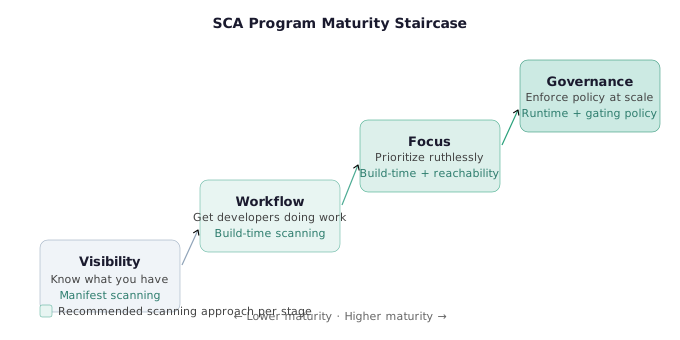
Scott’s maturity staircase maps each approach to program stage:
| Maturity Stage | Goal | Best-Fit Approach |
|---|---|---|
| Visibility | Know what you have | Manifest scanning — fast, low-friction |
| Workflow establishment | Get developers doing work | Build-time scanning — richer context, fewer wasted asks |
| Focus | Prioritize ruthlessly | Build-time + reachability, or runtime |
| Governance | Enforce policy at scale | Runtime + mature gating policy |
The common mistake is selecting a runtime or build-time tool before the team has established basic visibility and developer workflows — then wondering why adoption is poor and scan queues are backed up.
Actionable Takeaways
- Audit which ecosystems your SCA tool actually has full visibility into — for Maven and Gradle projects without lock files, assume your manifest scanner has significant blind spots and validate by comparing scan output against a manual
mvn dependency:treeor Gradle dependency report. - When evaluating SCA tools, ask specifically whether the tool performs reachability analysis and what build environment it requires — a tool claiming "build-time accuracy" that can't handle your actual JDK version or private registry is accurate in theory only.
- Map your program maturity stage to the appropriate SCA approach before issuing an RFP — a team still establishing baseline visibility should not be evaluating runtime SCA tools, and a team with a mature developer workflow is leaving prioritization value on the table by using manifest-only scanning.
Common Pitfalls
- Treating lock file presence as a universal assumption — Gradle lock files are rarely enabled in practice and Maven has no lock file at all, meaning manifest-scanning SCA will produce incomplete dependency trees for a large share of enterprise Java codebases.
- Selecting runtime SCA before establishing reliable test coverage — runtime tools only report what gets executed, so poor test coverage means the tool silently misses entire attack surfaces while appearing highly precise.
The Three Hidden Costs of Software Composition Analysis
Why “Buying an SCA Tool” Is Never the Whole Answer
Every SCA approach comes with three hidden costs that don’t appear on vendor comparison sheets. Understanding them is what separates teams who get value from SCA from teams who spend their entire credibility budget fighting their own tooling:
- Relevance — paid in time
- Prioritization — paid in resources
- Accuracy — paid in complexity
These aren’t defects in individual products. They’re fundamental trade-offs in how SCA can be done. The question is not which tool avoids all three costs — none do — but which cost profile matches your program’s current constraints and capacity.
Cost 1: Relevance — Paid in Time
Relevance is the problem of ensuring your SCA findings actually apply to software your organization owns, maintains, and cares about.
The core scenario: you report a critical CVE to a development team. They look at it and say, “This is in a test package. It’s not shipped. Why are you asking us to fix this?” Your credibility takes a hit. The finding was technically accurate but irrelevant to their threat model.
This happens at scale because most organizations don’t have a reliable software inventory. Applications get decommissioned but stay in CI. Test packages get scanned alongside production services. Repos that haven’t had a commit in two years still trigger weekly vulnerability reports.
How each scanning approach handles relevance:
| Approach | Relevance Cost |
|---|---|
| Manifest scanning | High time cost — requires maintaining an accurate software inventory to know whether each repo is production, test, or decommissioned. |
| Build-time scanning | Moderate — the act of building naturally filters out repos that don’t compile (abandoned or decommissioned). |
| Runtime scanning | Low — if it’s installed and running in a live environment, it’s almost certainly relevant. |
Manifest scanning shifts the relevance work to your software inventory. If your inventory is stale or incomplete, relevance costs will be high. Runtime scanning defers relevance validation to deployment — slower and more expensive to set up, but self-selecting by nature.
Scanning a Test Package: How Irrelevant Findings Burn Credibility Budgets
Proof of Concept
- The organization runs SCA scanning at the repository level using a manifest-scanning tool. No software inventory tier has been established — all repositories are treated as production-equivalent regardless of their actual purpose or deployment status.
- The SCA tool scans every repository in the org, including repositories containing test frameworks, internal tooling, proof-of-concept projects, and deprecated packages. A critical CVE is identified in a dependency that is only present in a test-scope configuration (e.g., listed under
[dev-dependencies]in Rust,testscope in Maven, ordevDependenciesin npm). - The security team sends the CVE finding directly to the responsible development team, framed as a critical issue requiring remediation. No pre-triage step was performed to validate whether the dependency is reachable in production builds or whether the repository is even active.
- The development team investigates and identifies that the flagged package is a test dependency. It is not compiled into production artifacts, not deployed to any environment, and not reachable by any external attacker. They escalate back: “We scanned a test package — this isn’t important.”
- The security engineer acknowledges the oversight. Future findings from the same security team — including legitimate, high-priority vulnerabilities — are now treated with skepticism. Developer engagement declines.
- Root cause: no software inventory classification was in place before scanning. The SCA tool correctly identified a real CVE. The failure was organizational.
- What should have happened: classify each repository as production, staging, internal tooling, test/dev, or decommissioned before scanning. Configure findings routing to suppress or de-prioritize findings in non-production, non-deployed dependencies.
Cost 2: Prioritization — Paid in Resources
Prioritization is the problem of determining which findings actually deserve engineering time — and in what order.
The most common symptom of poor prioritization is the scan time question: “Why does this scan take so long? Can we remove it from CI?” Security teams respond by asking for more RAM, more CPU. This cycle — slow scans → CI pressure → resource requests → temporary relief → scale growth → slow scans again — is a sign that prioritization work is being done manually at developer cost rather than computationally at infrastructure cost.
How each approach handles prioritization:
Manifest scanning:
- Limited prioritization signal available — primarily EPSS[5] (Exploit Prediction Scoring System), which estimates the probability a vulnerability will be exploited in the wild within 30 days
- No application context: a CVE in a library you use for logging scores the same as one in a library your auth layer depends on
- Noisy output is the norm — teams must manually triage, which means developers spend the time, not the computer
Build-time scanning:
- Enables reachability analysis — the ability to determine whether the vulnerable function in a dependency is actually called in your codebase
- If a CVE exists in a logging library but the vulnerable function is never called by your application, reachability analysis can deprioritize or suppress it
- Trade-off: longer scan times; standard GitHub Actions[1]-hosted runners may not have sufficient resources; build-time investment is required upfront
- Developers spend less time on manual triage because the scanner has already filtered for reachable, exploitable paths
Runtime scanning:
- Highest prioritization precision — if the runtime tool flags a package, it was executed during testing or in production
- “Everything that runtime tools report to you as being used is generally used” — the false positive rate for ‘is this actually loaded?’ approaches zero
- Trade-off: requires good test coverage to ensure meaningful execution paths are observed; a vulnerability in code only triggered by an edge case under load may never appear in runtime scan results
The resource equation:
- Manifest scanning: developers spend resources triaging noise
- Build-time scanning: infrastructure spends resources building; developers spend less time triaging
- Runtime scanning: instrumentation spends resources at execution time; developers spend the least time triaging, but setup investment is highest
Cost 3: Accuracy — Paid in Complexity
Accuracy is the problem of actually knowing what software is installed — not just what you intended to install.
Manifest scanning accuracy:
A manifest-scanning tool reads requirements.txt for Python projects. It sees every package you’ve explicitly listed — but only those packages, at only the versions you’ve specified. It does not resolve transitive dependencies unless you’ve generated a lock file. The fix — running pip freeze[2] to capture the full resolved environment — is something “no one actually does in practice.” The practical result: manifest scanners for Python frequently miss a significant portion of the actual installed package surface.
Build-time scanning accuracy: Building the software with your package manager produces the same dependency tree that would be installed in production. The cost: you need the exact toolchain version, access to the same registries, and sometimes the same environment variables that the original build used. If any of these are wrong, the build fails and the scan doesn’t run. Scott’s Java example: “If you’ve ever tried to build something in Java and had to downgrade your JAVA_HOME because it only supports Java 8 — there becomes a problem of understanding what tools are required to even actually build software.”
Runtime scanning accuracy: Runtime scanning achieves the highest accuracy for reachability: what was loaded, what was called, what was executed. The cost is installation and testing infrastructure. The time from “evaluating runtime SCA” to “runtime SCA is generating actionable findings” is measured in months for most organizations.
Reading the Trade-Off Matrix
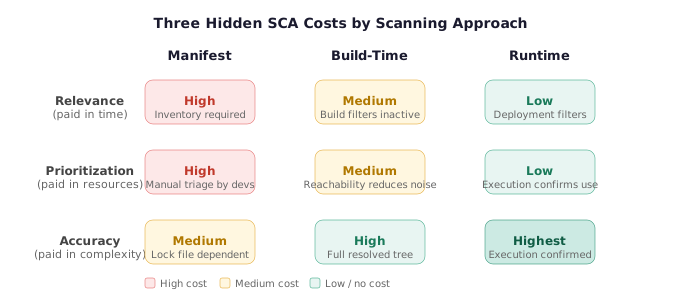
| Relevance Cost | Prioritization Cost | Accuracy Cost | |
|---|---|---|---|
| Manifest scanning | High (time in inventory) | High (manual triage) | Medium (lock file dependent) |
| Build-time scanning | Medium | Medium (build resources) | High |
| Runtime scanning | Low (deployment filters) | Low (execution confirms use) | Highest (but setup cost is highest) |
No approach dominates. The question is: which cost is most painful at your current program stage?
- If your biggest pain is not knowing what you have → manifest scanning and invest in software inventory
- If your biggest pain is developer complaints about irrelevant findings → build-time scanning with reachability analysis
- If your biggest pain is a backlog of thousands of findings you can’t triage → runtime scanning to qualify only what’s genuinely executed
CVE in a Four-Year-Old Migration Script: SLA Misapplication in Practice
Proof of Concept
- An SCA manifest scanner reads the Python
requirements.txtfile in a legacy scripts directory. The file includes a dependency — a database connector library — at a version with a known critical CVE. - The tool assigns the finding a high CVSS score. No application context (reachability, deployment status, usage frequency) is available to the manifest scanner.
- The security team’s policy triggers a 7-day remediation SLA for all critical findings, with the clock starting at CVE publication date. An automated Jira ticket is opened and assigned to the team that owns the scripts repository.
- The assigned developer traces the vulnerable dependency back to a migration script written to perform a one-time database schema migration four years ago. It executed successfully, has never been run since, and is not referenced by any CI pipeline, deployment manifest, or scheduled job.
- The dependency has a known CVE, but the script is not deployed, not executed, and has no external-facing attack surface. Upgrading would require re-testing a script that no longer serves a function.
- Faced with a critical ticket and a 7-day SLA, the developer deletes the migration script. The CVE disappears from future scan results. The ticket is closed as resolved.
- From the SLA compliance dashboard, this looks like a success. In reality, the security program spent credibility forcing a developer to delete a file, and the developer’s willingness to engage with the next legitimate security ask is now lower.
- What should have happened: software inventory classification should flag the scripts directory as non-deployed legacy code. SLA policy should require validation of an active deployment path before escalating. SLA clock policy should start at upstream maintainer fix availability, not CVE publication.
Actionable Takeaways
- Before selecting an SCA tool, identify which of the three costs — relevance, prioritization, or accuracy — is your program's primary constraint, then select the scanning approach that minimizes that specific cost even if it increases the others.
- For manifest scanning deployments: establish a software inventory tier (production, staging, test, decommissioned) before scanning and use it to filter findings — sending findings from test packages to developers is a direct credibility withdrawal.
- When build-time SCA scan times create CI pressure, frame the investment as moving triage work from developers to infrastructure — the question is not "can we remove this from CI" but "are we paying with developer time or with compute time, and which is cheaper?"
Common Pitfalls
- Conflating CVSS severity with prioritization — a critical CVSS score on an unreachable function in a rarely used library is less urgent than a medium score on a reachable auth dependency; manifest scanners with no reachability context make this conflation automatic.
- Deploying runtime SCA without sufficient test coverage — the tool will report only what it observes being executed, creating a false sense of precision while silently missing vulnerable code paths that tests never exercise.
Security Gating and Separating Technical Debt from Net New Risk
Security Gating Is Important — But Implementation Determines Whether It Helps or Hurts
CI-level security gating is a legitimate and valuable control. The problem is not gating itself — it’s the way most teams implement it. Scott is direct: “Security gating is important, but it’s important how you do it.”
The two most common gating configurations are:
- Block on any critical finding — the strictest gate
- Block on any critical or high finding — broader coverage
Both fail in practice when they don’t distinguish between technical debt (vulnerabilities that already existed) and net new risk (vulnerabilities introduced by a recent change).
The Core Principle: Gate on Change, Not on Existence
The fundamental mistake is treating a newly disclosed CVE as a new problem introduced by the developer currently submitting a PR. It isn’t. If a CVE drops today for a library you’ve been using for three years, that vulnerability existed three years ago — you’ve been accepting that risk implicitly. Declaring a build failure because the NVD published a CVE entry doesn’t change the actual risk posture. It just stops 60 developers from merging while one person tracks down a fix.
The correct gate definition: Break the build only when a dependency has been added or modified in the current change. This way, security gates catch developers actively introducing new risk without penalizing teams for the organizational debt that predates them.
As Scott puts it: “Only if you added a software dependency, or modified it in some way, should you break a build.” Existing vulnerabilities should be tracked and managed through a separate remediation workflow — not treated as a blocking issue for every new commit.
When Breaking All Builds Is a Cultural Choice
Scott acknowledges this isn’t a universal rule. He references a large bank where the security champions team intentionally breaks all builds on new CVEs to create urgency — and it works for them, because their security culture and engineering capacity support that level of friction.
The lesson is not that breaking all builds is always wrong — it’s that it’s a deliberate cultural and organizational decision, not a default. Teams that implement it successfully have:
- Active security champions who partner with developers rather than police them
- Established triage workflows so builds can be unblocked quickly
- Engineering leadership buy-in at the level needed to redirect sprint work for remediation
Most organizations don’t have all three. Defaulting to “break everything” without the cultural infrastructure produces blocked pipelines, frustrated developers, and escalations to leadership.
Rollout Strategy: Start Small, Put Winners on a Pedestal
For teams introducing security gating for the first time, Scott recommends a graduated approach:
- Start with direct dependencies that are reachable — the highest signal, lowest noise starting point
- Pick one team — an early adopter or innovation-friendly team, not the most resistant one
- Gate that one team first and measure what happens
- Highlight their success publicly — put them on the security newsletter, call them out in all-hands
- Expand from there — move toward broader BOM coverage only after the first team has demonstrated the workflow is manageable
Reusable CI Pipelines: The Infrastructure Investment That Pays Compound Returns
The single most impactful technical investment Scott recommends for AppSec programs scaling past a handful of repos is reusable CI pipeline templates.
The problem: if you’re deploying SCA tooling via CI integration, you need to configure a pipeline in each repository. At 1,000 repos, getting a developer to update the pipeline individually is measured in months — not because developers are resistant, but because it’s a low-priority ask competing with feature work.
The solution: reusable workflows in GitHub Actions[1] (and equivalent patterns in other CI systems) let you write the pipeline configuration once and reference it from any repo with a single-line include. A developer adding security scanning to a new repo drags and drops a reference — they don’t write or maintain the pipeline logic.
The security team controls the central workflow definition. Updates to scanner versions, gating thresholds, or reporting targets happen in one place and propagate automatically to every repo using the reference.
This is described as “probably the best investment you’re going to make in an AppSec program” — not because it’s technically sophisticated, but because it removes the per-repo friction that makes scaling otherwise impossible.
SLA Design: Clock Starts When the Fix Exists
A practical refinement: tie SLA clock start to upstream fix availability, not to CVE publication date.
Many open source vulnerabilities have no patch for extended periods. Some are disputed and never fixed. Asking a developer to remediate a vulnerability with no available fix is a guaranteed morale drain that accomplishes nothing except burning the relationship.
Scott’s recommended policy: the SLA remediation window begins on the day the upstream maintainer publishes a fixed version. Until then, the vulnerability is tracked and risk-accepted — not escalated as an overdue SLA violation.
The corollary: data quality in vulnerability management is a real, systemic problem. Scott notes cases where his team investigated a reported vulnerability only to discover it didn’t actually exist in the way the CVE described it. Before treating every database entry as ground truth, validate that the vulnerability is real, that it affects the version you’re using, and that a fix path exists.
Actionable Takeaways
- Redefine your CI security gate to trigger only on dependency additions or modifications — not on the discovery of CVEs in pre-existing packages — to eliminate build blockages caused by newly disclosed vulnerabilities in your existing technical debt.
- Invest in a reusable CI pipeline template (GitHub Actions reusable workflow or equivalent) as a one-time infrastructure project that scales SCA deployment across hundreds of repos without per-repo developer effort.
- Set SLA policy so the remediation clock starts when the upstream maintainer ships a fix — not on CVE publication — and document disputed or permanently unfixed vulnerabilities as accepted risk rather than as overdue tickets.
Common Pitfalls
- Breaking CI builds whenever a new CVE is published for any dependency — this conflates discovery of pre-existing technical debt with introduction of new risk, halts unrelated engineering work, and trains developers to view security gates as noise rather than signal.
- Rolling out security gating org-wide before piloting with a single team — the organizational friction of simultaneous rollout, without social proof from early adopters, maximizes resistance and minimizes the credibility-building effect of a visible early success.
Conclusion
SCA programs fail at a predictable rate, and the failure mode is almost always the same: tooling selected before process is established, metrics that punish developers instead of motivating them, and CI gates that treat organizational debt as individual developer failures. The fix is not a better scanner. It’s program architecture.
The three-cost framework — relevance, prioritization, accuracy — gives you a concrete lens for tool evaluation that vendor comparison sheets don’t provide. Match your scanning approach to your program’s actual maturity stage. Build the reusable CI infrastructure once. Start gating on change, not on existence. And report on what’s getting fixed, not what’s still broken.
For more context on securing the software supply chain and DevSecOps program design, explore related talks on the site. The open source security category covers dependency risk in depth across multiple conference perspectives.
References & Tools
- GitHub Actions Reusable Workflows — Write a CI pipeline once and reference it across thousands of repositories to scale security tooling without per-repo developer effort. ↩
- pip freeze — Produces the full resolved Python dependency environment including all transitive dependencies at exact installed versions; the accurate baseline most teams skip in practice. ↩
- Maven Dependency Mechanism — Common enterprise Java build system with no native lock file mechanism, making full transitive dependency visibility dependent on build-time SCA. ↩
- Gradle Dependency Locking — Lock file feature available but rarely enabled in real-world projects, creating manifest scanning visibility gaps despite the feature being available. ↩
- EPSS (Exploit Prediction Scoring System) — Scores the probability of a vulnerability being exploited in the wild within 30 days; the primary prioritization signal available to manifest-scanning SCA tools, though it provides no application-specific reachability context. ↩
Questions from the audience
Related deep dives
Breaking AI Agents: Exploiting Managed Prompt Templates to Take Over Amazon Bedrock Agents
When Passports Execute: Exploiting AI Driven KYC Pipelines | [un]prompted 2026
Agents Exploiting Auth-by-One Errors | [un]prompted 2026