Most security teams are outnumbered — one engineer for every hundred developers — and the gap only widens as AI-assisted coding accelerates output. Security guidance as a service flips this dynamic by embedding a RAG-powered AI bot into every stage of the SDLC, delivering org-specific, vetted answers whether a developer is triaging a Jira vulnerability ticket, running a threat model, or vibe-coding in their IDE.
This post breaks down how Adobe’s product security team built exactly that system over 18 months — from a single Jira-integrated RAG prototype to a platform-agnostic guidance engine spanning Slack, automated threat modeling, and an MCP server in Cursor. You’ll see the architecture, the document ingestion pipeline, the eval strategy, and the hard-won lessons about doc freshness, PR bottlenecks, and keeping pace with a field that evolves faster than any codebase.
Key Takeaways
- You'll learn how to design a centralized, RAG-backed security guidance system that delivers consistent, org-specific recommendations across Jira, Slack, and IDE environments — eliminating fragmented documentation and bandwidth bottlenecks.
- You'll be able to build an automated document ingestion pipeline using pub/sub, cron-based freshness checks, and PR-gated quality controls so your vector store always reflects vetted, up-to-date guidance.
- Apply evaluation (eval) frameworks with golden datasets to turn experimental AI security tooling into reliable production systems — the single most important factor in sustaining quality at scale.
The AppSec Scalability Problem and Why Generic AI Falls Short
The Security-to-Developer Ratio Crisis
Security guidance as a service starts with an honest acknowledgment: most security teams are structurally outnumbered. At Adobe — and across the industry — the security-to-developer ratio is low enough that one-on-one guidance is simply not scalable. When a developer needs to know exactly how to store secrets, which authentication patterns their organization mandates, or how to remediate a specific vulnerability class, a security engineer cannot be on call for every question across every team.
This bandwidth problem compounds across the SDLC. Security programs at mature organizations run multiple parallel processes: design reviews, threat modeling in the planning phase, static code scanners during development, dynamic vulnerability scanners in testing and production. Each of these surfaces produces guidance. Each of those guidance outputs tends to be delivered by a security engineer or partner — the same human, giving similar information on multiple different platforms. The duplication is exhausting and unsustainable.
Fragmented Documentation and the “Right Information at the Right Time” Problem
The third dimension of the scalability problem is fragmented documentation. Security champions and team leads create policy documents, secret storage guidelines, secure coding standards — a rich body of organizational knowledge. The problem is distribution. A policy doc that lives in a wiki no one searches, or a Confluence page that was accurate 18 months ago, fails silently. Developers don’t get the guidance they need, or they get stale guidance, or they get no guidance at all.
The practical result: developers default to searching the web or asking a public LLM, which introduces the next failure mode.
Why Off-the-Shelf LLMs Fail for AppSec Guidance
Generic LLMs are powerful, but they have a critical structural weakness for organizational security guidance: they have no context about your organization. Ask a public LLM “what authentication method should I use?” and you will receive a correct, generic, publicly available answer. What you will not receive is:
- Which specific authentication libraries your company has approved
- Which internal SSO platform integrates with your stack
- What your organization’s actual secret storage standard is
- What SLA your vulnerability program mandates for a given severity
As the Adobe team noted, the LLM “would give you a very generic answer — a generic solution to the problem. It will not give you what your platform standards are, what functions or methods your company is following.”
Beyond unhelpfulness, there is a more dangerous failure mode: hallucinated guidance. When an LLM is given insufficient context about a specific technical environment, it fills the gap with plausible-sounding but incorrect information. For security guidance, hallucinated answers are not just unhelpful — they can be actively harmful if a developer follows fabricated recommendations about authentication flows, input validation, or encryption key management.
The Insight That Drives the RAG Approach
The fundamental insight Adobe acted on is that context is king. The more organization-specific context you can inject into a model, the more useful and trustworthy the outputs become. This is precisely what RAG security addresses: instead of relying on the model’s parametric knowledge, you retrieve relevant documents from a curated, vetted knowledge base and supply them as grounding context at inference time.
But RAG alone is not sufficient. The Adobe team identified two additional requirements:
- Platform agnosticism: Developers need the same guidance whether they are triaging a Jira vulnerability ticket, asking a question in Slack, running a threat model, or writing code in their IDE. Building separate RAG systems for each platform is not scalable.
- A single source of truth: All guidance must flow from one central, vetted vector store. Fragmented guidance stores recreate the original documentation problem at a different layer of the stack.
These two constraints — consistent context delivery across all SDLC surfaces, backed by a single canonical knowledge store — define the architecture that the rest of the system is built to satisfy.
Actionable Takeaways
- Audit your current security guidance delivery: count how many platforms (Jira, Slack, wikis, code review comments) deliver the same guidance independently. Every duplicate delivery point is a maintenance burden and a consistency risk — a centralized RAG endpoint eliminates this duplication at the source.
- Before evaluating any AI-powered security tooling, define what "org-specific context" means for your organization — approved libraries, internal standards, vulnerability SLAs, SSO integrations. This context gap is why generic LLMs fail, and it must be documented and curated before it can be embedded in a vector store.
- Treat hallucination as a structural risk, not just a model quality issue. For security guidance specifically, a hallucinated recommendation about authentication or secret storage can propagate into production code. The mitigation is not a better model — it is a grounded retrieval layer that constrains the model to vetted organizational content.
Common Pitfalls
- Building separate RAG systems per platform (one for Jira, one for Slack, one for the IDE) recreates the fragmentation problem at the infrastructure layer. Each store diverges over time, requires independent maintenance, and will eventually produce inconsistent guidance — defeating the purpose of centralization.
- Assuming a well-prompted generic LLM can substitute for org-specific RAG. The gap is not the model's reasoning capability — it is the absence of organizational context. No amount of system prompt engineering can tell a public LLM what your company's internal secret storage standard is or which libraries your security team has approved.
Building the Centralized RAG Architecture for Security Guidance
From Siloed Prototype to Platform-Agnostic Security Guidance as a Service
The first version of Adobe’s security guidance as a service was deliberately narrow: a curated document set loaded into a vector store, wired directly into Jira[1]. Vulnerability tickets had SLAs, developers needed answers, and Jira was where the work happened. That integration proved the value of org-specific RAG immediately — instead of generic LLM responses, developers received recommendations grounded in Adobe’s actual platform standards and approved libraries.
Almost simultaneously the team connected the same vector store to a Slack[2] workflow. The reasoning was straightforward: not every developer has access to every Jira ticket, but everyone is in Slack. The two integrations shared the same underlying guidance corpus, which surfaced the architectural question that shaped everything that followed: what happens when a third system needs the same data?
The Decision to Build a Common Vector Store
Rather than building separate RAG pipelines per use case — a Jira RAG, a Slack RAG, a threat modeling RAG — the team made a deliberate architectural choice to centralize. A common vector store would serve as the single source of vetted, org-specific security guidance, with a shared endpoint that any downstream system could query.
This decision eliminated duplicated ingestion work, prevented guidance drift between platforms (where Jira might recommend one approach and Slack a different one), and made every future integration an integration problem rather than a data problem. Once a document is ingested into the central store, all consumers benefit immediately.
AI Orchestrator: The Core of the Architecture
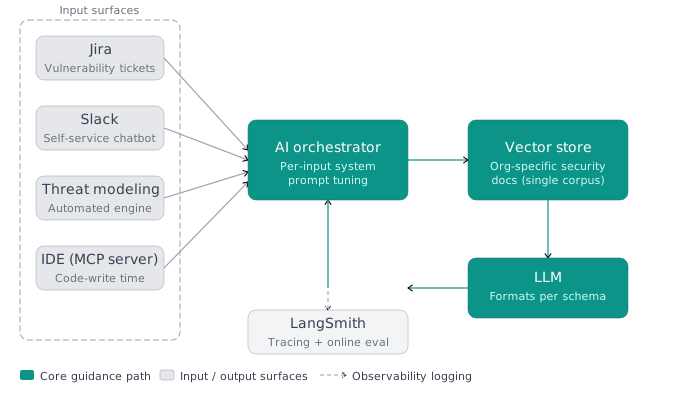
Every request — regardless of origin — flows through an AI orchestrator. The orchestrator is the architectural component that makes platform-agnostic guidance possible without sacrificing relevance.
The key insight here is that different input types carry different context shapes. A Jira vulnerability ticket contains structured exploit details and severity metadata. A Slack question is free-form natural language. A threat modeling platform request includes structured threat descriptions and system context. Treating all three identically would produce mediocre outputs for each.
The orchestrator solves this by tuning the system prompt per input type. Before the query hits the vector store, the orchestrator adjusts the prompt framing — the same underlying guidance corpus produces Jira-formatted remediation guidance for ticket inputs and conversational answers for chatbot inputs. The core retrieval logic is identical; the framing adapts to the consumer.
Input Surface → Orchestrator → Vector Store → LLM → Formatted Output
The data flow is consistent across all platforms:
- Input arrives from one of the connected surfaces (Jira, Slack, threat modeling engine, MCP server)
- Orchestrator selects the appropriate system prompt based on input type
- Vector store query retrieves relevant org-specific guidance chunks
- LLM formats the response into the configured JSON schema for that specific input type — vulnerability remediation outputs look different from chatbot outputs by design
- Response is returned to the calling surface in the expected format
- All interactions are logged to LangSmith[3] for traceability and online evaluation
LangSmith for Traceability and Online Evaluation
Logging to LangSmith is not an afterthought — it is built into the core architecture. Every orchestrator interaction is traced, which serves two purposes: operational observability (what queries are being asked, which documents are being retrieved, where retrieval is failing) and online evaluation (continuous quality monitoring against the golden datasets built during ingestion).
This traceability infrastructure is what makes the system trustworthy at scale. Without it, you have a black box serving security guidance to production developers. With it, you can detect when guidance quality degrades, trace it back to a specific document or retrieval path, and fix it before developers encounter a problem.
Evolution: Manual Curation to Automated Pipeline
The early vector store was populated with a small, manually curated set of documents. This worked for the initial Jira integration but exposed a scaling constraint quickly: the number of documents that actually needed to be in the store — covering all of Adobe’s vulnerability classes, platform standards, and security process docs — was far larger than a manual workflow could maintain.
The realization that the document set needed to grow and stay current drove the design of the automated ingestion pipeline (covered in the next section). Architecturally, this meant the vector store needed to support incremental updates, not just one-time bulk loads. That requirement shaped every downstream design decision in the pipeline.
Why a Shared Endpoint Matters for Security Consistency
The practical security benefit of a single shared endpoint is guidance consistency. When a developer sees the same recommendation whether they ask in Slack, encounter it in a Jira ticket, or receive it from the threat modeling engine, that consistency reinforces the guidance. There is no ambiguity about which answer is “the real one.”
In organizations where security documentation lives in multiple wikis, Confluence spaces, and team-specific channels, guidance inconsistency is a genuine security risk — developers may follow outdated or incorrect guidance simply because it was the first result they found. A centralized RAG architecture, backed by a single vetted document corpus, eliminates that failure mode by design.
RAG-Powered Security Chatbot: Delivering Org-Specific Guidance via Slack and Jira
Proof of Concept
-
Identify the gap driving the architecture: The security-to-developer ratio at Adobe was low enough that one-on-one guidance was not scalable. Developers were receiving fragmented documentation across wikis, Slack threads, and scanner outputs, and generic LLMs returned generic answers — lacking platform standards, company-specific methods, and internal policy details. Hallucination risk further reduced trust. The decision was made to route all guidance through a single, curated vector store rather than rely on un-grounded LLM responses.
-
Curate the initial document corpus: The team started with a small, hand-selected set of security documents — policies, standards, and remediation guides — and loaded them into a vector store. This deliberately narrow initial scope kept quality high and established the retrieval baseline before automation was layered in. At this stage, PDF-to-embedding conversion still involved some manual preprocessing work.
-
Integrate with Jira as the first delivery surface: Adobe’s vulnerability tickets carry SLAs, making them a high-priority touch point. The chatbot was wired into the Jira ticket workflow as the first integration: when a developer or engineer opens a vulnerability ticket, the service is called automatically, the vulnerability details are passed as input, and the system retrieves Adobe-specific remediation guidance — both short-term fixes for the immediate finding and long-term fixes for recurring vulnerability classes — formatted as structured JSON output.
-
Extend to Slack for self-service queries: Recognizing that not all developers have access to Jira tickets, the team integrated the same guidance service into a Slack workflow at roughly the same time. Developers can ask questions in natural language — “how do I do X at Adobe?” or “how do I reach the security champion for product Y?” — and receive the same vetted, org-specific answer drawn from the identical vector store backend. This eliminated the need to maintain parallel guidance sources for different channels.
-
Configure the AI orchestrator for platform-specific input types: As integrations multiplied (Jira, Slack, threat modeling, IDE), a shared AI orchestrator layer was introduced. The orchestrator accepts input from any surface, then adjusts the system prompt based on the input type — a vulnerability ticket gets a different prompt framing than a chatbot question or a threat model recommendation request. The vector store retrieval, LLM formatting pass, and output structure are all configured per use case while drawing from the same underlying document corpus.
-
Log all interactions in LangSmith for traceability: Every call to the orchestrator — from Slack, Jira, or any other surface — is logged in LangSmith, providing full trace visibility into what was retrieved, what prompt was used, and what answer was returned. This observability layer is a prerequisite for the online evaluation workflows that run in production.
-
Validate consistency across surfaces (partial PoC): The architecture and both Jira and Slack integrations are described in enough detail to reconstruct the flow. The same query posed in the IDE MCP server and in Slack should return the same guidance — demonstrating that the vector store, not the channel, is the source of truth. The exact prompt templates, vector store schema, and embedding model are not disclosed.
Actionable Takeaways
- Design your RAG security service around a single shared vector store endpoint from the start — even if your first integration is only one platform. Adding a second consumer to a shared store is trivial; migrating two separate stores into one later is expensive and creates temporary guidance inconsistency.
- Build system prompt tuning per input type into your AI orchestrator architecture before your first deployment. Jira tickets, Slack questions, and IDE queries carry fundamentally different context shapes; a single rigid prompt will underserve all of them. Parameterize the prompt at the orchestrator layer so each consumer gets appropriately framed responses without duplicating retrieval logic.
- Instrument every orchestrator interaction with a tracing tool (LangSmith or equivalent) from day one, not after you encounter a quality problem. Traceability is what converts an experimental security bot into a defensible production system — it is the evidence layer that lets you demonstrate quality, diagnose failures, and justify continued investment.
Common Pitfalls
- Building separate RAG pipelines per platform rather than a common vector store. This creates guidance drift — Jira may recommend one mitigation approach while Slack surfaces a different one from an older or differently curated corpus. Each additional silo multiplies maintenance burden and undermines the consistency that makes the system valuable.
- Applying a single undifferentiated system prompt to all input types. A threat modeling platform input contains structured threat context; a Slack message is free-form natural language; a vulnerability ticket has exploit details and severity metadata. Treating them identically forces the LLM to infer context it should be given, degrading response quality and increasing hallucination risk for each use case.
Automated Document Ingestion Pipeline and Vector Store Freshness
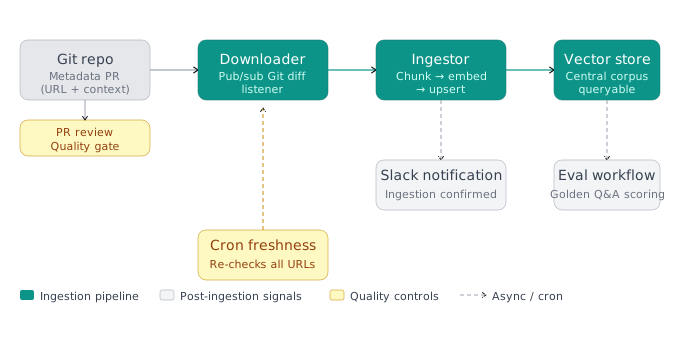
When Adobe’s security team first deployed their RAG-based security chatbot, the document ingestion process was largely manual. Someone had to extract content from PDFs or internal pages, run one-off scripts to generate embeddings, and load them into the vector store. That approach broke down quickly as the number of source documents grew. The solution was a fully automated document ingestion pipeline built on a pub/sub architecture with Git as the single source of truth.
Git as the Source of Truth for Security Docs
The pipeline begins before any content ever touches the vector store. Every document that feeds the centralized security knowledge base must first exist as a metadata file in a Git repository. Security champions or documentation owners create a small metadata file — essentially a pointer containing the URL of the document to ingest, plus any relevant context — and submit it via a pull request.
This PR-based workflow serves a dual purpose:
- Quality gate: A reviewer validates the metadata and confirms the source document is appropriate for ingestion before any processing begins.
- Change tracking: Because everything is in Git, the system has a complete audit trail of what was added, when, and by whom.
Once the PR merges, the pipeline kicks off automatically.
The Pub/Sub Downloader Service
Downstream of the Git repo sits a downloader service operating on a pub/sub model. It listens for Git diffs — specifically, changes to the metadata files. When it detects a new or modified metadata entry, it fetches the content from the corresponding URL and queues it for processing.
This event-driven design means there is no polling overhead during normal operation. A document merge triggers exactly one ingestion event. The service does not care whether the content is a Confluence page, an internal wiki, or an external security standard — it handles the fetch transparently.
Cron-Based Freshness Monitoring
New document ingestion is only half the problem. Security documentation changes over time: standards are updated, policies are revised, remediation guidance is refined. A vector store that reflects documents from six months ago will eventually surface stale, incorrect guidance to developers.
To address vector store freshness, the pipeline includes a cron job that periodically re-checks all previously ingested URLs. If the content at a URL has changed since the last ingest, the job flags it for re-processing and pushes it back through the pipeline. This creates a continuous freshness loop that does not depend on document owners proactively flagging updates — the system detects drift automatically.
The team also maintains a shared responsibility model alongside this automation: when eval workflows surface degraded answer quality for a specific document domain, the security team reaches out to document owners directly. And document owners can proactively notify the team when a significant update is ready, bypassing the cron cycle for time-sensitive changes.
The Ingestor: Embeddings and Vector Store Population
After the downloader fetches content, it passes to the ingestor service. This component handles:
- Document chunking — splitting long documents into segments sized appropriately for the embedding model
- Vectorization — generating embeddings for each chunk
- Vector store population — writing the embeddings and associated metadata to the shared vector store
An important note on tooling evolution: when the team built the first version of this pipeline, they handled all chunking and vectorization themselves because LLMs could not yet process multimodal input and managed vector store services were primitive. By the time of this talk, multiple vendors offered fully managed ingestion — upload a file and the vendor handles chunking, embedding, and indexing. The team’s advice: stay current with the tooling landscape. What required custom infrastructure in v1 may be a commodity service today.
Post-Ingestion: Slack Notifications and Eval Triggering
Once a document successfully lands in the vector store, the pipeline emits two signals:
-
Slack notification — A message is posted to a dedicated channel confirming the document has been ingested. This gives the security team and document owners immediate visibility without polling a dashboard.
-
Eval workflow trigger — This is where the pipeline connects to quality assurance. When a document owner submits a metadata file, they are also asked to provide a small reference dataset: three to four question-and-answer pairs that represent ideal responses the guidance service should return when queried about that document’s content. These pairs form a golden dataset for that document. After ingestion, the eval workflow runs automatically, testing the freshly ingested content against the reference dataset and scoring correctness and relevance. If scores fall below threshold, the team is alerted before the document goes live in production queries.
The PR Bottleneck Trade-Off
The PR review step is an intentional friction point. It guarantees that only vetted, reviewed content enters the guidance store — which is essential when that store is being queried by developers making security decisions. However, the team acknowledges this creates a throughput bottleneck when ingestion volume spikes or reviewers are unavailable. This is a deliberate trade-off between speed and quality, not an oversight.
Automated Document Ingestion Pipeline: Git-to-Vector-Store with Cron Freshness Checks
Proof of Concept
-
Author a metadata file in Git: A security champion or document owner creates a small metadata file in the designated Git repository. This file contains the URL of the document to be ingested and any associated metadata (e.g., document category, owner). Git is the explicit source of truth — no document enters the pipeline without a corresponding metadata entry.
-
Validate metadata and merge the PR: Before the metadata file is merged, it is validated (schema check, URL reachability). Once validation passes, a PR is created and reviewed. The PR review step is a deliberate quality gate — it introduces some latency but prevents low-quality or incorrect documents from entering the vector store. After approval, the PR is merged to the main branch.
-
Downloader service detects the Git diff via pub/sub: The downloader service subscribes to Git commit events (pub/sub model). When it detects that a metadata file has been added or changed in the repository, it identifies the associated URL and fetches the raw document content from that URL. This event-driven architecture means new documents are ingested automatically within minutes of a PR merge, with no manual intervention.
-
Cron job checks previously ingested URLs for content updates: In parallel with the event-driven path, a cron job periodically re-fetches all URLs that have already been ingested. It compares the current content against the previously stored version to detect changes. If the content has changed, it pushes the updated document back through the downloader → ingestor pipeline. This ensures the vector store reflects the most current version of every document without requiring document owners to file a new PR every time content changes.
-
Ingestor generates embeddings and writes to the vector store: The ingestor service receives the raw document content from the downloader. It performs document chunking, generates vector embeddings, and upserts the resulting vectors into the shared vector store. At this stage the document becomes queryable by all downstream services (Jira guidance, Slack chatbot, threat modeling integration, MCP server).
-
Slack notification confirms successful ingestion: Once the ingestor completes, an automated message is posted to a designated Slack channel confirming that the document has been successfully ingested. This gives document owners and security engineers visibility into pipeline status without needing to query the vector store directly.
-
Eval workflow is triggered automatically post-ingestion: Immediately after ingestion, an evaluation workflow fires. The metadata file collected at Step 1 also includes a reference dataset — typically three to four question-and-answer pairs that represent ideal responses for that document. The eval workflow queries the vector store with those questions, compares the responses against the golden answers, and scores for correctness and relevancy. This automated eval loop catches quality regressions immediately after a new document or update is ingested, before any developer ever queries it in production.
Actionable Takeaways
- Use Git as the source of truth for your vector store's document registry. Requiring metadata PRs before ingestion gives you an audit trail, a quality gate, and a natural trigger point for automation — all with tooling your team already uses.
- Implement cron-based freshness checks on every ingested URL rather than relying on document owners to flag updates. Security guidance that drifts out of date is worse than no guidance because it actively misleads developers.
- Pair each ingested document with a small golden dataset (3–5 Q&A pairs) and trigger an automated eval run post-ingestion. This makes quality regression visible immediately rather than after developers have already received bad guidance in production.
Common Pitfalls
- Treating document ingestion as a one-time operation. The vector store reflects the state of your documentation at ingestion time, not continuously. Without cron-based re-checking or a freshness monitoring layer, guidance quality silently degrades as upstream documents change.
- Skipping the PR review gate in the name of speed. The bottleneck is real, but removing the quality gate means unvetted or incorrect documentation can enter the guidance store and propagate bad recommendations to every developer who queries it across all integrated platforms.
Shift Left Security Delivery: Threat Modeling, Vulnerability Triage, and IDE MCP Server
How One Guidance Store Serves Every Stage of the SDLC
The central architectural bet behind security guidance as a service is that a single, curated vector store can serve radically different consumers without duplicating knowledge. Adobe’s product security team proved that hypothesis across three distinct delivery surfaces: an automated threat modeling engine, a Jira-based vulnerability triage workflow, and an IDE MCP server[4] that delivers recommendations at code-write time. Each surface speaks a different language — structured threat data, vulnerability ticket context, and free-form developer queries — yet all draw from the same vetted guidance corpus.
Surface 1: Automated Threat Modeling Integration
On the shift-left end of the SDLC, Adobe operates an automated AI threat modeling platform. Engineers maintain wiki pages in a specific format; the platform parses that page, identifies threats, and then — critically — makes an API call to the security guidance service to surface Adobe-specific remediation recommendations for each identified threat.
This integration inverts the traditional threat modeling workflow. Instead of a security engineer reviewing a design document and manually pulling relevant guidance, the threat modeling engine does it automatically. The same vector store endpoint that answers Jira and Slack queries answers the threat modeling engine’s calls, with the AI orchestrator tuning the system prompt for the threat context before forwarding the request.
Key design decision: The threat modeling integration team did not build their own guidance store. They consumed the shared endpoint. This is the architectural discipline that prevents sprawl — every new consumer integrates against the common service rather than spawning its own siloed RAG instance.
Surface 2: Vulnerability Triage and Remediation in Jira
The Jira integration was the first production use case and remains one of the highest-volume surfaces. When a vulnerability finding lands in a Jira ticket, the workflow calls the guidance service with the full vulnerability and exploit details. The service returns two categories of guidance:
- Short-term fix: The immediate, specific remediation for the identified vulnerability — what to change right now to close the exposure.
- Long-term fix: Structural recommendations for engineering teams dealing with multiple vulnerabilities of the same class. If a team is seeing a pattern of injection flaws or insecure deserialization issues, the long-term guidance points toward secure-by-default architectural changes rather than one-off patches.
This two-horizon approach is significant. Most vulnerability management tooling optimizes for ticket closure — get the CVSS score down, meet the SLA. Adobe’s guidance service goes further by recognizing that a cluster of related vulnerabilities is a signal about a systemic engineering practice that needs to change. Delivering that signal at the point of triage — when the engineering team already has the vulnerability context in front of them — is far more effective than a quarterly security review.
The AI orchestrator adjusts the system prompt for vulnerability context before querying the vector store, ensuring the LLM formats the response as a structured JSON object appropriate for Jira rendering rather than a conversational answer.
Surface 3: IDE MCP Server — Security at Code-Write Time
The MCP (Model Context Protocol) server represents the furthest-left integration point: security guidance delivered while a developer is actively writing code, before any scanner, before any threat model, before any ticket exists.
Adobe built a custom MCP server — named Adobe Security Guidance — that exposes a single tool to coding agents. The integration works as follows:
- A developer working in Cursor[5] (or any MCP-compatible coding agent) encounters a security question while writing code — for example, how to handle SQL input safely.
- They type their question into the agent chat: “How do I fix SQL injection?”
- Cursor’s coding agent recognizes it is connected to the Adobe Security Guidance MCP tool and automatically routes the query to the tool.
- The MCP server receives the query, calls the same shared guidance service endpoint, pulls the relevant Adobe-specific security guidance from the vector store, and returns it.
- The guidance is formatted and displayed directly in the IDE chat — no context switching, no wiki navigation, no waiting for a security engineer to respond.
The presenters noted that this experience is IDE-agnostic at the protocol level; while the demo used Cursor, the MCP server can connect to any coding agent that supports the protocol.
Rollout: The IDE Extension as the Distribution Mechanism
Getting developers to actually configure and use an MCP server is a non-trivial adoption problem. Adobe solved it with an IDE extension. When a developer installs the extension and signs in, the MCP configuration and Cursor rules are provisioned automatically — developers never have to manually edit config files or locate the MCP server URL.
The team also ran internal road shows to demonstrate the capabilities. The reported adoption pattern was telling: engineering teams came to the security team proactively, requesting access after seeing the tool in action. The presenters attributed this to a core principle — make security zero-calorie. When security guidance is seamless and in-flow, developers want to use it.
Preliminary testing of security rules and skills embedded via the extension showed approximately a 70% reduction in vulnerabilities in code — even foundational rules produced significant results.
System Prompt Tuning Per Delivery Surface
One implementation detail that enables the single-store, multi-surface architecture is per-input system prompt tuning. The AI orchestrator does not use a single system prompt for all consumers. Before querying the vector store, it adjusts the prompt based on the type of input:
- Threat modeling queries are framed to return structured threat-specific recommendations.
- Jira vulnerability queries are framed to return both short-term and long-term fix guidance in a structured JSON format.
- Chatbot queries (Slack, IDE) are framed for conversational, developer-friendly responses.
This tuning means the same underlying guidance can be surfaced in the format that is most useful for each consumer — without maintaining separate guidance corpora or separate retrieval pipelines.
MCP Server in Cursor: Injecting Security Guidance at Code-Write Time
Proof of Concept
-
MCP Server Setup: Adobe built a custom MCP server that wraps their existing security guidance service endpoint. The server exposes a single tool named “Adobe security guidance,” which accepts a natural-language security query and returns formatted guidance from the central vector store.
-
Connecting the MCP Server to Cursor: Inside Cursor, the MCP server is registered as a connected tool. In the demo, the MCP server configuration is visible in Cursor’s tool panel under the name “Adobe security guidance.” The coding agent in Cursor automatically recognizes that it is connected to this tool.
-
Developer Interaction at Code-Write Time: As a developer writes code and encounters a security concern — for example, a potential SQL injection vulnerability — they type a natural-language question directly into the Cursor chat interface, such as: “How do I fix SQL injection?”
-
Coding Agent Tool Invocation: Cursor’s coding agent receives the query, identifies that the “Adobe security guidance” MCP tool is available and relevant, and automatically makes a call to the MCP server with the query as input.
-
Vector Store Retrieval via MCP: The MCP server forwards the query to the AI orchestrator, which applies the appropriate system prompt tuning for IDE-sourced inputs, queries the common vector store, retrieves the most relevant Adobe-specific security guidance documents, and passes them to the LLM for formatting into a structured JSON response.
-
In-IDE Guidance Delivery: The formatted guidance is returned through the MCP server back to Cursor, where it is pretty-printed and displayed inline in the chat interface — same IDE experience, no context switching to Jira or Slack required.
-
Consistency Across Platforms: The same query submitted from the IDE via MCP returns the same vetted, org-specific guidance as if the developer had asked in Slack or encountered it in a Jira vulnerability ticket. The single common vector store ensures consistency across all delivery surfaces.
-
Rollout via IDE Extension: To enforce consistent MCP configuration across all developers, Adobe built a Cursor extension. Once a developer installs and signs into the extension, the MCP server config and Cursor rules are automatically applied — removing the manual setup burden and ensuring uniform access to the security guidance tool.
-
Rules and Skills Testing: In parallel, Adobe tested injecting security guidance as Cursor rules (
.mdfiles) and as agent skills. Preliminary testing showed that even foundational security rules reduced vulnerabilities in generated code by approximately 70%, validating the approach of embedding security context directly into the coding agent’s default behavior.
Actionable Takeaways
- When building a security guidance system, expose it as a shared API endpoint rather than building per-team RAG instances. Every new consumer — threat modeling engines, ticketing systems, IDE tools — should integrate against the common service. This eliminates guidance drift and makes the investment in document curation and eval compound across all surfaces.
- For vulnerability triage integrations, always return both short-term and long-term fixes. Short-term closes the ticket; long-term addresses the systemic engineering practice that produced the vulnerability class. Delivering both at the point of triage is when engineering teams are most receptive and have the most context.
- Solve the MCP adoption problem with an IDE extension that auto-provisions configuration on sign-in. Developer tooling that requires manual setup will be configured inconsistently or not at all. Make the security-by-default path the zero-effort path.
Common Pitfalls
- Using a single generic system prompt across all delivery surfaces. A vulnerability remediation query and a developer chatbot query require different response formats and framing. Without per-input prompt tuning, the guidance service will produce responses that are correctly sourced but poorly formatted for the consumer's context, reducing adoption.
- Treating the IDE integration as an optional add-on rather than a distribution priority. The MCP server is the furthest-left intervention point in the SDLC — it catches security issues before any scanner runs. Failing to invest in the rollout mechanism (the IDE extension) leaves the highest-leverage surface underutilized.
LLM Evaluation, Doc Freshness, and Lessons for Production AI Security Systems
Eval Is the Bridge Between Experiment and Production
The single most important lesson Adobe’s security guidance team identified after 18 months of building this system is unambiguous: LLM evaluation is what turns an AI experiment into a production system. Without a rigorous eval framework, you cannot confidently assert that your RAG-based security guidance service is returning accurate, relevant, or safe responses at scale.
Building the eval infrastructure is time-consuming and manual — the team was explicit about this. There are no shortcuts. But it is precisely this investment that enabled the platform to scale beyond a prototype and serve multiple surfaces (Jira, Slack, IDE, threat modeling engine) with confidence.
Golden Datasets: The Foundation of LLM Evaluation
The Adobe team implemented a golden dataset approach tied directly to the document ingestion pipeline. When a document owner submits a new metadata file for ingestion, they are also asked to provide a reference dataset — typically three to four question-and-answer pairs that represent ideal responses for that document.
Once the document is ingested into the vector store, an automated eval workflow is triggered. This workflow tests the live system against the golden dataset, measuring:
- Correctness — does the answer match the expected reference answer?
- Relevancy — is the retrieved context from the vector store actually pertinent to the query?
This approach means every new document addition is automatically validated before being relied upon in production workflows. The eval trigger is part of the ingestion pipeline itself, not a separate manual step — ensuring evaluation is never skipped.
Online Evaluation via LangSmith
Beyond offline golden dataset testing, the team integrated online evaluation for live production traffic. All AI orchestrator interactions are logged to LangSmith, providing full traceability across every request-response pair. This observability layer enables the team to:
- Spot degradation in response quality over time
- Detect when a specific query type is returning low-relevancy results
- Identify documents in the vector store that may have become stale or are underperforming
LangSmith serves as the observability backbone — without it, debugging quality regressions in a RAG system at scale would be opaque.
Doc Freshness: A Shared Responsibility Model
Keeping the vector store current is a persistent operational challenge. Security guidance documents evolve — new vulnerabilities emerge, platform standards change, internal policies are updated. A RAG system is only as good as the documents it retrieves from.
Adobe’s current approach is a shared responsibility model:
- Proactive path (team-initiated): When eval workflows detect that a document’s responses are degrading — answers no longer match golden datasets or relevancy scores drop — the team identifies the affected document and reaches out to the document owners to request an update.
- Reactive path (owner-initiated): Document owners who have updated their guidance proactively contact the security team to trigger a re-ingestion, ensuring the vector store reflects the latest version.
The cron-based freshness check in the ingestion pipeline provides a technical backstop — it periodically re-checks registered URLs for content changes and re-ingests updated documents automatically. But for documents not publicly hosted or for changes that don’t trigger URL-level diffs, the human coordination loop remains necessary.
PR Review as a Quality/Speed Trade-Off
The document ingestion workflow requires a PR review step before any new metadata file is merged and the ingestion pipeline is triggered. This gate is intentional — it ensures that only vetted, high-quality documents enter the vector store.
However, the team acknowledged this creates a bottleneck when trying to ingest documents quickly at scale. A burst of new document submissions, or an urgent need to update guidance in response to a breaking vulnerability, can be delayed by review queue depth.
This is a deliberate trade-off: speed vs. quality. The PR gate is what prevents low-quality, duplicative, or inaccurate documents from polluting the vector store and degrading guidance quality across all downstream surfaces. Removing it would accelerate ingestion but introduce uncontrolled content risk into a system that developers trust for security decisions.
For teams building similar systems, the lesson is to make this trade-off consciously and invest in streamlining the review process (automated metadata validation, clear submission guidelines) rather than eliminating the gate entirely.
Keeping Pace with a Rapidly Evolving AI Landscape
When Adobe built v1 of their RAG system, the team handled all document processing manually — chunking, vectorization, embedding generation. At the time, LLMs could not accept multimodal input. Since then, the landscape has shifted dramatically:
- Vector store vendors now offer managed ingestion — upload a file and the platform handles chunking, embedding, and indexing automatically.
- Multimodal LLMs can now process PDFs, images, and structured documents directly.
- MCP (Model Context Protocol) emerged as a standard interface for connecting AI agents to external tools, enabling the IDE integration described in the previous section.
The team’s approach has been to continuously re-evaluate the technology stack and adopt improvements as they mature. This requires treating the guidance platform as a living system rather than a one-time build — architectural decisions made 18 months ago may already be obsolete, and the teams that stay competitive are those that actively monitor and adopt better tooling.
The 70% vulnerability reduction observed in preliminary testing of security rules and skills injected into developer IDEs is a concrete early signal of impact — but sustaining that result requires the same discipline: eval, freshness, and iteration.
Actionable Takeaways
- Build a golden dataset collection step directly into your document ingestion workflow — require document owners to submit 3–5 reference Q&A pairs alongside every new document. Trigger an automated eval run immediately after ingestion completes so quality validation is never a separate, skippable step.
- Implement a shared responsibility model for doc freshness: use cron-based URL change detection for automated re-ingestion, but also instrument your eval pipeline to alert when response quality drops — and route those alerts to document owners, not just your AI team.
- Treat the PR review gate in your ingestion pipeline as a quality control investment, not overhead. Streamline it with automated metadata validation and clear submission guidelines rather than removing it — the gate is what keeps low-quality content out of a system developers trust for security decisions.
Common Pitfalls
- Skipping eval infrastructure in early stages because it is "too slow" or "too manual." The Adobe team was explicit: eval is time-consuming and laborious, but it is the single most enabling factor for running AI security systems in production. Teams that defer this investment end up with systems they cannot confidently scale or defend.
- Treating the vector store as a static artifact after initial build. Security documentation evolves continuously, and a RAG system that retrieves stale guidance is worse than no system — it provides confident-sounding but outdated answers. Doc freshness must be an operational discipline, not a one-time setup task.
Conclusion
Adobe’s security guidance as a service demonstrates that the scalability problem in application security is solvable — not by hiring more security engineers, but by building infrastructure that multiplies the reach of the ones you have. The core architecture is elegant in its discipline: one vector store, one orchestrator, one endpoint — serving Jira, Slack, threat modeling, and the IDE from a single vetted knowledge corpus.
The most transferable lessons are architectural, not technical. Centralize before you specialize. Build eval into the pipeline before you go to production. Treat document freshness as an ongoing operational discipline. And design the developer experience so that using security guidance is lower friction than ignoring it.
For teams working on secure software development, this system represents a practical model for embedding security into every stage of the SDLC without creating toil for developers. The 70% vulnerability reduction in preliminary IDE testing is an early signal, but the more durable result is cultural: when developers actively request access to a security tool because it makes their work easier, the security team has solved the hardest problem in the field.
For further reading on related topics, see DevSecOps and AI security on The Cyber Archive.
References & Tools
- Jira — Atlassian issue and project tracking platform; used as the first delivery surface for the RAG-based security guidance service, surfacing remediation recommendations directly within vulnerability tickets. ↩
- Slack — Team messaging platform; used as the second delivery surface, enabling developers to ask free-form security questions and receive the same org-specific guidance as Jira, from the same shared vector store backend. ↩
- LangSmith — LLM observability and evaluation platform by LangChain; used for logging and tracing all AI orchestrator interactions, enabling both online evaluation of production traffic and offline golden dataset testing. ↩
- Model Context Protocol (MCP) — Open protocol for connecting AI agents to external tools and data sources; used to build the Adobe Security Guidance MCP server that exposes the guidance service to coding agents in the IDE. ↩
- Cursor — AI-powered code editor with a native coding agent; used as the primary IDE for the MCP server integration demo, where the Adobe Security Guidance tool surfaces org-specific recommendations directly in the chat interface. ↩
Questions from the audience
Related deep dives
Breaking AI Agents: Exploiting Managed Prompt Templates to Take Over Amazon Bedrock Agents
When Passports Execute: Exploiting AI Driven KYC Pipelines | [un]prompted 2026
Agents Exploiting Auth-by-One Errors | [un]prompted 2026