AWS IAM sounds like an access control list. In practice, it is a programming language — one where inline policies, resource policies, permission boundaries, SCPs, RCPs, and tag-based conditions all interact in ways that make answering “who can access this bucket?” a multi-hour exercise rather than a lookup. AWS IAM simulation at scale exposes a hard truth: the more powerful your authorization model, the harder it becomes to understand what it actually permits.
This post breaks down how a Netflix cloud security engineer diagnosed the capability gap between the IAM questions security teams must answer and what today’s tooling can actually deliver — and how the open-source tool Yams was built to close it. You will learn how to model IAM access at enterprise scale, measure exposure and efficiency as first-class security KPIs, and evaluate hypothetical policy changes before they cause outages.
Key Takeaways
- You'll learn why existing IAM analysis tools (Policy Simulator, Access Analyzer, pmapper) fall short at enterprise scale and what architectural patterns are needed to close the capability gap between the questions security teams want to ask and the answers their tooling can provide.
- You'll be able to apply the concepts of IAM exposure (how many principals can access a resource) and efficiency (how close access is to right-sized) as measurable KPIs that translate cloud security progress into executive-readable metrics and OKRs.
- Apply on-demand IAM simulation with overlays — the ability to redefine your environment hypothetically and evaluate the blast radius of policy or SCP changes before making them — to reduce the risk of rogue configuration changes in complex multi-account AWS organizations.
Why AWS IAM Defies Simple Access Modeling
AWS IAM simulation at scale starts with a deceptively simple question: who can access this resource? In most access control systems — a Google Doc, a file share, a database ACL — the answer is a lookup. You inspect an access control list and get a definitive answer in seconds. AWS IAM does not work this way, and the gap between what engineers expect and what IAM actually does is where most analysis tooling breaks down.
IAM Is a Programming Language, Not an Access List
The Netflix cloud security engineer who built Yams[1] described the realization this way: the more and more you get into the advanced features of IAM, the less and less it looks like something you can very quickly answer. It’s not a static access list — it’s a lot more like a programming language.
That framing is worth unpacking. When you ask “can this principal delete objects in this S3 bucket across accounts?”, you are not doing a lookup. You are evaluating a program. The inputs to that program include all of the following, simultaneously:
- Inline and attached identity policies on the principal
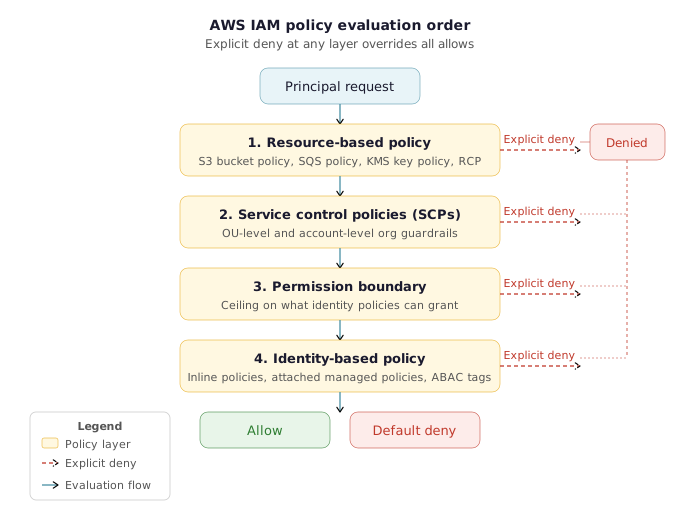
- Resource-based policies on the target (S3 bucket policy, SQS queue policy, KMS key policy, etc.)
- Permission boundaries applied to the principal, which act as a ceiling on what identity policies can grant
- Service Control Policies (SCPs) applied at the OU or account level in AWS Organizations, which restrict what any principal in the account can do regardless of their identity policy
- Resource Control Policies (RCPs), which restrict what can be done to a resource regardless of who is asking
- Tag-based ABAC conditions, where access depends on matching principal tags to resource tags at evaluation time
- Default root trust behavior, which is service-specific and often counterintuitive
The interaction between these layers is not additive — it is multiplicative in complexity. Each layer can independently deny access, and the evaluation order matters. An explicit deny anywhere in the chain overrides any allow. SCPs act before identity policies. Resource policies can grant access to principals that appear to have no permissions at all.
The Edge Case That Breaks Intuition
One of the most instructive examples the speaker raised is the zero-permission principal with a trusting resource policy. If a principal in an account has no identity policy whatsoever — no inline, no attached, nothing — but a resource policy in that account explicitly grants that principal access, the principal has access. You would look at the role and conclude it can do nothing. It can actually do quite a lot, depending on what resource policies trust it.
This edge case breaks almost every mental model security engineers carry from traditional access control systems. It also exposes why simply auditing identity policies is insufficient for IAM security analysis — you must also evaluate resource-side grants, and you must evaluate them together.
Why Capabilities and Comprehension Move in Opposite Directions
AWS IAM’s expressiveness is genuinely useful. Permission boundaries let you delegate role creation without losing control over the maximum permissions a created role can hold. SCPs let you enforce hard guardrails across an entire organization without touching individual accounts. Tag-based ABAC conditions let you write a single policy that automatically scopes access based on resource ownership, environment, or classification.
The problem is that as IAM’s capability to express complex authorization goes up, the ability to model what it actually permits goes down proportionally. The speaker framed this explicitly: as those capabilities for describing authorization go up, it makes it harder and harder to model and harder and harder to kind of get right.
This is the foundational tension that makes IAM access modeling at enterprise scale a simulation problem rather than a query problem. You cannot answer “who can access this resource?” by inspecting any single data source. You must evaluate the full policy interaction for every principal, against every resource, for every action you care about — and do it accurately, at scale, in a timeframe that is useful for the person asking.
The Metrics Program That Revealed the Gap
The need for IAM simulation at Netflix did not originate in a security incident. It originated in an enterprise security metrics program — a straightforward initiative to build quantitative, standardized metrics across security domains and report them upward.
For most domains, generating those metrics was tractable. If you want to know who can access a Google Doc, you read the ACL. But for IAM, the same question — “who can access this resource?” — had no simple answer. The environment had over a decade of layered policy decisions, more than 100,000 IAM roles, and access patterns spanning everything from ABAC-heavy tag conditions to org-level SCPs. Answering even basic access questions required simulating the full policy stack.
The lesson is not specific to Netflix’s scale. Any AWS environment using permission boundaries, SCPs, or tag-based conditions faces the same modeling challenge — just at smaller volume. The complexity is inherent to the IAM model itself. Scale only makes the gap between questions and answers more visible.
Actionable Takeaways
- When auditing access to a resource, never rely solely on identity policy inspection. Always evaluate resource-based policies in the same pass — a principal with no identity policy may still have access if a resource policy grants it explicitly.
- Treat IAM policy evaluation as a program execution, not a lookup. For any "can X do Y to Z?" question, enumerate all seven policy layers (inline, attached, resource policy, permission boundary, SCP, RCP, ABAC conditions) and determine which apply before drawing conclusions.
- When building IAM security metrics, recognize that "who can access this?" is a simulation problem. Design your tooling around simulation infrastructure rather than expecting static data sources to answer access questions accurately.
Common Pitfalls
- Assuming a principal with no visible identity policy has no access. Resource-based policies can grant access independently of identity policies, making zero-policy principals a common blind spot in IAM auditing.
- Treating IAM analysis as a one-time lookup rather than a continuous simulation workload. Because managed policies, permission boundaries, SCPs, and ABAC tag values can all change independently, access decisions are only valid as of the moment they are evaluated — stale data produces incorrect answers.
Why Existing IAM Analysis Tools Fall Short at Enterprise Scale
When the Netflix cloud security team set out to answer basic IAM access questions as part of an enterprise security metrics program, they did not start by building new tooling. They evaluated every available option first. What they found was a consistent pattern: each tool collapsed under the weight of a real enterprise AWS environment before it could deliver the answers the team needed. Understanding exactly where and why these tools break is the starting point for any security engineer evaluating AWS IAM access analysis tools at scale.
AWS Policy Simulator: First-Party but Inaccurate
The AWS Policy Simulator[2] is the obvious first stop — it is a first-party tool built by the same team that wrote the IAM evaluation logic. Yet the Netflix team found it “surprisingly, even though it’s first party, not the most accurate on simulating IAM policies” and “pretty clunky to use” at any meaningful scale.
The accuracy gap is not a minor rounding error. It is structural. AWS IAM has accumulated a large set of advanced features — tag-based ABAC conditions, permission boundaries, resource control policies (RCPs), service control policies (SCPs), org-level conditions, and service-specific edge cases — and the Policy Simulator does not fully model all of them. For environments that use these features heavily (particularly any org that has adopted ABAC as a security control layer), simulation results from Policy Simulator cannot be trusted as ground truth. You may get an “allow” back when the real evaluation would deny, or vice versa.
For a security metrics program that requires simple, reliable answers — “how many principals can access this resource?” — an inaccurate simulator produces inaccurate metrics, which produces inaccurate OKRs, which produces false confidence in your security posture.
AWS Access Analyzer: High-Level Insights at Prohibitive Cost
AWS Access Analyzer[3] has grown significantly in capability over time, including resource-level insights that can answer some of the higher-level questions a security team needs. The Netflix team did not dismiss it — but they also could not use it. The blocker was cost.
Access Analyzer’s resource-level analysis at enterprise scale requires CloudTrail data events. At Netflix’s volume — over 100,000 IAM roles, well over 100,000 SQS queues, and a decade of layered infrastructure — enabling data events across all services to power Access Analyzer analysis is cost-prohibitive. The tool exists. The capability exists. The price of feeding it the data it needs to work does not.
This is a constraint that many large AWS customers will recognize. The gap is not in the tool’s logic but in the economics of the data pipeline that tool requires at scale.
pmapper: Memory Exhaustion Before the First Answer
pmapper[4] is the most well-regarded open-source tool for answering IAM “who can” questions. It builds an access graph of your environment and lets you query it — a genuinely powerful approach. The Netflix team took significant architectural inspiration from it. But they could not use it directly.
The failure mode was blunt: pmapper ran out of memory attempting to load the Netflix environment. The team ran the tool, waited eight hours for it to try to build the access graph, and it never finished. A Ctrl-C and a return to the drawing board.
The issue is not a bug in pmapper — it is a fundamental challenge of loading many gigabytes of JSON policy data into memory in a single process to build a graph that can be queried. At environments where all access policies, when serialized, run to many gigabytes, the graph-build phase simply exhausts available memory before it can answer a single question.
The speaker was explicit that this is not a criticism of pmapper’s design: “no shade at all against these tools — it just didn’t really work in our environment.” If your environment is smaller and pmapper loads cleanly, it remains a recommended tool. The constraint is purely one of scale.
imspy: Recommended Where Scale Allows
imspy[5] was evaluated alongside pmapper as an alternative IAM analysis tool and faces similar scale constraints. The Netflix team recommends it for environments where those limits are not a blocking factor. Like pmapper, imspy is a solid tool for IAM analysis at the scale it was designed for.
The Four Failure Dimensions
Looking across all four tools, the failure modes cluster into four categories that any security engineer can use as an evaluation framework when assessing cloud IAM policy simulation tooling against their own environment:
-
Accuracy — Does the tool correctly model all IAM policy types you actively use? Advanced features like ABAC tag conditions, permission boundaries, SCPs, RCPs, and org-based conditions are commonly unsupported or partially supported. If your security controls rely on these features, an inaccurate simulator produces inaccurate security conclusions.
-
Performance under load — Loading the full environment (all principals, all policies, all resources) is itself a major operation. For large orgs, this can mean many gigabytes of JSON. Tools that require full environment load upfront — graph-based tools in particular — may exhaust memory or take hours before they can answer a single question.
-
Simulation volume — Even if the environment loads, the number of simulations required to answer broad questions scales multiplicatively: principals × actions × resources. At Netflix’s scale (100,000+ roles, 100,000+ SQS queues), just answering “who can access all SQS queues?” requires between 50 and 200 billion simulations. Tools optimized for thousands of simulations fall over in the billions.
-
Integration — IAM analysis does not live in isolation. Security teams need to connect IAM answers to other tooling: on-call workflows, policy review systems, data platforms, posture dashboards. Tools built around Python CLI scripts or designed for standalone operation are difficult to integrate into existing security infrastructure. Language choice and operational model both matter for integration feasibility.
The Capability Gap
The conclusion the Netflix team reached after exhausting the available options was not that existing tools are bad — it is that there is a structural capability gap between the questions security teams need to ask of IAM and what current tooling can answer for large-scale environments:
- Policy Simulator: inaccurate for advanced features
- Access Analyzer: too expensive to feed at scale
- pmapper: memory-limited on large environment loads
- imspy: same scale constraints
That gap — between the questions and the answers — is what motivated building Yams from scratch, with an architecture designed specifically to close it.
Actionable Takeaways
- Before adopting any IAM analysis tool, map it against the four failure dimensions: accuracy (advanced IAM feature support), load performance (memory and time to ingest your full environment), simulation volume (can it handle billions of simulations?), and integration (does its operational model fit your existing tooling stack?). Only after that evaluation can you know whether the tool will hold at your environment's scale.
- If your IAM security controls rely on ABAC tag conditions, permission boundaries, SCPs, or RCPs, treat AWS Policy Simulator results as approximate rather than authoritative. Validate access decisions for those policy types through environment-specific testing before building metrics or compliance claims on top of them.
- For environments where pmapper or imspy cannot load your full environment, consider whether a server-resident hot data model — where policy data is loaded once and kept in memory for repeated queries — would change the feasibility of IAM analysis for your scale. This architectural shift is what unlocked synchronous, on-demand answers for the Netflix team.
Common Pitfalls
- Trusting first-party tooling (AWS Policy Simulator) as ground truth for advanced IAM feature behavior. First-party does not mean fully accurate. For environments using ABAC, permission boundaries, SCPs, or RCPs, simulator inaccuracies can produce false positives and false negatives in security assessments.
- Underestimating the simulation count required for broad IAM questions. A tool that performs well at thousands of simulations may fail entirely at the millions or billions needed to answer "who can access all resources of type X?" at enterprise scale. Test at realistic simulation volumes before committing to a tooling choice.
Designing a High-Performance IAM Simulator: Architecture of Yams
From Capability Gap to Clean-Sheet Design
After existing tools fell over on accuracy, performance, and integration, the author took stock of what a purpose-built IAM simulator actually needed to accomplish — and built Yams[1] (Yet Another IAM Simulator). The name, he notes, emerged from saying “IAM” very fast: it starts to sound like “yam.” Practical naming aside, the architectural decisions behind Yams were anything but accidental.
AWS IAM simulation at scale demands more than porting existing open-source tools to a faster language. Each design choice in Yams was a direct response to a failure mode identified in the prior tooling: pmapper running out of memory, batch scripts taking 19 hours, Python’s throughput ceiling, and the inability to provide on-demand answers during on-call incidents.
Three Interfaces: Library, Server, and CLI
Yams exposes three consumption interfaces, and the order in which they were added tells the story of the problem space:
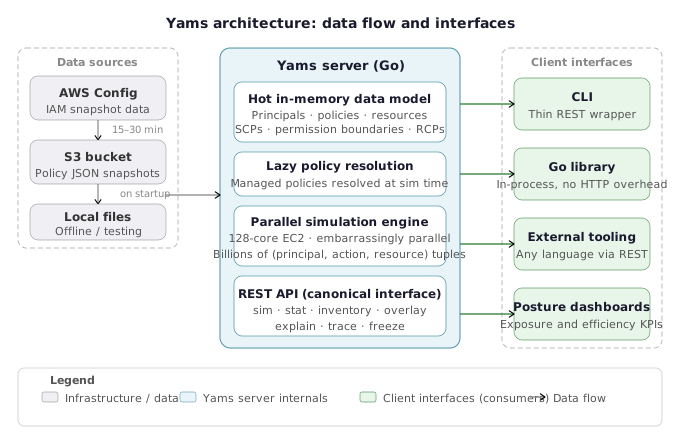
- Go library — The original design. Direct in-process integration for Go-based tooling at Netflix. Offers the lowest latency and deepest integration for workloads that can import it natively.
- CLI — Added when the library alone proved insufficient for ad-hoc investigation. The CLI is described as “a very naive wrapper over the REST API,” meaning every CLI command maps 1:1 to an API call on the server. This design keeps the CLI thin and ensures all clients share the same code path.
- Server with REST API — The architectural pivot that unlocked performance. Once a server model was adopted, the hot data problem became solvable: load the environment once, keep it resident in memory, and answer questions synchronously without reloading gigabytes of JSON on every invocation.
The shift from script to server was the most consequential design decision in the project. Scripts have to reload state on every invocation. A server amortizes that cost across thousands of requests.
Why Go
The choice of Go over Python — the language used in both IAM Metrics Next and Metrics v2 — was deliberate. Go offers significantly better throughput for CPU-bound workloads, and IAM simulation is a fundamentally CPU-bound problem. The author notes that Netflix increasingly uses Go for cloud tooling precisely because of performance characteristics. When simulations need to reach into the billions, squeezing performance at the language level matters.
Go also simplifies deployment: a single statically linked binary, no interpreter dependency, and easy containerization for the 128-core EC2 instances that run full-environment simulation passes at Netflix.
AWS Config as the Authoritative Data Source
AWS Config[6] is Yams’s sole data source for the current implementation. Every IAM entity — principals, policies, resources, accounts, SCPs — is sourced from Config snapshots. Netflix writes this data to S3, and Yams reads from S3 on startup and periodically thereafter.
Key characteristics of this approach:
- Refresh cadence: AWS Config delivers new snapshots every 15–30 minutes. Yams ingests those snapshots as they arrive, so the data resident in the server is as fresh as Config allows.
- Coverage limitation: AWS Config does not capture authorization data for every AWS resource type. Where Config lacks coverage, Yams cannot simulate. This is a known constraint the author acknowledges explicitly — it is not a fixable software problem, but a first-party data availability problem.
- Scale advantage: Pulling from S3-backed Config snapshots sidesteps the describe API contention problem. Calling describe APIs directly across hundreds of thousands of resources creates service quota pressure and produces stale data before the enumeration even completes.
- Local file support: Sources can also be local files, enabling offline testing against static snapshots. In practice, Netflix uses the S3 path exclusively.
The trade-off accepted here is real: Yams cannot provide real-time authorization data fresher than the Config refresh cycle. For the use cases it targets — metrics, posture analysis, on-call troubleshooting — a 15–30 minute lag is acceptable.
Hot Data Model: Keep the Environment Resident
The single biggest performance lesson from the earlier Python scripts was that loading the environment is the bottleneck. Netflix’s IAM environment, if serialized to a JSON file, runs to many gigabytes. Loading that on every invocation is not practical for any workload above trivial scale.
Yams solves this by keeping all authorization data hot in server memory. On startup, the server reads and parses all Config snapshot data into an in-memory data model. Subsequent simulation requests operate against this resident data without re-reading disk or S3. The result: a test environment — with 1,445 entities including the full corpus of AWS managed policies — loaded in approximately 10 seconds. The same environment took multiple hours or crashed entirely in earlier tooling.
The stat command surfaces this model’s state: entity counts, last source refresh time, and universe size. This gives operators a quick health check on whether the server’s view of the environment is current.
Lazy Policy Resolution at Simulation Time
A subtlety in Yams’s data model is that managed policies, permission boundaries, and SCPs are not expanded at load time. They are resolved lazily at simulation time.
The author uses the Schrödinger’s cat analogy deliberately: a permission boundary stored as a reference (an ARN) is in a superposition — you do not know what it permits until you resolve it against the current policy definition at the moment of the query. Resolving eagerly at load time would lock in a stale expansion; resolving lazily ensures the simulation uses the most current policy document.
This design has a direct consequence for the --freeze flag:
- Without
--freeze: listing a principal’s policies shows references (ARNs) for managed policies and permission boundaries, not their expanded content. - With
--freeze: Yams resolves all policy layers — inline policies, managed policies, permission boundaries, SCPs, and account context — and returns the full effective permission set for that principal.
The freeze operation answers the question: “For this principal, what do all policy layers combined actually permit right now?” This is the authoritative view, resolved at query time, not a cached snapshot.
Multiprocessor Parallel Simulation
IAM simulation is described as “embarrassingly parallel” — each (principal, action, resource) tuple can be evaluated independently of every other. This property means that adding cores scales throughput almost linearly.
Yams doubles down on this property by using Go’s concurrency model to parallelize across all available cores. The deployment recommendation at Netflix is a 128-core EC2 instance for full-environment simulation passes. With that hardware, a simulation covering a small number of actions across core resource types completes in 15–30 minutes — compared to 19 hours for the single-threaded Python baseline.
The practical implication is that the simulation performance ceiling is set by hardware and the scope of the query, not by the tool’s architecture. Narrower queries (fewer principals, fewer actions, fewer resources) complete in seconds or low minutes. Full-universe sweeps still take meaningful wall-clock time, but they are no longer the bottleneck for answering individual questions synchronously.
Integration Architecture: REST-First Design
The REST API is the canonical interface. The CLI is a thin client over it; the Go library provides in-process bindings that bypass HTTP overhead for native integrations.
This layering means:
- Any language, any tool can integrate via the REST API without requiring a Go dependency.
- High-frequency workloads (like internal automation that needs to evaluate thousands of scenarios per minute) can use the Go library to eliminate serialization overhead.
- Netflix’s existing cloud tooling can enrich its own UI surfaces by calling the REST API rather than building separate IAM analysis stacks.
The explicit design goal is to avoid building yet another UI. Yams provides the answers; existing operational tooling surfaces them.
Acknowledging the Limits
The author is direct about what Yams does not solve:
- AWS Config gaps: If Config lacks authorization data for a resource type, Yams cannot simulate it. This is a first-party problem, not a tool problem.
- IAM inconsistencies: Edge cases like multi-resource API calls (
ec2:RunInstances) or unusual condition key evaluation semantics exist in IAM itself and propagate into any simulator that reimplements IAM evaluation logic. - Chained resource access: Yams models direct principal-to-resource interactions. Resource-to-resource interactions (S3 triggering SNS, SNS to SQS, service-linked roles) are not currently modeled.
- Human identity mapping: Yams operates at the IAM principal level (roles, users). Mapping human identities through an IdP (Okta, Identity Center, LDAP groups) to IAM principals is an unsolved abstraction in the current design.
These constraints define the current scope — and the roadmap. Yams is explicitly described as “tip of the iceberg.” The architecture is designed to grow into answers it cannot yet provide.
Actionable Takeaways
- Adopt a server-resident hot data model for any IAM analysis tooling you build or evaluate. Reloading gigabytes of policy data per invocation is the primary performance bottleneck at enterprise scale. A server that keeps authorization data hot in memory makes synchronous, on-demand answers feasible.
- Use AWS Config snapshots written to S3 as the data source for IAM simulation infrastructure. This sidesteps describe API contention and service quota pressure, provides a consistent snapshot across all accounts, and is far more scalable than live API enumeration — accepting a 15–30 minute freshness lag as the trade-off.
- Design your IAM simulation interfaces in layers: a REST API as the canonical interface, a thin CLI wrapper over that API, and an optional native library for high-frequency in-process callers. This architecture keeps integration surface consistent across all consumers and avoids building redundant UI surfaces.
Common Pitfalls
- Resolving managed policies and permission boundaries eagerly at data load time produces a stale, cached expansion that diverges from reality as policies change. Lazy resolution at simulation time ensures the simulator always evaluates the current policy definition, not a snapshot taken at startup.
- Attempting to simulate IAM access by calling describe APIs live across a large environment creates service quota contention and produces data that is already stale before enumeration completes. At Netflix scale, describe APIs could not keep pace with the rate of change in the environment.
On-Demand IAM Simulation: Inventory, Explain, and Overlay Capabilities
Inventory: Putting All Policy Information at Your Fingertips
One of the most immediate pain points in large-scale AWS IAM environments is simply knowing what exists. Yams addresses this through a rich inventory layer that surfaces principals, resources, and API actions in a queryable, real-time interface.
After starting the Yams server and pointing it at its data sources (local files or S3 dumps from AWS Config[6], refreshed every 15–30 minutes), you can immediately:
- List all principals in the environment, with output truncated for readability
- Full-text search principals using case-insensitive queries — e.g., searching for
red-roleacross all role names - Inspect individual principals with a summary view using the
--keyflag, which shows the attached policies, inline policies, and permission boundaries as references (not yet resolved) - List and query resources using the same full-text interface — most useful for resources that carry resource-based policies
A critical design decision surfaces immediately: managed policies and permission boundaries are stored as references, not expanded inline. Resolution happens at simulation time. This is by design — it ensures the most current policy definition is pulled in at the moment a question is asked, rather than working off a stale snapshot embedded at load time. The speaker described this as “Schrödinger’s cat” — you cannot know the effective permissions until you actually evaluate them.
You can also inspect individual API calls directly through Yams, pulling in the programmatic service authorization reference. This lets you query which condition keys apply to a given action, or which resource types it operates against — answering questions that normally require navigating the AWS documentation manually.
Permission Freeze: Resolving All Policy Layers for a Principal
For deeper investigation, Yams provides a --freeze flag on principal inspection. This performs a full resolution of every policy layer affecting a principal, expanding:
- Attached managed policies (resolved to their current definitions)
- Permission boundaries
- Service control policies (SCPs) from the AWS Organizations hierarchy
- Account-level context
The result is a single, fully-expanded view of everything that affects a principal’s effective permissions. For a security engineer troubleshooting an unexpected access denial — or trying to understand why a role that “shouldn’t have access” apparently does — this is the first tool to reach for. The freeze output answers: what does this principal’s complete permission universe actually look like right now?
The same freeze capability applies to resources. For any resource carrying a resource policy, the freeze view resolves and displays the complete policy, enabling precise analysis of cross-account trust, explicit allows, and deny conditions without manually assembling policy JSON from multiple sources.
Multi-Dimensional Simulation: Omitting Principal, Action, or Resource
The core simulation interface in Yams accepts a principal–action–resource tuple and returns an allow or deny decision. For a single, well-formed scenario this works exactly as expected. The real capability emerges when you intentionally omit one dimension of that tuple.
AWS IAM simulation at scale requires the ability to enumerate, not just evaluate. Yams supports three enumeration modes:
- Omit the principal: Given an action and resource, return every principal in the environment that can perform that action against that resource. This directly answers the “who can access this?” question that drove the original Netflix metrics program.
- Omit the resource: Given a principal and action, return every resource in the environment that principal can act upon with that action.
- Omit the action: Given a principal and resource, return every action that principal can perform against that resource.
These three modes enable a security engineer to pivot across the full principal–action–resource space in a single query, without pre-specifying the dimension being enumerated. In practice, this is what enables IAM exposure analysis at enterprise scale — rather than asking a point-in-time question about one tuple, you ask a structural question about your entire authorization model.
The speaker demonstrated this with a concrete example: querying which principals can perform a given S3 action against a bucket that carries a deny-based bucket policy with an ABAC condition. A role (red-role) that held full S3 permissions in its identity policy was conspicuously absent from the enumeration result — because the resource policy’s deny condition blocked it. This is precisely the class of interaction that no mental model of IAM can reliably track at scale.
Explain and Trace: Human-Readable Access Decision Reasoning
When simulation produces a surprising result — an expected allow that comes back denied, or a denial that should not be possible — Yams provides two diagnostic flags:
--explain produces a short, human-readable summary of the single most decisive factor in the access decision. In the bucket example above, the explain output surfaces the explicit deny in the resource policy as the controlling reason — without requiring the engineer to manually walk through every applicable policy layer. This is the flag designed for on-call troubleshooting, where the goal is the shortest path to the right answer.
--trace produces a full evaluation walkthrough, stepping through every policy layer in the IAM evaluation order: resource policies first, then SCPs, then permission boundaries, then identity policies. The output is comprehensive to the point of being unwieldy for casual use, but when a specific condition key is evaluating unexpectedly or a deny is appearing from an unclear source, the trace output will identify exactly where in the evaluation chain the decision was made.
Together, these two flags address the “why” problem that earlier internal tools at Netflix could not answer. Prior iterations of the metrics tooling could report that a principal had access to a resource, but could not explain the policy chain behind that conclusion — making the tool difficult to trust during development and nearly useless for user-facing troubleshooting. The explain and trace flags make the simulation auditable and self-documenting.
The speaker noted that one of the most frequent on-call scenarios for the Netflix cloud security team involves users attempting to request additional permissions when the actual blocker is a control applied elsewhere — a permission boundary, an SCP, or an account-level restriction. Without explain-level tooling, diagnosing this requires deep tribal knowledge about the organization’s policy architecture. With it, a first-responder can surface the correct answer and the correct fix without escalating.
Overlays: Hypothetical What-If Analysis Before Changes Are Applied
The overlay capability is arguably Yams’s most operationally critical feature for enterprise AWS environments. It addresses a question that the Netflix cloud security team described as both high-value and high-anxiety: what happens if I make this change?
With the overlay mechanism, you can:
- Export the current definition of any policy, principal, or resource from Yams
- Edit that definition locally — adding permissions, modifying conditions, changing tags, restructuring SCPs, or altering any other attribute
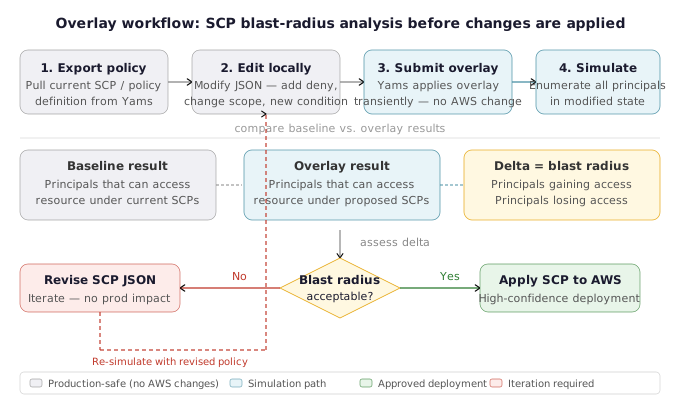
- Submit the modified definition as an overlay alongside a simulation request
- Receive results that reflect how the environment would behave if those changes were applied — without actually applying them
In the live demonstration, the speaker showed this by adding s3:PutObjectAcl to a role that did not previously have it, then running a simulation with the overlay active. The result correctly reflected the new permission, confirming the change would have the intended effect — before a single IAM policy was actually modified in the AWS account.
The design extends well beyond single-permission changes. The overlay mechanism was explicitly built for the SCP change evaluation use case — one of the most dangerous operations in a multi-account AWS Organization. An SCP applied at the wrong OU level, or with an overly broad deny statement, can instantly remove access for thousands of principals across hundreds of accounts. Yams overlays allow a security engineer to model the proposed SCP, simulate its effect against the full universe of principals and resources in the organization, and identify blast radius before submitting the change.
During Q&A, the speaker confirmed: the overlay was explicitly designed to handle this exact scenario. You redefine the SCP as you intend it to be, then ask questions of the modified environment. Anything you can express in the policy JSON can be modeled as an overlay.
This converts SCP changes from a high-risk, commit-and-pray operation into a reviewable, simulation-backed workflow with a quantifiable change scope.
Diagnosing Why a Principal With Full S3 Permissions Is Denied Access: The Explain Flag
Proof of Concept
-
Identify the suspicious principal. In the talk, the speaker demonstrates using a role called “red roll” (red role). The role has been confirmed to hold full S3 permissions in its identity-based policy. When Yams runs a multi-dimensional simulation (
simwith principal omitted) to enumerate all principals that can performs3:GetObjectagainst a specific bucket, red roll is notably absent from the results — even though its policy should grant access. - Run a targeted single simulation to confirm the deny. Execute the Yams
simcommand with all three dimensions populated (principal, action, resource):yams sim --principal <red-roll-arn> --action s3:GetObject --resource <bucket-arn>Yams returns
DENIED. The result echoes back the principal, action, and resource for confirmation, but does not yet explain why. - Apply the
--explainflag to get a human-readable diagnosis. Rerun the same simulation with the explain flag appended:yams sim --principal <red-roll-arn> --action s3:GetObject --resource <bucket-arn> --explainYams performs full policy resolution — pulling in the identity policy, the bucket’s resource policy, any permission boundary on the role, and applicable SCPs — and returns a short, human-readable explanation. In this demonstration, the output reads: there is an explicit deny in the resource policy. The bucket’s resource policy contains a deny statement (in this case enforcing an ABAC/tag-based condition) that overrides the allow in the role’s identity policy.
-
Understand why the deny wins. AWS IAM evaluation logic dictates that an explicit deny at any policy layer — identity policy, resource policy, SCP, permission boundary, or RCP — overrides any allow. The speaker’s demonstration uses a bucket policy with a deny-based ABAC condition (tag-keyed access control) that Netflix uses heavily. The principal’s tags do not satisfy the condition, so the deny fires. The identity-level
s3:*allow is irrelevant once an explicit deny is present. -
Optionally apply
--tracefor full evaluation walk-through. For engineers who need to see every step of the IAM policy evaluation engine, Yams offers a--traceflag that walks through the complete evaluation order — starting with resource policies, then SCPs, then identity policies, permission boundaries, and session policies. The speaker notes that the trace output can be extremely verbose (“so large as to almost not be useful”), but it is the authoritative path for diagnosing edge cases such as unusual condition key evaluation or multi-resource API call behavior. - Contrast with the pre-Yams workflow. Before tooling like Yams, diagnosing this scenario required a security engineer to manually review the role’s inline and attached policies, fetch and parse the bucket’s resource policy JSON, check whether a permission boundary existed and expand it, identify the relevant SCP in the OU hierarchy, and then mentally simulate the evaluation order — a process the speaker describes as heavily reliant on “contextual and historical knowledge” and “very error-prone.” The explain flag compresses this multi-step investigation to a single CLI call with a one-line diagnosis.
Enumerating All Principals That Can Perform a Specific Action Against a Resource
Proof of Concept
-
Start the Yams server and load environment data. Launch the Yams server and point it at one or more sources (local files or S3 paths containing AWS Config exports). The server loads all principals, resource policies, permission boundaries, SCPs, and RCPs into a hot in-memory model. For a test environment, this takes approximately 10 seconds. Confirm readiness with the
statcommand, which reports the number of loaded entities and the last source refresh timestamp. -
Identify the target resource and action. Determine the specific API action and resource ARN to query. In the talk’s live demonstration, the target was an S3 bucket with a deny-based bucket policy that also enforced ABAC tag conditions — a configuration used heavily at Netflix to enforce data classification controls.
- Issue a principal-omitted simulation query via the Yams CLI. Run the
simcommand, supplying only the action and resource ARN. Omit the principal entirely:yams sim --action s3:GetObject --resource arn:aws:s3:::example-bucket/*When the principal field is absent, Yams does not return a single allow/deny verdict. Instead, it iterates across every principal in the loaded environment and evaluates the full policy stack — inline policies, attached managed policies, resource policies, permission boundaries, SCPs, and RCPs — for each one. The result is a list of every principal for which the simulation evaluates to
allow. -
Observe the effect of deny policies and ABAC conditions on the result set. In the demonstration, a role called “red roll” held full S3 permissions via its inline or attached policies. Despite this, it was absent from the enumerated list of principals that could perform
s3:GetObjectagainst the target bucket. This counterintuitive result is explained by an explicit deny in the bucket’s resource policy, combined with a tag-based condition that red roll’s tags did not satisfy. Because Yams resolves all policy layers simultaneously — rather than evaluating only identity-side policies — the deny and condition correctly suppress the apparent allow, and red roll is excluded from the output. - Use the explain flag to understand why a specific principal is absent. To confirm why red roll was excluded, re-run the simulation with both the principal and the
--explainflag:yams sim --principal arn:aws:iam::123456789012:role/red-roll \ --action s3:GetObject \ --resource arn:aws:s3:::example-bucket/* \ --explainThe explain output produces a short human-readable summary of the controlling policy decision. In this case, it identifies the explicit deny in the resource policy as the reason access is blocked, even though an allow exists on the identity side. This confirms the principal-omitted enumeration was accurate and explains why red roll did not appear in the list.
-
Optionally use the trace flag for full policy evaluation walkthrough. For deep debugging — such as verifying which condition key caused a tag-based deny to fire — add
--traceinstead of--explain. The trace output walks through every evaluation step: resource policies first, then SCPs, then permission boundaries, then identity policies. - Interpret the output as an exposure metric. The count of principals returned by the principal-omitted simulation is the exposure value for that resource — the number of principals that can actually reach it given all active policy layers. This number feeds directly into the KPI framework described in the talk: a high exposure count on a sensitive data store signals a least-privilege gap, while a low count confirms effective access controls. By running this query across multiple resources and tracking the count over time, security teams can chart IAM exposure trends and express least-privilege progress as a measurable OKR.
Freezing a Role’s Effective Permissions Across All Policy Layers
Proof of Concept
-
Load the environment into Yams. Start the Yams server with one or more sources (local files or S3 paths containing AWS Config authorization data). Yams ingests IAM principals, managed policies, resource policies, permission boundaries, and SCP/RCP data in approximately 10 seconds for a test environment. At this point, managed policy references are stored as pointers — they are not yet expanded.
-
Query the role in inventory mode. Run a principal query (e.g., a case-insensitive full-text search for the role name) to locate the target role. Use the
--keyflag to retrieve a summary of the principal. Observe that permission boundaries and managed policy references appear as references only — not as expanded policy documents. This is by design: Yams defers resolution to preserve performance and ensure the most current policy definition is used at evaluation time. - Apply the
--freezeflag. Re-run the principal query or inspection command with the--freezeflag appended. Yams performs on-demand resolution of all policy layers:- Managed policy references are fetched and expanded inline.
- Permission boundaries are resolved to their full policy document, showing the exact set of actions the boundary permits or denies.
- Account-level SCPs are pulled in and intersected against the role’s identity-based policies.
- RCPs (Resource Control Policies) are applied where relevant.
- Interpret the freeze output. The resulting output presents the role’s effective permission universe — the superset of what all attached and applicable policy layers allow or deny. Security engineers can see:
- Which permissions survive the permission boundary constraint.
- Which actions are blocked by SCPs regardless of what identity-based policies grant.
- The full expanded text of every managed policy attached to the role.
-
Apply the same flag to resources. The
--freezeflag is equally applicable to resource inspection. For resources with resource-based policies (e.g., S3 bucket policies, SQS queue policies), freezing resolves the full resource policy document and makes it available for inspection alongside principal-side policies. The speaker noted this is “most interesting for things with resource policies” but is available for any defined resource. - Cross-reference with individual API call inspection. Yams also exposes the AWS service authorization reference programmatically. After freezing a role, security engineers can inspect individual API calls to see which condition keys apply to a given action and which resource types that action targets — providing a complete picture of the conditions under which a frozen permission would actually be exercised.
Evaluating the Blast Radius of an SCP Change Using Yams Overlays
Proof of Concept
-
Identify the SCP to be changed. In the Yams CLI or via the REST API, pull the current SCP definition for the target organizational unit (OU). Yams loads SCP data from AWS Config snapshots (refreshed every 15–30 minutes into S3), so the policy returned reflects your current production state. This is the baseline you will modify.
-
Author the overlay — the hypothetical SCP change. Edit the SCP JSON to reflect the intended modification. This could be a new
Denystatement restricting a service, a narrowed resource scope, a new condition key, or a structural change to an existingAllow. The overlay is a JSON file that represents what the SCP would look like after the change — it does not need to be applied to AWS to be used. -
Pass the overlay to Yams at simulation time. Supply the modified SCP definition as an overlay alongside your simulation query. Yams accepts overlay definitions that redefine any entity in the environment — a principal policy, a resource policy, a permission boundary, an account attribute, or in this case a service control policy. The overlay is applied transiently; nothing is written back to AWS.
Example (CLI pattern):
yams sim --principal <principal-arn> --action <action> --resource <resource-arn> \
  --overlay scp_modified.json
For broad blast-radius analysis, omit the
--principalargument so Yams enumerates every principal that would be affected:yams sim --action <action> --resource <resource-arn> --overlay scp_modified.json -
Compare the overlay results against the baseline. Run the same simulation twice — once without the overlay (current state) and once with it (hypothetical state). The delta between the two result sets is the blast radius: which principals gain access, which lose access, and which are unaffected. As confirmed in the Q&A session, this is precisely the use case the overlay feature was designed for: “you would redefine the SCP, write it at whatever you want to be, and then start asking questions based on that.”
-
Use the
--explainflag to understand specific access-decision changes. For any principal whose access outcome changed between baseline and overlay runs, add the--explainflag to obtain a human-readable explanation of why the decision changed. This surfaces the exact policy layer responsible — useful when the SCP interacts with permission boundaries, resource policies, or ABAC conditions in non-obvious ways. -
Use the
--traceflag for full policy-evaluation walk-through (optional). For cases where the explain output is insufficient,--traceemits the complete step-by-step evaluation path Yams followed. Yams evaluates policies in the same order as AWS: resource policies first, then SCPs, then identity policies, then permission boundaries. -
Proceed with the SCP change or iterate. If the blast radius is acceptable — only the intended principals are affected, no unexpected access disruptions are flagged — the engineer can apply the SCP change to AWS with high confidence. If the overlay simulation reveals unintended denials or unexpected access grants, the SCP definition can be revised and re-simulated without touching production. This loop replaces the previous approach of “apply the SCP and see what breaks,” which the speaker described as having burned the Netflix team “a couple of times with rogue SCP changes.”
Actionable Takeaways
- Use the multi-dimensional simulation modes (omit principal, action, or resource) to run structural enumeration queries — not just point-in-time access checks. "Who can perform this action against this resource?" is the correct starting question for exposure analysis, and Yams answers it directly without requiring a pre-enumerated principal list.
- For on-call IAM troubleshooting, reach for the `--explain` flag first. It surfaces the single controlling policy decision in human-readable form, enabling fast triage without requiring the responder to mentally walk the full IAM evaluation order. Reserve `--trace` for cases where a specific condition key or edge-case evaluation needs forensic-level inspection.
- Before applying any SCP or permission boundary change in a multi-account AWS Organization, model it as a Yams overlay. Export the current policy definition, make the intended edits, and simulate the result against your actual principal and resource inventory. Treat the overlay result as a required pre-flight check, not an optional audit step.
Common Pitfalls
- Trusting inventory views that show managed policies and permission boundaries as references, and assuming those references reflect effective permissions. In Yams, policy references are not resolved until simulation time — a principal that appears to have limited permissions in the inventory summary may have significantly broader or narrower effective access once boundaries and SCPs are resolved. Always use `--freeze` or run an actual simulation to get effective permission data.
- Attempting to use point-in-time simulation to answer structural questions. Asking "can this one principal access this one resource?" is a useful sanity check, but it does not tell you how many other principals share that access or whether the access is expected. The explain and trace flags are diagnostic tools for known anomalies — the multi-dimensional enumeration modes are the right mechanism for proactive exposure analysis.
Measuring IAM Security with Exposure and Efficiency KPIs
Translating IAM Security Into Business Language
One of the most persistent challenges for cloud security teams is translating the value of AWS IAM work into something an executive audience can act on. Remediating overly permissive roles, migrating accounts, and enforcing least privilege are all valuable — but they resist simple reporting. “We deleted 300 policies” does not communicate risk reduction. What’s needed is a KPI for cloud access: a small set of intuitive metrics that reflect both the current state and the direction of progress.
This is precisely the problem that originally kicked off the Netflix IAM simulation work. The team was participating in an enterprise security metrics program that required standardized, quantitative answers across security domains. For other domains — access to a Google Doc, for example — the answer is a lookup. For IAM, it requires simulation. Two concepts emerged to fill that gap: exposure and efficiency.
Exposure: How Many Principals Can Access a Resource?
Exposure is defined as the number of principals that have the ability to access a given resource. It is a direct measure of how much inbound access a resource is accumulating — intended or otherwise.
The critical nuance is that exposure is contextual:
- For a sensitive production data store, exposure should approach zero — only the specific application roles that genuinely require access.
- For a shared logging bucket, an exposure of several thousand principals might be entirely expected and acceptable.
- For an IAM role distributed broadly to human users, you would want exposure on the resources that role can reach to be tightly scoped.
The value of exposure as a KPI is that the direction of travel is always intuitive: you want it to go down. Whether reported as an aggregate average across your environment or scoped to a specific resource class (critical data stores, prod-only assets), a downward trend in exposure is unambiguously positive. Yams is built to generate this number at scale — running the simulation across all principals for a target resource and returning a count.
Efficiency: How Close Are You to Right-Sized Access?
Efficiency builds on exposure by introducing a numerator: how many principals actually need or actively use access to the resource, versus how many can access it.
The formula is straightforward:
Efficiency = (principals that need access) / (principals that have access)
A few worked examples make this concrete:
- 5 principals need access, 5 have access → efficiency = 1.0 (100%). Access is perfectly right-sized.
- 10 principals need access, 1,000 can access → efficiency = 0.01 (1%). Access is dramatically over-provisioned — a strong signal for remediation.
Efficiency is the metric that makes least-privilege work measurable. Rather than describing remediation projects qualitatively, security teams can point to efficiency improvements as evidence of concrete progress toward right-sized access.
Sourcing the Numerator: Who Actually Needs Access?
The denominator — who can access a resource — comes from IAM simulation at scale. The harder problem is the numerator: who does or needs to access a resource. Three data sources are available, each with different cost and fidelity tradeoffs:
1. CloudTrail data events (gold standard) Data events log every API call against a resource, making them the most accurate signal for actual access patterns. The drawback is cost: at Netflix’s scale, enabling data events across all resources is prohibitively expensive. For organizations that can afford it, this is the recommended approach.
2. SDK instrumentation Netflix gave a talk at re:Invent 2022 on the alternative: instrumenting SDKs to capture access telemetry at a fraction of the cost of CloudTrail data events. Coverage has gaps — not every caller goes through an instrumented path — but it provides a usable approximation at scale.
3. Organizational context In some cases, the numerator can be derived structurally rather than observationally. If tagged resources are defined as belonging to a specific team or environment, org context (account tags, resource ownership metadata) can establish who should have access even before behavioral data is available. This works especially well for greenfield environments or tightly governed resource classes.
Expressing IAM Progress as OKRs
Once exposure and efficiency are quantified, they map cleanly to Objectives and Key Results (OKRs) — the format most executive audiences already use to track business outcomes. Several concrete OKR patterns have emerged from this work:
-
“Reduce average exposure across all production data stores from X to Y by Q3.” This translates an IAM remediation program into a single measurable commitment.
-
“Achieve 80% efficiency on all roles distributed to human users by end of year.” Scoping efficiency targets to human-accessible roles focuses effort on the highest blast-radius identities.
-
“Reduce prod environment exposure from test accounts to fewer than 10 principals.” Boundary analysis between environments — the same question networking teams answer with traffic analysis — now has an IAM equivalent.
-
“Drive exposure on S3 bucket [X] to 5 or fewer principals.” Resource-specific targets for critical data stores give teams a precise goal rather than a vague mandate to “improve least privilege.”
These OKRs are not aspirational — they are the direct output of feeding exposure and efficiency numbers into standard goal-setting frameworks. Netflix colleagues used the exposure concept to chart the measurable impact of account migrations, turning what had previously been a narrative (“moving things out of big account is good, trust us”) into a tracked metric with a clear trend line.
Applying Exposure and Efficiency in Practice
For security teams adopting these KPIs, the recommended implementation path is:
-
Start with a scoped resource class. Rather than attempting to compute exposure across your entire AWS environment immediately, pick a high-value resource class — production S3 buckets, RDS instances, secrets — where the exposure baseline is most actionable.
-
Choose your numerator source. If CloudTrail data events are affordable in your environment, enable them for the target resource class. If not, evaluate SDK instrumentation or org-context-based ownership as an approximation.
-
Establish a baseline and set a directional target. The initial exposure and efficiency numbers establish the baseline. Set a time-bound target (e.g., reduce average exposure by 30% in two quarters) and track against it.
-
Use exposure to prioritize remediation. Resources with the highest exposure and lowest efficiency are the highest-value targets for least-privilege work. Simulation tooling like Yams provides the list; the security team provides the remediation.
Actionable Takeaways
- Adopt exposure (principal count with access) and efficiency (need-to-access / can-access ratio) as the two primary KPIs for your IAM security program. Both metrics are intuitive — exposure goes down, efficiency goes up — and translate directly into executive-legible OKRs without requiring the audience to understand IAM policy evaluation mechanics.
- Source the efficiency numerator using the most cost-effective option available: CloudTrail data events for high-fidelity environments that can absorb the cost; SDK instrumentation as a scalable alternative with acceptable gaps; or organizational context (ownership metadata, environment tags) for structurally governed resource classes where behavioral data is unavailable.
- Frame least-privilege remediation projects as exposure-reduction campaigns with time-bound, resource-scoped targets. Rather than reporting project completion, report the before-and-after exposure number. This converts IAM security work from an operational narrative into a measurable outcome with a clear trend line.
Common Pitfalls
- Treating exposure as an absolute threshold rather than a contextual metric leads to misplaced remediation effort. A resource with exposure of 5,000 principals may be operating exactly as intended (a widely shared logging endpoint), while a resource with exposure of 50 may be severely over-provisioned for a single-application data store. Establish expected exposure ranges per resource class before comparing across resources.
- Reporting IAM remediation progress in qualitative terms ("we reduced over-provisioned roles") rather than quantitative ones ("we reduced average exposure on production data stores from 847 to 312 principals") fails to capture business value for executive audiences. Without a numeric baseline established before the remediation project begins, measuring and communicating impact becomes impossible.
Conclusion
AWS IAM is powerful enough to express almost any authorization model you need — and complex enough that understanding what it actually permits requires purpose-built simulation infrastructure. The journey from a metrics program that needed simple answers to an open-source simulator capable of billions of evaluations illustrates the gap that exists between IAM’s expressiveness and the tooling available to comprehend it.
Yams fills that gap with three architectural decisions that matter: a server-resident hot data model that makes on-demand simulation feasible at enterprise scale, multi-dimensional simulation modes that answer structural access questions rather than one-off lookups, and an overlay system that converts dangerous policy changes into reviewable simulations with quantified blast radius.
The exposure and efficiency KPIs are the operational output of that infrastructure — a way to take the raw simulation capability and turn it into executive-legible security metrics that make least-privilege progress visible, comparable, and trackable over time.
For teams building IAM security programs, the path forward is clear: treat IAM as a simulation problem, not a lookup problem; measure exposure and efficiency instead of project completion; and validate policy changes with overlays before they reach production.
For further reading on related topics on this site, explore how identity and access management intersects with broader cloud security architecture, and how security metrics programs can be structured to communicate risk reduction to executive stakeholders.
References & Tools
- Yams (Yet Another IAM Simulator) — Open-source Go library, server, and CLI for high-volume, full-fidelity AWS IAM simulation with overlay, explain, trace, and multi-dimensional enumeration capabilities. ↩
- AWS Policy Simulator — First-party AWS tool for simulating IAM policy decisions; noted as inaccurate for advanced IAM features (ABAC, permission boundaries, SCPs, RCPs) at enterprise scale. ↩
- AWS Access Analyzer — Provides higher-level IAM insights including resource-level analysis; cost-prohibitive at Netflix's scale due to CloudTrail data event requirements. ↩
- pmapper — Open-source tool for building IAM access graphs and answering "who can" questions; recommended for environments within its scale constraints. ↩
- imspy — IAM analysis tool evaluated alongside pmapper; recommended where scale constraints are not a limiting factor. ↩
- AWS Config — Primary data source for Yams; provides IAM authorization data for principals, policies, and resources, refreshed every 15–30 minutes into S3. ↩
Questions from the audience
Related deep dives
The AI Security Larsen Effect - How to Stop the Feedback Loop | [un]prompted 2026
This Wasnt in the Job Description- Building a production-ready AWS environment from scratch
I SPy - Rethinking Entra ID research for new paths to Global Admin