Your company just acquired another firm and someone hands you a ticket: “Integrate their cloud environment into ours.” Cloud security during mergers and acquisitions looks deceptively simple on paper — the major providers publish migration guides — but the real danger lives at the organization level, in services your team may never have had to think about before. A single missed de-registration of a delegated administrator account, or a forgotten IAM Identity Center dependency, can silently revoke access for hundreds of engineers the moment the first account moves.
This post breaks down the specific technical landmines a cloud security engineer will face when integrating AWS and GCP environments post-acquisition. Drawing from real hands-on experience across three acquisitions, it covers identity federation prerequisites, root credential takeover, GuardDuty’s legacy invitation trap, GCP’s VPC Service Controls constraint, log continuity, and the cross-functional stakeholder web that can derail even a well-planned migration.
Key Takeaways
- You'll learn how organization-level cloud services like AWS IAM Identity Center and GCP's IAM hierarchy create hidden access disruptions when accounts are migrated between organizations — and how to sequence your migration plan to avoid them.
- You'll be able to identify which AWS delegated administrator services require explicit de-registration before account migration, with special attention to GuardDuty's legacy invitation method that can silently break threat detection coverage.
- Apply the "web of dependencies" framework to map every stakeholder, system, and service — SSO, CI/CD, log pipelines, billing — before starting a cloud M&A integration, ensuring nothing breaks and you have a tested backout plan for every step.
AWS Organization-Level Identity and Access Risks During Cloud Migration
When you move AWS accounts from one AWS organization to another during a merger or acquisition, the accounts themselves retain their workloads — EC2 instances keep running, Lambda functions keep executing, S3 objects stay where they are. But cloud security during mergers and acquisitions gets complicated fast at the organization level, where services that span multiple accounts can silently break the moment an account migrates. Two of the most impactful organization-level risks in AWS are AWS IAM Identity Center[1] and root credential management, and both must be addressed before the first account moves.
AWS IAM Identity Center: One Identity Source Per Organization
Identity and access management at scale in AWS runs through AWS IAM Identity Center[1] (formerly AWS SSO). Rather than configuring an SSO provider individually in each AWS account, IAM Identity Center lets you connect your identity provider to all accounts in your organization from a single control plane. It’s convenient — until you’re migrating accounts between organizations.
The critical constraint is documented directly by AWS: you can have only one identity source per organization. This is not a soft limit or a quota you can request to increase — it is a hard architectural restriction. When an acquired company’s AWS accounts are moved into your organization, their IAM Identity Center instance does not come with them. Any employee who relied on that instance for access to their AWS accounts will lose that access the moment the account migrates.
This creates a hard migration prerequisite:
- If the acquired company is using their own IAM Identity Center instance: Their employees must be fully onboarded to your SSO provider — and provisioned through your IAM Identity Center instance — before any accounts are migrated. If you migrate accounts first, those employees lose access with no graceful fallback.
- If the acquired company is using individual SAML identity providers configured per-account: Those SAML configurations live inside the account itself and will survive the migration. The access keeps working. You then have the option to continue supporting that model or migrate those accounts to your centralized IAM Identity Center on a timeline that suits the business.
The difference between these two configurations is not always obvious from the outside. As part of your pre-migration assessment, explicitly enumerate how each AWS account in the acquired organization is granting human access today. Don’t assume.
AWS IAM Identity Center Access Loss During Account Migration
Proof of Concept
-
Understand the constraint: AWS IAM Identity Center[1] is an organization-level service. Each AWS organization supports exactly one IAM Identity Center instance and one identity source (e.g., Okta, Azure AD, or the built-in identity store) for that instance. There is no way to have two active identity sources simultaneously within a single AWS organization.
-
Identify the pre-migration state: The acquired company has their own AWS organization with an active IAM Identity Center instance connected to their identity provider (e.g., their own Okta tenant). Their engineers authenticate to their AWS accounts exclusively through this federation path. No individual SAML configurations exist at the account level — all access flows through the org-level IAM Identity Center.
-
Trigger the access loss: An engineer on the migration team migrates the first batch of AWS accounts from the acquired company’s organization into the acquiring company’s organization. The migration moves the accounts at the AWS Organizations[2] level. The accounts now belong to the acquiring organization.
-
Observe the outcome: The acquiring organization’s IAM Identity Center instance is connected to a different identity provider — the acquiring company’s SSO. The moment the acquired accounts join the new organization, their users’ access via the old IAM Identity Center instance is severed. The acquired company’s engineers attempt to log in to their AWS accounts through their SSO portal and receive access denied errors. Their role assignments, permission sets, and session tokens from the old identity source are no longer valid in the new organizational context.
-
Why this is easy to miss: The AWS documentation notes the one-identity-source-per-org constraint, but it is buried in the IAM Identity Center product docs rather than surfaced prominently in the account migration guides. Teams focused on the mechanics of moving accounts (detaching from source org, inviting into destination org) may not cross-reference the identity federation implications until engineers start reporting broken access.
- The correct mitigation sequence: The prerequisite for migrating any AWS account from an organization that uses IAM Identity Center is to onboard all affected employees onto the acquiring company’s SSO provider before the first account moves. Specifically:
- Provision the acquired company’s user identities in the acquiring company’s identity provider (e.g., create or sync their accounts in the acquiring org’s Okta or Azure AD tenant).
- Verify that those identities can authenticate through the acquiring organization’s IAM Identity Center instance.
- Confirm that the necessary permission sets and account assignments have been replicated or recreated in the acquiring org’s IAM Identity Center.
- Only then begin migrating AWS accounts.
-
Exception — individual SAML providers per account: If the acquired company configured SAML identity federation at the individual account level (rather than through org-level IAM Identity Center), those per-account SAML configurations survive the migration intact. The accounts move, but the SAML trust relationship is scoped to the account, not the organization. In this case the immediate access disruption does not occur, though the team must still plan to consolidate identity management over time.
- Key takeaway for security engineers: Treat IAM Identity Center onboarding as a hard prerequisite gate — not a parallel workstream — when the target accounts use org-level SSO federation. Document this gate explicitly in the migration runbook so it cannot be skipped under schedule pressure.
Root Credential Management: A Solved Problem With a Transition Period
Root credentials for AWS accounts have historically been difficult to manage at organization scale. For any organization that had grown beyond a single security or ops owner, the approaches ranged from shared password managers to documented manual processes — none of which scaled cleanly or provided strong auditability.
AWS changed this significantly when it introduced centralized root access management through AWS Organizations[2]. This feature lets the management account centrally control and revoke root credentials across all member accounts, eliminating the need to track and rotate individual root passwords account by account. Because this feature was introduced relatively recently, it is worth explicitly checking whether your organization has it enabled — and whether the acquired company’s organization does too.
If your organization has centralized root access enabled:
- After migrating an account, you can delete or rotate the existing root credentials directly from the centralized management console.
- Before migration, audit whether any workloads in the acquired accounts are using root access keys or root signing certificates. These should not exist — root access keys are an anti-pattern AWS has discouraged for years — but M&A integrations are exactly the kind of scenario where legacy configurations surface. If any workloads depend on root credentials, that dependency must be removed before migration.
If your organization does not have centralized root access enabled:
You are working with the older model. The steps are:
- Obtain the root credentials for each AWS account being migrated.
- Bring those credentials under your organization’s credential management process.
- If root credentials are unavailable — for example, the acquired company lost them or the original owner is no longer available — this is no longer a blocking problem. AWS now allows the management account owner to update the email address and phone number on any member account directly through AWS Organizations, without opening a support case. Once updated, you can use the standard password reset and MFA recovery flow to regain root access.
That last capability is a meaningful operational improvement. In earlier versions of this problem, losing root credentials could mean opening AWS support tickets and waiting days. The current tooling removes that blocker — but you still need to know it exists and confirm that no workloads are relying on root-level API access before you proceed.
Sequencing These Prerequisites Correctly
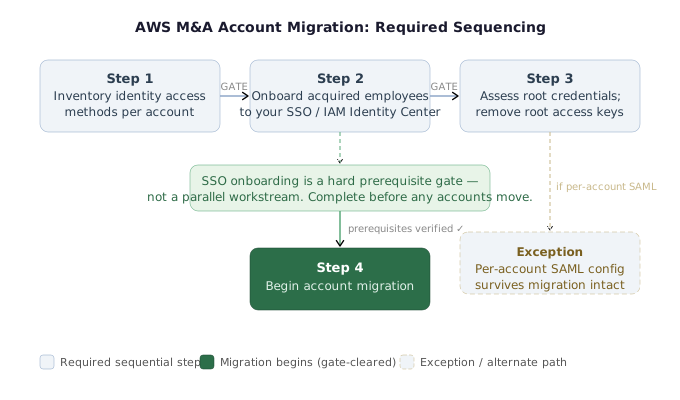
Both of these items — IAM Identity Center migration and root credential takeover — are prerequisites that must be validated and resolved in the planning phase, not discovered mid-migration. The practical sequencing looks like this:
- Inventory identity access methods across all accounts in the acquired organization (IAM Identity Center, per-account SAML, long-lived IAM users, root access keys).
- Onboard acquired employees to your SSO provider and provision them in your IAM Identity Center instance before any accounts move.
- Assess root credential status for each account; enable centralized root access if not already active; remove any root access keys found.
- Only then begin account migration for the accounts whose prerequisites are verified complete.
Skipping any of these steps doesn’t cause a hard failure at migration time — it causes a silent access disruption that surfaces after the fact, often at 2am when someone can’t log in to a production account.
Actionable Takeaways
- Before migrating any AWS accounts, explicitly audit how human users in the acquired organization are accessing each account — IAM Identity Center, per-account SAML, or long-lived IAM users. If IAM Identity Center is in use, treat employee SSO onboarding as a hard prerequisite that must complete before the first account moves.
- Enable centralized root access management in your AWS organization if it is not already active. Before migration, scan all acquired accounts for root access keys and root signing certificates; remove any dependencies found. If root credentials are missing, use the AWS Organizations console to update the account email and phone number and recover access without opening a support case.
- Document the identity access inventory and prerequisite completion status for each account in your migration plan. Treat IAM Identity Center onboarding and root credential verification as signed-off checklist items, not background tasks — they are blocking prerequisites, not cleanup work.
Common Pitfalls
- Migrating AWS accounts before employees from the acquired company have been onboarded to your SSO provider and provisioned in your IAM Identity Center instance. The one-identity-source-per-organization constraint means their access is severed at the moment the account moves, with no graceful fallback. This mistake is easy to make because the account migration itself succeeds — the access failure is silent until someone tries to log in.
- Assuming root credentials are inaccessible when they are merely unknown. The ability to update account email and phone number directly from AWS Organizations (without a support case) means lost root credentials are recoverable — but only if you know this capability exists. Teams unfamiliar with the feature may block their migration unnecessarily or, worse, leave accounts with unaudited root credentials during the transition window.
Delegated Administrator De-Registration and GuardDuty’s Legacy Invitation Trap
AWS Organizations[2] lets you delegate management of certain organization-level services to specific accounts — so your network team can own AWS Firewall Manager[3], and your security team can own GuardDuty[4], without everyone needing access to the management account. That delegation model is powerful, but it creates a hard prerequisite during cloud migration security in M&A scenarios: any account designated as a delegated administrator must be de-registered before it can be moved between organizations.
The De-Registration Requirement for Delegated Administrator Accounts
The AWS documentation is explicit: if the account you are migrating is a delegated administrator, you must de-register it from that role before the migration can proceed. If you skip this step, the migration will fail with a detailed error message informing you that the delegated administrator account cannot be removed from the organization until it has been de-registered. The error is descriptive enough that you will know exactly what went wrong — but the fix requires deliberate pre-migration planning, not just a quick click during the move.
This requirement applies broadly across AWS services that support the delegated administrator model:
- AWS Firewall Manager[3] — typically delegated to a network or security account
- AWS Security Hub[5] — security posture management, often delegated to a central security account
- AWS GuardDuty[4] — threat detection, with important caveats covered below
For member accounts (accounts that are not the delegated admin themselves), the migration generally proceeds without manual de-registration steps. The member account relationship is severed automatically when the account leaves the source organization.
GuardDuty: Two Configuration Paths, One Silent Failure Mode
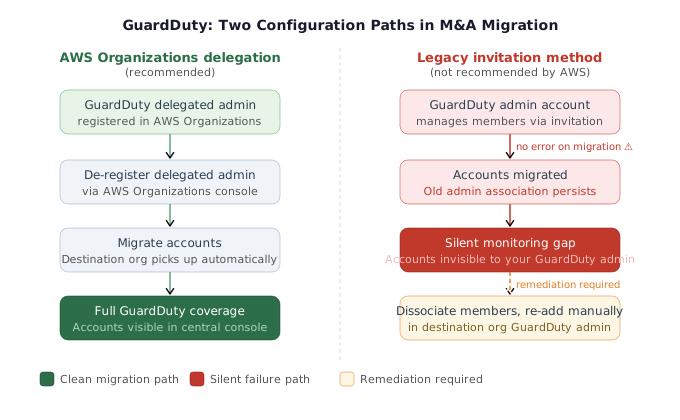
GuardDuty[4] introduces a complication that does not exist for most other AWS services. Where services like Security Hub and Firewall Manager can only be configured through AWS Organizations delegation, GuardDuty supports two distinct configuration models:
- AWS Organizations delegation — GuardDuty’s administrator account is set as a delegated administrator through AWS Organizations, the recommended and modern approach.
- Legacy invitation method — GuardDuty’s administrator-member relationship is configured directly between accounts using GuardDuty-native invitations, independent of AWS Organizations.
AWS strongly discourages the legacy invitation method. Multiple pages of GuardDuty documentation include explicit notes stating that GuardDuty recommends using AWS Organizations instead of GuardDuty invitations to manage member accounts. Despite this guidance, the legacy method remains available — and if the organization you are acquiring used it, you have a second, less-obvious configuration path to unwind.
The failure mode is subtle: it is entirely possible to migrate the GuardDuty member accounts — and even the GuardDuty admin account itself — from the source organization into your own, and then discover that your delegated GuardDuty administrator cannot see those accounts. The migrated accounts remain associated with the old GuardDuty admin account through the legacy invitation relationship, even though the account has physically moved to your organization. In the case of the admin account itself, it arrives in your organization still carrying a GuardDuty admin identity that now has no valid organizational context.
This is not a noisy failure. GuardDuty continues running on those accounts. Findings continue to be generated locally. But those findings are no longer visible to your centralized security operations. Threat detection coverage silently breaks without any error messages or alerts to indicate that something is wrong.
GuardDuty Legacy Invitation Method Leaving Migrated Accounts Unmonitored
Proof of Concept
-
Identify the GuardDuty configuration model in the source organization. GuardDuty[4] supports two administrator account models: (a) a delegated administrator configured through AWS Organizations[2], and (b) a legacy invitation method where a GuardDuty admin account manually invites member accounts. AWS explicitly discourages the legacy method in at least three separate documentation pages, each containing a note stating: “GuardDuty recommends using AWS Organizations instead of GuardDuty invitations to manage your member accounts.” Despite this, both models remain in active use.
-
Understand the migration failure mode. If the source organization uses the delegated administrator model, de-registering the delegated admin account before migration follows the same procedure as any other AWS organization-level service — and a clear error message prevents you from migrating the account until de-registration is complete. However, if the source organization uses the legacy invitation method, no such guard rail exists. The member accounts and even the GuardDuty admin account itself can be migrated into the destination organization without any error, but the association between the legacy admin and its members persists across the migration boundary. The destination organization’s GuardDuty delegated administrator cannot see these migrated accounts because they are still bound to the old admin account.
-
Confirm visibility gap. After migrating member accounts that were managed via the legacy invitation method, open the GuardDuty console under the destination organization’s delegated admin account. The migrated accounts will not appear as managed members. Any findings generated in those accounts will not surface in the central GuardDuty view, leaving the accounts effectively unmonitored from a threat detection standpoint — with no alerts or warnings to indicate the gap exists.
- Execute the remediation sequence. The fix requires the following ordered steps:
- Step 4a — Dissociate all member accounts from the legacy GuardDuty admin. Before migrating any accounts, log into the legacy GuardDuty admin account in the source organization and dissociate all member accounts from it. Critically, dissociating member accounts does not disable GuardDuty on those accounts — it only severs the administrative association.
- Step 4b — If the source org uses delegated admin: De-register the delegated administrator account for GuardDuty in the source organization’s AWS Organizations console before initiating any account migration.
- Step 4c — Migrate the accounts into the destination organization via AWS Organizations account migration.
- Step 4d — Verify automatic pickup. If the destination organization uses a GuardDuty delegated administrator configured through AWS Organizations, migrated accounts should be automatically detected and enrolled as members. Verify this in the GuardDuty console under the destination delegated admin account.
- Step 4e — Manual enrollment fallback. If accounts are not automatically picked up — either because automatic enrollment did not trigger, or because the destination organization is still using the legacy invitation method — manually add each migrated account as a member in the destination GuardDuty admin account.
- Validate full coverage restoration. After all migrated accounts appear as active members under the destination organization’s GuardDuty administrator, confirm that findings from those accounts are visible in the central GuardDuty view. This validates that threat detection coverage has been fully restored and no accounts remain in a silent monitoring gap.
Delegated Administrator De-Registration Failure Blocking AWS Account Migration
Proof of Concept
-
Identify the scenario: The acquiring company initiates account migration, attempting to move an AWS account from the source organization into the destination AWS organization using AWS Organizations[2] account migration controls.
-
Trigger the failure: The account being migrated has been configured as a delegated administrator for one or more AWS organization-level services — for example, AWS Firewall Manager[3] delegated to the network team’s account, or Amazon GuardDuty[4] delegated to a security tooling account. The migration is attempted without first de-registering these delegated administrator permissions.
-
Observe the error: AWS returns a detailed error message blocking the migration. The error explicitly states that the account cannot be removed from the organization because it is still registered as a delegated administrator. The error message identifies the service for which the account holds delegated admin status, giving the operator a clear actionable signal.
-
Resolve the block — standard services: For most AWS services that support the delegated administrator model (Firewall Manager, Security Hub[5], etc.), the fix is to de-register the account as delegated administrator via the AWS Organizations console or CLI before reattempting the migration. Member accounts associated with those services do not require manual de-registration — only the delegated admin account itself.
- Resolve the block — GuardDuty special case: GuardDuty introduces a second, less-obvious path. Its administrator account can be configured either as a delegated administrator through AWS Organizations (the recommended method) or through the legacy invitation method, which pre-dates AWS Organizations integration.
- If GuardDuty is managed via AWS Organizations delegation: de-register the delegated admin account as with any other service.
- If GuardDuty is managed via the legacy invitation method: the admin account is not visible as a delegated administrator in AWS Organizations, so the standard de-registration path will not surface it. The operator must separately identify the GuardDuty admin account using the legacy method.
- In either case, dissociate all GuardDuty member accounts from the admin account before migration. This severs the association but does not disable GuardDuty on the member accounts themselves — threat detection remains active.
-
Migrate the accounts: Once the delegated administrator de-registration (and member account dissociation for GuardDuty) is complete, proceed with the account migration into the destination organization.
-
Re-establish GuardDuty coverage: After migration, member accounts should be automatically picked up by the delegated administrator account in the destination organization if one is configured. If they are not — or if the destination org is still using the legacy invitation method — add the migrated member accounts manually to restore full GuardDuty coverage.
- Confirm no silent coverage gaps: Validate that all migrated accounts are visible under the destination organization’s GuardDuty delegated admin or admin account. Any accounts that migrated while still associated with the source org’s legacy GuardDuty admin will be invisible to the destination’s security tooling until explicitly re-added.
Why This Matters for Security Operations
The GuardDuty legacy invitation trap is particularly dangerous in M&A contexts because security teams are often focused on IAM, network, and workload continuity during the migration. GuardDuty findings keep appearing locally on each account, so nothing looks obviously broken from the account level. The gap only becomes visible when someone checks the central GuardDuty console and notices that accounts acquired during the migration are not present in the member list — which may not happen immediately.
A coverage gap in GuardDuty means that anomalous API calls, cryptocurrency mining activity, credential exfiltration patterns, and network-level threat signals from the acquired accounts are not reaching your security operations team. For organizations with active adversaries or high-value workloads in the acquired environment, this is exactly the kind of blind spot that creates real incidents.
The broader lesson is that for any AWS service that supports the delegated administrator model, you must audit both the delegated admin account and the member account relationships before migration begins — and for GuardDuty specifically, you must check for legacy invitation configurations even when no delegated admin account is present.
Actionable Takeaways
- Before migrating any AWS account, audit every organization-level service for delegated administrator assignments. Build a checklist that includes GuardDuty, Security Hub, Firewall Manager, and any other services in use, and confirm de-registration is complete before initiating the account move. Skipping this step causes migration failures for most services and silent coverage gaps for GuardDuty.
- For GuardDuty specifically, do not assume that the absence of a delegated administrator account in AWS Organizations means GuardDuty is unmanaged. Explicitly check whether a GuardDuty admin account exists via the legacy invitation method by reviewing the GuardDuty console in each candidate account. Dissociate all member accounts before migration regardless of which path was used.
- After migrating accounts into your organization, verify that GuardDuty member visibility is confirmed in your central security account — not just that GuardDuty is enabled on each account individually. A post-migration checklist should include logging into the GuardDuty delegated admin account and confirming all migrated accounts appear in the member list with active status.
Common Pitfalls
- Assuming that member account migration handles GuardDuty automatically without checking for legacy invitation configurations. If the source organization used the legacy invitation method instead of AWS Organizations delegation, migrated accounts will not appear under your GuardDuty delegated administrator, creating a silent threat detection gap. This is especially dangerous because GuardDuty continues running locally on the affected accounts, so the coverage loss is not immediately obvious.
- Attempting to migrate a delegated administrator account without de-registering it first. While most services will surface an explicit error blocking the migration, this still introduces unplanned downtime during the migration sequence. The correct approach is to treat de-registration as a pre-migration prerequisite for every service with a delegated administrator, not a step to handle reactively when the migration fails.
GCP IAM Hierarchy, Google Workspace Integration, and VPC Service Controls
GCP’s Three-Tier IAM Hierarchy and Why It Complicates Cloud Migration Security
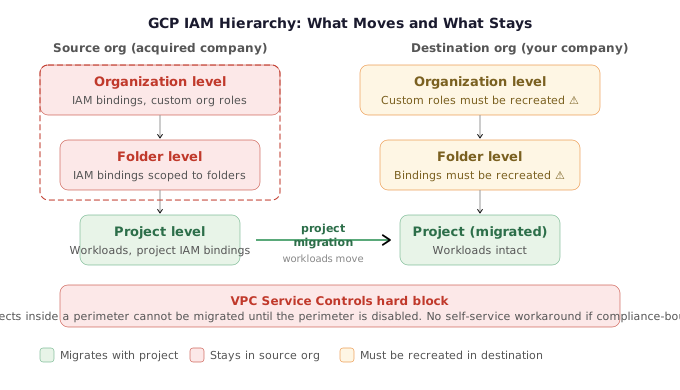
GCP IAM[6] operates differently from AWS at a structural level. Rather than account-based isolation, GCP organizes resources into a three-tier hierarchy: project level, folder level, and organization level. Permissions can be assigned to any identity — human users, service accounts, or groups — at any of these three tiers. When you migrate GCP projects from an acquired company’s organization into yours, permissions granted at the folder and organization levels in the source organization do not automatically follow the project.
This is a critical distinction. Moving a GCP project between organizations is not a simple lift-and-shift. The IAM bindings that lived above the project level — at the folder or organization scope — are left behind in the source organization. Realigning those permissions in the destination organization is a mandatory migration task, not optional cleanup. For each migrated project, you need to audit which identities (Google Workspace users, service accounts, groups) had access through folder-level or organization-level IAM roles, and re-establish equivalent bindings in your own hierarchy at the appropriate scope.
If the source organization used custom IAM roles at the organization level, these require especially careful handling. GCP explicitly flags this in its own documentation. Custom roles are organization-scoped and will not exist in your destination organization — they must be recreated and reassigned before migrating dependent projects, or access will silently break.
Google Workspace Integration: Cross-Domain Sharing vs. Full Migration
Google Workspace[7] is tightly integrated with GCP as the human identity provider. Users and groups from a Workspace account are the primary way employees are assigned GCP permissions. After an acquisition, employees from the acquired company need to gain access to resources in your GCP organization — but this is not as hard a prerequisite as AWS IAM Identity Center’s one-identity-source constraint.
GCP supports cross-domain sharing, which allows you to assign IAM permissions to users and groups from a different Google Workspace account. This means the acquired company’s employees can be granted access to your GCP projects before their Workspace accounts are fully migrated, providing operational continuity during the transition. It buys time — but it is a temporary arrangement, not a permanent identity strategy.
The more consequential Workspace decision comes at the end of the migration lifecycle: to fully delete a GCP organization, you must delete its underlying Google Workspace account. Google itself describes this as a potentially very damaging action that might be impossible to fully reverse. If the acquired company uses that Workspace for corporate Gmail, calendar, and other productivity tools, this decision cascades far beyond the cloud environment. This must be a coordinated decision with whichever team owns email and identity management at your company — not a unilateral call by the cloud security team.
VPC Service Controls: The Hard Migration Blocker
VPC Service Controls[8] is an advanced GCP security feature that acts as a firewall for the GCP API itself. When a project is protected by a VPC Service Control perimeter, all requests to Google Cloud APIs must originate from within the defined VPC or from explicitly allowed IP ranges. It is an effective control for preventing data exfiltration and enforcing network-level access constraints on cloud APIs.
The migration constraint is absolute: you cannot migrate a GCP project that is inside a VPC Service Control perimeter. The perimeter must be disabled before the project can be moved between organizations. In many cases this is straightforward — temporarily remove the project from the perimeter, migrate it, then re-enroll it in the destination organization’s perimeter.
However, if the VPC Service Control perimeter exists specifically to satisfy a compliance requirement — PCI DSS, HIPAA, or a contractual obligation — disabling it, even temporarily, may not be an option. In that scenario, there is no documented self-service path. The recommendation is to contact GCP support directly. This is not a case where careful documentation reading yields a workaround; it is a genuine architectural constraint with compliance implications that require escalation.
GCP VPC Service Control Perimeter Blocking Project Migration
Proof of Concept
-
Understand the control: VPC Service Controls[8] is an advanced GCP feature that functions like a firewall for the GCP API. It restricts API requests to those originating from within a designated VPC or from specific trusted IP address ranges, creating a security perimeter around the projects it protects.
-
Identify the migration constraint: When attempting to migrate a GCP project from the source organization into the acquiring organization, GCP enforces a hard constraint: a project that is currently inside a VPC Service Control perimeter cannot be migrated. The migration will be blocked until the perimeter protection is removed.
-
Assess the disable option: If the team has the authority to temporarily disable the VPC Service Controls perimeter, they can do so, complete the project migration, and then re-apply the perimeter within the destination organization. For many environments, this is the straightforward resolution path.
-
Identify the compliance blocker: If the VPC Service Controls perimeter exists specifically to satisfy a compliance requirement — for example, a regulatory mandate requiring API access to be restricted to known network boundaries — then temporarily disabling it may not be permissible. Removing the control would put the project out of compliance for the duration of the migration window.
-
No documented workaround: As of the time of the talk, there is no documented self-service workaround for migrating a compliance-bound VPC Service Controls-protected project between GCP organizations. The speaker explicitly noted this as an unresolved edge case discovered through careful reading of GCP documentation rather than direct hands-on experience.
-
Escalate to support: The recommended path for this scenario is to contact GCP support directly. Support teams may have access to migration paths or tooling not available through the standard console or API.
-
Community input gap: The speaker noted that if anyone has successfully navigated this specific scenario — migrating a GCP project protected by a compliance-required VPC Service Controls perimeter — their experience and approach would be valuable, indicating this is a real-world gap in publicly documented M&A cloud migration guidance.
Actionable Takeaways
- Before migrating any GCP projects, audit IAM bindings at the folder and organization levels in the source organization. Identify every identity — user, group, service account — with permissions above the project level and create a mapping to equivalent roles in your destination organization. Recreate custom organization-level IAM roles in the destination org before migration day.
- Check every GCP project slated for migration against the source organization's VPC Service Control perimeters. If any project is enrolled in a perimeter, determine whether disabling it temporarily is permissible under your compliance obligations. If it is not, open a support case with Google before scheduling the migration — this is not solvable without their involvement.
- Engage your email and identity management team early on the Google Workspace question. Use cross-domain sharing as a temporary bridge for employee access during migration, but align on a plan and timeline for full Workspace consolidation, and treat the decision to delete the source Workspace account as a coordinated, reversibility-reviewed action — not a cleanup task.
Common Pitfalls
- Treating GCP project migration as equivalent to AWS account migration. In AWS, most account-level resources move with the account. In GCP, permissions granted at the folder or organization level are scoped to the source organization and do not follow the project. Teams unfamiliar with GCP's IAM hierarchy often discover broken access only after migrated projects are already in the destination organization.
- Assuming that deleting the source GCP organization is a routine cleanup step. Because deleting a GCP organization requires deleting its underlying Google Workspace account, the blast radius extends to all Workspace services — Gmail, Drive, Calendar, Meet — used by the acquired company. Initiating this without cross-functional sign-off can cause irreversible data loss.
Log Continuity and SIEM Integration During Cloud Environment Mergers
Cloud security during mergers and acquisitions introduces a category of risk that is easy to overlook when the team is focused on identity federation and delegated administrator cleanup: log continuity. The moment a cloud account moves between organizations, the visibility your security team depends on can go dark — silently and without any immediate error.
Why Log Infrastructure Doesn’t Follow the Account
When an AWS account migrates from one organization to another, the workloads inside it keep running. But CloudTrail[9] and CloudWatch[10] infrastructure is typically configured at the organization level, not the account level. If your SIEM or log aggregation pipeline is set up to pull from your existing AWS organization’s CloudTrail trails, it will not automatically start ingesting logs from the newly migrated accounts. The same applies to GCP Cloud Logging[11] — project-level log sinks do not automatically re-associate themselves with the destination organization’s centralized log pipeline.
This means there is a window — potentially a long one — where security events in migrated accounts are being generated but not collected, indexed, or alerted on.
The SIEM Mismatch Problem
The acquiring company and the acquired company may be using entirely different log management stacks. Common scenarios include:
- The acquired company uses Splunk[12], while your organization uses OpenSearch or a SaaS SIEM.
- The acquired company has no centralized SIEM at all — logs are sitting in S3 buckets or GCP log sinks with no downstream processing.
- Both companies use the same vendor but separate instances, with different field mappings, retention policies, and alert rules.
In each of these cases, there are two distinct risks to manage:
- Your existing log infrastructure must be extended to include the migrated accounts. If your CloudTrail organization trail, CloudWatch log group forwarding, or GCP log sink is not updated to cover the new accounts or projects, those assets are effectively invisible to your SOC.
- The acquired company’s existing log infrastructure must remain functional until you can formally decommission it. If their Splunk forwarders, CloudTrail trails, or GCP log exports break during migration, you lose historical and real-time coverage in the period when you need it most.
Practical Guidance for Log Continuity
For AWS:
- Verify whether your organization-level CloudTrail[9] trail is configured to include all accounts in the organization. When a new account joins, check whether it is automatically picked up or requires manual inclusion.
- Confirm that any CloudWatch[10] log group forwarding rules that feed your SIEM are extended to cover resources in the migrated accounts.
- If the acquired company has their own CloudTrail trails writing to S3, do not disable or delete those trails during migration. Keep them active until you have confirmed your centralized trail is capturing equivalent coverage.
For GCP:
- Review log sinks at the organization and folder level in the destination organization. Confirm that migrated projects are within scope of the centralized Cloud Logging[11] export.
- If the acquired company had organization-level log sinks, these will not transfer. Recreate equivalent sinks in the destination organization for the migrated projects.
Cross-platform:
- Establish a log continuity checkpoint as a formal gate in your migration plan — migration of an account or project is not complete until log coverage is verified end-to-end, from event generation through to SIEM ingestion and alert validation.
- Do not decommission the acquired company’s SIEM or log infrastructure until you have run both pipelines in parallel and confirmed parity.
Above All, Do Not Lose Logs
The speaker’s guidance on this point is direct: above all else, make sure you are not losing logs during the migration. In the context of a cloud audit logging perspective, that means treating log continuity as a first-class security requirement — not an afterthought to be cleaned up after the migration is complete. A gap in CloudTrail or Cloud Logging coverage during a period of significant infrastructure change is exactly the kind of blind spot an attacker would exploit.
Actionable Takeaways
- Before migrating any AWS account, verify whether your organization-level CloudTrail trail will automatically include the new account. Test this by migrating a low-risk account first and confirming CloudTrail events appear in your SIEM within minutes of the move.
- Keep the acquired company's existing log infrastructure (Splunk forwarders, CloudTrail trails, GCP log sinks) fully operational throughout the migration and run both pipelines in parallel until you have confirmed equivalent coverage in your centralized SIEM — only then decommission theirs.
- Add a formal log continuity gate to your migration checklist: an account or GCP project is not considered successfully migrated until you have validated end-to-end log flow from event generation through SIEM ingestion, with at least one test alert firing correctly.
Common Pitfalls
- Assuming that because an AWS account's workloads keep running after migration, its logs are still being collected. Organization-level CloudTrail trails and CloudWatch forwarding rules are scoped to the organization — migrated accounts are not automatically included and must be explicitly verified.
- Decommissioning the acquired company's SIEM or log forwarding infrastructure too early, before centralized coverage has been confirmed. This creates a blind spot during the highest-risk phase of the integration when security visibility is most critical.
M&A Cloud Migration Planning: The Web of Dependencies
The “Web of Dependencies” Framework for Cloud M&A Migrations
When your company acquires another, you are not just acquiring their AWS accounts or GCP projects. You are acquiring an entire interconnected system — and cloud security during mergers and acquisitions requires mapping every thread in that web before a single account moves. The cloud environment is the tip of the iceberg; beneath it lies a tangle of identity systems, delivery pipelines, network infrastructure, and operational tooling, all of which must be accounted for in your migration plan.
Every Cloud Environment Has Hidden Stakeholders
The talk is explicit: “There are a bunch of different things that are interconnected that are going to be other factors that will impact your cloud environment and maybe in ways that you don’t immediately expect.” Specifically, you must account for:
- SSO provider: As covered in the IAM Identity Center and Google Workspace sections, identity is a hard prerequisite. The teams who own your SSO platform — and their counterparts at the acquired company — must be looped in before any accounts migrate.
- CI/CD pipelines: Deployment pipelines are typically wired to specific AWS accounts, GCP projects, or service accounts. Moving those targets without updating pipeline configuration will break deployments silently or cause security gaps from stale credentials.
- Network infrastructure: Shared VPCs, AWS Resource Access Manager[13] (RAM) shared resources, Route 53 hosted zones, and peering arrangements are all potentially disrupted by account migration. RAM and shared VPCs were described by a Q&A participant as “exactly as bad as you’d expect” — a known landmine flagged even though it was cut for time.
- Finance and billing: AWS organization-level consolidated billing and GCP billing account linkages change the moment accounts move. Finance teams at both companies need visibility and sign-off on the migration timeline and sequencing.
- Security tooling: Your SIEM, vulnerability management platform, and any third-party security SaaS products integrated with cloud APIs may lose visibility into migrated accounts if they are not explicitly updated.
Org Size Shapes Who You Need at the Table
The practical scope of this stakeholder problem scales directly with the size of both organizations:
- In large organizations, each dependency has a dedicated team. Coordinating across SSO, network, CI/CD, finance, and security requires a formal project management structure with named owners and explicit sign-off gates.
- In small organizations, a single engineer or small team may own all of these functions — but the risk is that cross-discipline dependencies are assumed to be known rather than documented, and something slips through.
Either way, all stakeholders must be identified and engaged as early as possible — not after problems surface during migration.
Migration Planning: Sequencing, Documentation, and Backout Plans
The closing guidance from this talk distills directly into three non-negotiable practices:
1. Have a migration plan and document it well.
Every step should be written down: what is moving, in what order, what the pre-conditions are (e.g., “IAM Identity Center SSO migration complete before any AWS accounts move”), and who is responsible for each action. This documentation is also what lets you bring finance, legal, and non-technical stakeholders into the process without requiring them to understand the technical details.
2. Get all stakeholders involved as early as possible.
Late-stage discovery of a dependency — e.g., finding out the acquired company’s CI/CD system is hardcoded to an IAM role in a specific AWS account, the day before that account is scheduled to migrate — is the primary cause of emergency rollbacks and migration-night incidents. Early engagement surfaces these dependencies when there is still time to sequence around them.
3. Have a backout plan for every step.
Google’s own documentation explicitly calls this out for GCP project migrations: ensure you have the permissions and procedures in place to reverse any migration action if something unexpected happens. This applies equally to AWS: “Be able to undo anything that you do with this.” A backout plan is not a fallback for failure — it is a prerequisite for executing at all, because without it, a single unexpected error forces you to choose between a broken environment and an unrecoverable state.
When in Doubt, Contact Support
The final piece of guidance applies to the entire migration, not just individual provider-specific issues: “When in doubt, contact support.” AWS and GCP support teams have seen these migrations before, understand the edge cases in their own services, and can advise on sequencing and known gotchas — especially for services like VPC Service Controls where the documentation explicitly does not offer a clean answer.
Actionable Takeaways
- Before any accounts move, build a dependency map that includes SSO provider, CI/CD pipelines, network infrastructure (shared VPCs, RAM, Route 53), security tooling, and finance/billing — and identify the named owner or team responsible for each. Every dependency on the map needs a representative at the migration planning table.
- For every migration step, write a corresponding backout procedure and confirm in advance that you have the permissions to execute it. A step without a tested rollback path should not be executed in production until one exists.
- Engage stakeholders from both the acquiring and acquired company as early as possible — before the migration plan is finalized, not after. Late-stage discovery of cross-team dependencies is the primary driver of migration delays and night-of incidents.
Common Pitfalls
- Treating the migration as a cloud-team-only project and failing to involve SSO, network, CI/CD, and finance teams until their systems break. Cloud accounts do not exist in isolation; every operational dependency will surface during migration whether or not the right people are in the room.
- Executing migration steps without documented backout plans. Once an account moves or a delegation is severed, the window to reverse it cleanly narrows quickly. The assumption that "we can just undo it" is not a plan — it is the absence of one.
Conclusion
Cloud security during mergers and acquisitions is not primarily a technical challenge — it is a sequencing and dependency challenge where the consequences of getting the order wrong are silent, delayed, and difficult to reverse. The four major landmine categories covered here — AWS IAM Identity Center access loss, GuardDuty’s legacy invitation trap, GCP’s VPC Service Controls hard block, and log continuity gaps — share a common thread: none of them produce obvious errors at migration time. Each one is discoverable only through careful pre-migration assessment, explicit pre-condition gates, and post-migration validation.
The “web of dependencies” framework is the right lens for all of this. Every cloud environment is entangled with identity systems, delivery pipelines, network infrastructure, security tooling, and finance systems. The cloud security team cannot own this migration alone — it requires named owners from every dependent system, documented backout plans for every step, and a migration plan that treats access, visibility, and compliance as non-negotiable throughout the transition window.
For more on the foundational practices that underpin these migration decisions, see our coverage of identity and access management and security operations. If you are working through governance and compliance requirements that interact with your migration plan — particularly around VPC Service Controls and log retention — those constraints should be in the room at the earliest planning stages.
References & Tools
- AWS IAM Identity Center — AWS's organization-level identity federation service (formerly AWS SSO); enforces one identity source per organization. ↩
- AWS Organizations — Management layer for multi-account AWS environments; centralized root access management and account migration flow through this service. ↩
- AWS Firewall Manager — Organization-level network security service; delegated administrator must be de-registered before migrating the admin account. ↩
- AWS GuardDuty — Threat detection service with two configuration models (AWS Organizations delegation vs. legacy invitation method); both require explicit handling during M&A migrations. ↩
- AWS Security Hub — Security posture management service with delegated administrator support; the delegated admin account requires explicit de-registration before migration. ↩
- GCP IAM — GCP's three-tier IAM hierarchy (project, folder, organization); folder and organization-level bindings do not follow projects during migration. ↩
- Google Workspace — Human identity provider tightly integrated with GCP; deleting the source GCP organization requires deleting its Workspace account, which may be irreversible. ↩
- GCP VPC Service Controls — GCP API firewall perimeter that must be disabled before migrating projects between organizations; disabling may violate compliance requirements. ↩
- Amazon CloudTrail — AWS audit logging service; organization-level trails must be explicitly verified to cover newly migrated accounts. ↩
- Amazon CloudWatch — AWS monitoring service; log group forwarding rules must be updated to include migrated accounts during M&A integrations. ↩
- GCP Cloud Logging — GCP audit and operations logging; organization and folder-level log sinks do not transfer during project migration and must be recreated. ↩
- Splunk — Example SIEM platform; cited as a log management stack that may differ between acquiring and acquired companies, requiring parallel pipeline operation during migration. ↩
- AWS Resource Access Manager (RAM) — Service for sharing resources across AWS accounts; flagged as a known migration landmine for shared VPCs and Route 53 resources. ↩
Questions from the audience
Related deep dives
The AI Security Larsen Effect - How to Stop the Feedback Loop | [un]prompted 2026
This Wasnt in the Job Description- Building a production-ready AWS environment from scratch
I SPy - Rethinking Entra ID research for new paths to Global Admin