A developer installs what appears to be a popular VS Code extension — same logo, same GitHub repository stats, same publisher verification badge. Within seconds of installation, a JavaScript payload silently exfiltrates credentials, clipboard contents, and open file contents to a Discord webhook. This is the reality of malicious VS Code extension attacks, a supply chain threat vector that affects 70% of developers who use the world’s most popular IDE.
For security engineers, this talk from Checkmarx security researcher Raphael Silva at OWASP Global AppSec USA 2025 reveals why IDE extensions represent one of the most underdefended attack surfaces in modern software development — running with full user privileges, auto-updating without review, and bypassing most EDR and SIEM controls. This post covers extension anatomy, real-world attack patterns, and the limited but actionable defenses available today.
Key Takeaways
- You'll learn how malicious VS Code extensions bypass Microsoft's publishing safeguards using typosquatting, dependency injection, and obfuscated payloads — and why these attacks remain effective even against vigilant developers.
- You'll be able to identify the key attack patterns used by real-world malicious extensions (Discord webhook exfiltration, ransomware loaders, clipboard monitoring) so you can build better detection rules for your SIEM or EDR.
- Apply extension allowlisting in VS Code to reduce your organization's attack surface — the only currently reliable defense against rogue IDE extensions reaching developer machines.
Why Developer IDEs Are High-Value Supply Chain Targets
Malicious VS Code extensions represent a particularly dangerous class of supply chain attack because developer machines are not equal to other corporate endpoints — they are the keys to the kingdom. When an attacker compromises a developer’s IDE, they inherit everything that developer can access: production credentials stored in environment files, SSH keys, cloud provider tokens, API keys in local repositories, and direct access to build pipelines. This is categorically different from compromising an HR workstation.
A successful extension attack on a single developer can cascade across an entire organization’s infrastructure. Security controls that work adequately elsewhere in the enterprise often fail at the IDE layer because developer tools are specifically trusted to run arbitrary code as part of their normal function.
Why VS Code Specifically
VS Code commands approximately 70% of the developer market[1] (Stack Overflow developer surveys), meaning any attack vector targeting VS Code extensions has an enormous potential blast radius. Even developers who primarily use other IDEs typically have VS Code installed and open it periodically.
Several architectural properties make VS Code uniquely attractive as an attack surface:
- No sandboxing: All extensions run with the full privileges of the user running VS Code. If the developer is running as an administrator, every extension is an administrator too.
- Auto-update by default: Extensions update automatically in almost all common scenarios. An attacker can publish a legitimate extension, build a user base over months, then push a malicious update — infecting every existing install simultaneously with no user interaction.
- Bypasses security controls: IDE processes are typically whitelisted in enterprise security tools. Security operations teams monitoring for suspicious binary execution often don’t flag JavaScript running inside an extension host process.
- Rapid time-to-publish: An attacker can go from account creation to a published, publicly available extension in approximately 10 minutes. There is no meaningful vetting gate.
OWASP Recognition
The OWASP Top 10 2025[2] elevated “Vulnerable and Outdated Components” to number three overall — and in the developer-submitted survey, it ranked as the single most critical risk. The security community is recognizing that the supply chain extends beyond npm packages to the tools developers use to write code.
Actionable Takeaways
- Audit your organization's VS Code extension landscape now: pull the list of installed extensions from developer machines and check each against the VS Marketplace removals tracking file. You may find silently removed malicious extensions that were installed — and uninstalled from your machines — without anyone being notified.
- Treat developer workstations as a separate, elevated-risk tier in your threat model. Apply the same scrutiny to IDE plugins that you apply to third-party software installations — they execute with equivalent or greater privilege.
- Engage your security operations team to verify whether current EDR and SIEM rules cover IDE extension installation events. Based on research testing multiple EDR products, the answer is likely no.
Common Pitfalls
- Assuming developer tools are implicitly trusted because they are used for legitimate work. The same trust that makes VS Code useful — running arbitrary JavaScript with no sandbox — is the property attackers exploit. "It's a developer tool" is not a security control.
- Conflating the VS Code Marketplace "Verified Publisher" badge with trustworthiness. Verification only means the publisher owns a domain registered for six months. It makes no claim about the publisher's intentions or the safety of their code.
VS Code Extension Architecture and the Attack Surface
Extension Anatomy: It’s Just a Zip File
A VS Code extension (.vsix) is a ZIP archive. There is no obfuscation, no encryption, no binary compilation — it is plain JavaScript. Anyone can extract it and read every line of code. The extension is manifest-driven: the package.json file controls what the extension does, what npm packages it depends on, when it runs, and what other VS Code extensions it depends on.
Activation Events: The Star Trigger
Every VS Code extension must declare when it activates:
onStartupFinished— runs after VS Code fully loadsonLanguage:json— runs when a specific file type is opened*(star) — runs as soon as VS Code is physically capable of executing it
Research across malicious extensions in the wild found that over 90% use the star activation event. The moment VS Code starts, before the developer has opened a project or typed a single character, the malicious code is already running.
Extension Dependencies: The Hidden Persistence Mechanism
The package.json manifest supports two types of extension relationships with very different uninstall behaviors:
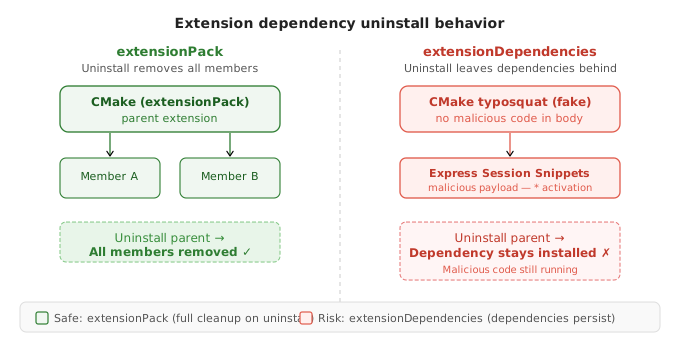
Extension Packs (extensionPack field): When you uninstall the pack, all bundled extensions are also uninstalled.
Extension Dependencies (extensionDependencies field): When you install an extension with dependencies, VS Code installs those dependent extensions automatically. When you uninstall the parent extension, the dependencies remain installed.
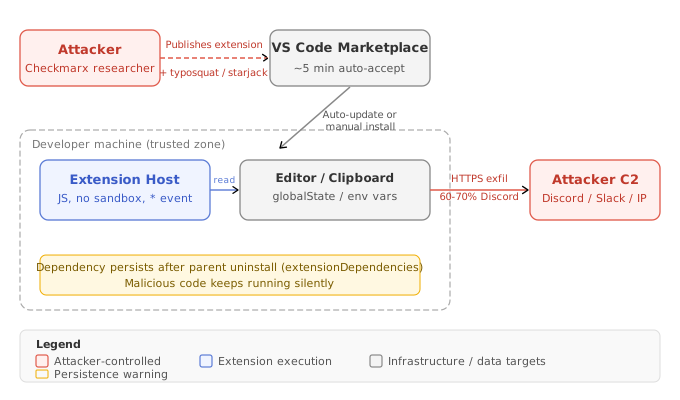
This asymmetry is a critical attack vector. An attacker publishes a benign-looking typosquatted extension with no malicious code in its own body — making it safe to inspect. The payload lives in a dependency that gets silently installed alongside it. When the victim uninstalls the fake, the malicious dependency keeps running.
### CMake Typosquatting Extension with Hidden Dependency Chain: Persistent Code After Uninstall
Proof of Concept
-
Publisher typosquatting: Register a publisher ID visually indistinguishable from the legitimate CMake publisher at normal screen resolution. Legitimate ID:
twwxs. Attacker ID:tvvxs(W replaced with two V characters). The difference is imperceptible without character-by-character comparison. -
Visual identity cloning: Copy the byte-identical logo image (same file hash) and README (same file hash) from the real CMake extension. On the Marketplace listing page, both extensions appear visually identical.
-
Starjacking the repository: Set the
repositoryfield inpackage.jsonto point at the legitimate CMake project’s GitHub URL. The Marketplace fetches statistics from this URL — so the fake extension’s page shows the real project’s 20,000 stars, open issues, pull requests, and commit history. -
Clean extension body with malicious dependency: The CMake fake’s JavaScript source contains zero malicious code — it passes manual code review. Its
extensionDependenciesfield declares the malicious Express Session Snippets extension. VS Code installs this dependency automatically with no separate user prompt. -
Payload execution: The Express Session Snippets dependency activates immediately with the star (
*) event, beginning data exfiltration before the developer has opened any project. -
Persistence after uninstall: When the victim discovers and uninstalls the fake CMake extension, VS Code’s
extensionDependenciesbehavior leaves the Express Session Snippets dependency installed and running. The victim believes the threat is remediated; the payload continues operating silently. -
Forensic stealth: Any developer who extracts and inspects the CMake
.vsixfinds no suspicious code. The malicious behavior is entirely in the dependency — not surfaced during the installation flow.
The .vscode/extensions.json Vector
VS Code supports a .vscode/extensions.json project configuration file listing recommended extensions. When a developer opens a project containing this file, VS Code prompts them to install the recommended extensions — displaying publisher names prominently.
An attacker who controls a repository (or can submit a PR) can add malicious extensions to the recommendations list, spoofing well-known publisher names. The prompt displays “Recommended extensions from Microsoft, GitHub, Google” — but the publisher names shown are whatever the attacker declared. A developer who trusts the repository clicks install.
npm Dependency URLs and Registry Gaps
npm allows dependencies to be declared as GitHub repository URLs, local file paths, or arbitrary URLs — not just registry package names. The npm registry has a known issue where URL-declared dependencies are not shown in registry metadata, meaning automated security tools that inspect dependency trees via the registry API miss them entirely. Attackers are actively exploiting this to bypass dependency analysis tooling.
Actionable Takeaways
- Before installing any VS Code extension, check its
extensionDependenciesfield in the Marketplace or by extracting the.vsix. Understand what additional extensions will be installed automatically and cannot be cleanly removed by uninstalling the parent. - Audit
.vscode/extensions.jsonfiles in repositories your developers clone — particularly from external or open source sources. Treat recommended extension lists as untrusted input requiring the same scrutiny as a third-party dependency. - Check running extensions in VS Code against your organization's approved extension list. Pay particular attention to any extension using the star (
*) activation event — the dominant pattern in malicious extensions.
Common Pitfalls
- Assuming that uninstalling an extension removes all associated code. Extension dependencies declared via
extensionDependenciespersist after the parent is removed — leaving potentially malicious code running with no obvious indicator of its presence. - Trusting publisher names displayed in VS Code prompts at face value. Publisher names in
.vscode/extensions.jsonrecommendation prompts are attacker-controlled strings, not verified identities.
Marketplace Trust Signal Spoofing and Publishing Safeguards Bypass
What Microsoft Says vs. What Actually Happens
Microsoft states the VS Code Marketplace[1] employs multiple publishing safeguards: malware scanning, dynamic behavioral detection, runtime monitoring, and name-squatting detection. The Checkmarx research demonstrates a significant gap between these claims and observable reality.
Every PoC extension submitted — including one with a completely unobfuscated, plaintext malicious payload — was automatically accepted within approximately five minutes of submission. The unobfuscated extension remained available for nearly a month after being discovered by a third-party researcher (a private individual in Poland running his own personal scanning tool) before Microsoft removed it. During that period, it accumulated 920 installs.
Typosquatting Publisher Names
The Marketplace prevents exact-duplicate publisher names but not visually similar ones. The CMake research demonstrated this: twwxs (legitimate) vs. tvvxs (attacker). At normal reading distance these are functionally indistinguishable. The same applies to extension names — single character substitutions (homoglyphs, adjacent keyboard keys, repeated letters) create names that appear identical.
Microsoft has improved typosquatting detection since this research — the original test was harder to replicate by the time of the presentation. The improvement is incremental, not comprehensive.
Starjacking: Spoofing Repository Metrics
VS Code extension Marketplace pages display GitHub repository statistics fetched from whatever repository URL the publisher declares in their package.json — with no verification that the publisher owns that repository. An attacker points their malicious extension’s repository field at the legitimate project’s GitHub URL. The Marketplace page then displays the real project’s 20,000 stars, 80 open issues, and active pull request history.
What “Verified Publisher” Actually Means
The verification requirement is:
- Own a domain for at least six months
- Have the extension published for at least six months
Domain ownership is trivially purchasable. The badge signals domain ownership — not code safety, organizational legitimacy, or any security review. An attacker running a patient campaign can achieve verified status through patience alone.
### Unobfuscated Payload Upload: Bypassing VS Code Marketplace Automated Malware Detection
Proof of Concept
-
Obfuscation removal: Starting from version 1.24 of the Express Session Snippets fake (versions 1.1–1.23 used Base64-in-PNG obfuscation), all encoding was removed. The malicious payload — info stealer logic making callbacks to a logging server — was written directly into the extension’s JavaScript source files in plaintext. A human reading the source would immediately recognize it as malicious.
-
Extension submission: The unobfuscated extension was submitted through the standard publisher portal with no special bypass technique. It went through the same automated review pipeline as all other extensions.
-
Automatic acceptance: The extension was accepted and made publicly available in approximately five minutes — the same timeframe as the obfuscated versions. The Marketplace’s automated scanning did not flag the plaintext malicious JavaScript.
-
Third-party detection: A private researcher in Poland, who operates a personal malware scanning tool for VS Code extensions as a side project (not affiliated with any security company), detected the extension and emailed the researcher the same evening it was published. Semantic analysis of extension JavaScript is technically feasible — Microsoft has simply not implemented it.
-
Microsoft response timeline: Despite the third-party report, the unobfuscated malicious extension remained publicly available for nearly a month before Microsoft removed it. Microsoft Defender[3], identified as the primary automated scanner, missed all custom PoC payloads — detecting only known-bad signatures, not novel malicious patterns.
-
Disclosure gap: Every malicious extension that has been publicly disclosed and removed from the VS Code Marketplace was reported by a third-party security vendor or independent researcher — not caught by Microsoft’s own systems.
Actionable Takeaways
- Never rely on Marketplace visual signals alone — star count, verified badge, logo, or repository statistics. All of these can be spoofed. If an extension is critical to your workflow, verify the publisher ID character-by-character against the known-good extension identifier, not just the display name.
- Monitor the VS Code Marketplace removals tracking file[4] (a Markdown table in the VS Marketplace GitHub repository) for extensions that match identifiers installed in your environment. This is currently the only proactive data source available for compromise detection.
- When evaluating extension trustworthiness, navigate directly to the publisher's declared GitHub repository and verify the repository owner is the expected organization — not just that the statistics look plausible.
Common Pitfalls
- Interpreting the "Verified Publisher" badge as a security indicator. It only confirms domain ownership for six months — a trivially achievable bar for any motivated attacker running a patient campaign.
- Trusting extension repository statistics (stars, issues, PRs) as evidence of community validation. Starjacking allows these metrics to be copied from any legitimate open source project without the attacker controlling or contributing to it.
Real-World Malicious Extension Payload Patterns and Data Exfiltration
The Threat Landscape: 17 Extensions Reported, One with a Million Installs
Over the research period, Checkmarx identified and reported approximately 17 malicious VS Code extensions to Microsoft, with two additional extensions under review at the time of the talk. One extension had over one million installs — the largest known instance of VS Code marketplace malware by install count. The remaining reported extensions ranged from hundreds to a few thousand installs each.
A critical finding: approximately half of the identified malicious extensions were unpublished — uploaded to the Marketplace but not publicly searchable. Retrievable via the Marketplace API but invisible in the Marketplace UI. This suggests two attacker behaviors: staging payloads for future activation, or publishing and immediately unpublishing to target specific victims while evading broad detection.
Primary Payload Pattern 1: Data Exfiltration via Webhook APIs
The dominant attack pattern is data theft with exfiltration via webhook APIs. Over 60–70% of identified malicious extensions used Discord webhooks[5] as their exfiltration channel — chosen because HTTPS traffic to discord.com is indistinguishable from legitimate Discord client activity at the network layer.
What these extensions steal:
- Editor contents on change: Extensions register listeners for VS Code’s
onDidChangeTextDocumentevent. Every edit triggers exfiltration of the affected file’s complete contents. Credentials typed or pasted into VS Code are captured in real time. - Clipboard monitoring: Extensions access the system clipboard. Developers who copy credentials from a password manager to paste into a terminal expose those credentials during the copy phase.
- VS Code global state: VS Code’s
globalStateAPI stores persistent data across sessions. Any extension can request data from global state, including data stored by other extensions — a malicious extension can extract tokens cached by a legitimate authentication extension. - Environment fingerprinting: Hostname, username, OS version, installed extensions list, and directory paths are commonly collected to profile the victim before or alongside exfiltration.
Primary Payload Pattern 2: Remote Payload Downloaders
The second dominant pattern is the downloader: minimal code whose sole purpose is fetching and executing a second-stage payload from a remote endpoint.
Two common implementations observed in the wild:
PowerShell via Invoke-WebRequest (Windows): Uses Invoke-WebRequest with a -Uri parameter pointing to a PS1 file on an attacker-controlled server, saves to $env:TEMP, then executes with -ExecutionPolicy Bypass.
Curl-to-bash (Linux/macOS): Pipes a shell script directly from a remote URL into bash with no intermediate file — leaving minimal forensic evidence.
One documented case delivered a ransomware loader via this mechanism, demanding payment in Shiba Inu (SHIB) cryptocurrency. The extension itself contained no ransomware code — only the downloader — allowing it to pass automated scanning that looks for known malicious signatures in the extension bundle.
### Express Session Snippets Typosquatting Extension: Info Stealer PoC with Obfuscated Payload
Proof of Concept
-
Extension creation and masquerading: Register a publisher associated with Express.js tooling. Name the extension to appear in search results for “express session snippets” — a commonly searched development utility. Craft metadata, description, and README to appear legitimate.
-
Payload encoding and embedding: Base64-encode the malicious JavaScript payload (an info stealer logging all incoming requests from infected machines). Embed the encoded string inside a PNG image file bundled with the extension. Automated scanners inspect JavaScript files for suspicious patterns but do not decode and analyze data embedded in binary image assets.
-
Runtime extraction via regex: On activation (star
*event, firing immediately at VS Code startup), the extension’s JavaScript reads the bundled PNG, applies a regex to locate the Base64 payload string within the image binary data, extracts it, decodes it from Base64, and executes it dynamically. -
Callback infrastructure: A web server logs all incoming HTTP requests. Each infected installation phones home, recording the machine’s hostname, username, directory paths, OS, and installed extension list.
-
Marketplace submission and acceptance: Submitted through the standard publisher portal. Automatically accepted and publicly available in approximately five minutes, with no human review and no automated detection.
- Infection growth: Within two weeks: 920 installs from approximately 300 unique IPs. Analysis of callback logs revealed:
- A significant portion came from automated security scanning tools (identifiable by directory path patterns consistent with sandbox environments)
- Genuine developer workstations were also infected, including one working on a Robot Operating System (ROS) project and another on an underwater simulation system — confirming real-world developer compromise, not just security researcher activity
- Detection timeline: Not detected by Microsoft. Flagged by the private Polish researcher running a personal scanning tool. Microsoft took nearly a month to remove the extension.
Common Infrastructure Patterns in Wild Extensions
Across 17+ reported extensions, consistent patterns emerged:
- Hardcoded HTTP endpoints: Direct IPs or URLs pointing to PS1 or shell script files — visible in plaintext JavaScript source
- Discord webhooks (dominant), followed by Slack and Telegram
- Targeted VS Code APIs:
clipboard,onDidChangeTextDocument,globalState - Host fingerprinting: Hostname, username, installed extension list
- Download-and-execute: curl-to-bash or Invoke-WebRequest to temp file
These patterns are stable enough to build SIEM detection rules: any VS Code extension process making outbound HTTPS connections to discord.com/api/webhooks, hooks.slack.com, or api.telegram.org immediately after installation is a high-fidelity indicator of malicious activity.
Actionable Takeaways
- Build SIEM or EDR behavioral rules that alert on VS Code extension host processes making outbound connections to Discord, Slack, or Telegram webhook API endpoints immediately after a new extension installation event. This is the highest-fidelity detection signal currently available for this attack class.
- Treat any hardcoded IP or domain found in a VS Code extension's JavaScript source as an IOC. Extension source is readable — extract and analyze
.vsixfiles from your approved extension list and submit hardcoded endpoints to your threat intelligence platform. - Review access logs for your secrets management systems, cloud provider APIs, and CI/CD platforms following any unvetted extension installation. Data exfiltrated via editor-change listeners is silent at the endpoint but may appear as anomalous access patterns in downstream systems.
Common Pitfalls
- Blocking Discord at the network perimeter as a sufficient defense. Attackers use whatever exfiltration channel is available — Slack, Telegram, and direct HTTPS to attacker-controlled IPs are all documented alternatives.
- Assuming that because an extension's source code appears clean, it is safe to install. The CMake dependency chain attack demonstrates that the malicious payload can live entirely in a dependency extension, making the primary extension appear completely benign under code review.
Detection Gaps and Organizational Defenses Against Rogue IDE Extensions
The Detection Gap Is Real
Testing evaluated multiple EDR products against live malicious extension installation and execution. None of the tested EDR products generated alerts. The extensions installed, ran their payloads, and exfiltrated data while endpoint security tooling registered nothing of interest.
The fundamental problem is architectural: VS Code’s extension host is a legitimate process running legitimate JavaScript. The distinction between an extension fetching npm package metadata and an extension exfiltrating editor contents to Discord is behavioral, not signature-based. Building reliable EDR detection requires behavioral analysis of VS Code child processes and network telemetry correlated with installation events — a detection engineering challenge most vendors have not yet addressed.
VS Code itself logs very little about extension behavior. The developer tools console captures startup events and errors but does not provide a forensic-quality record of extension network activity, file system access, or API calls. In an incident response scenario, determining exactly what a malicious extension accessed is significantly harder than it should be.
What Actually Detects Malicious Extensions
Every malicious extension publicly disclosed and removed from the VS Code Marketplace was reported by a third-party security vendor or independent researcher — not caught by Microsoft’s own systems. Microsoft’s automated controls did not catch:
- An obfuscated Base64-in-PNG payload
- A clean extension with a malicious dependency
- A completely unobfuscated info stealer with hardcoded network callbacks
When Microsoft does remove a malicious extension, the removal process works against defenders:
- Silent uninstall: The extension is removed from affected machines without user notification. Developers have no alert that they may have been compromised.
- No disclosure: No security advisories. No communication about what data the extension accessed or what remediation is appropriate.
- Minimal public record: A row added to a Markdown table in the VS Code Marketplace GitHub repository[4] — listing the extension identifier, removal date, and a brief reason code. Not publicized by Microsoft.
Actionable Defenses
1. Extension allowlisting (highest impact)
VS Code supports an organizational extension allowlist via the extensions.allowed setting, enforceable organization-wide via MDM/GPO. It is the only control that reliably prevents malicious extension installation — operating before installation rather than attempting to detect malicious behavior after the fact.
Developer resistance is real. Research noted Reddit threads where developers described allowlisting as causing “a revolt.” Security teams implementing this should expect friction and plan a managed rollout with a clear process for developers to request additions.
2. SIEM behavioral rules
- Alert on VS Code extension host making connections to
discord.com/api/webhooks,hooks.slack.com, orapi.telegram.orgwithin a short window of a new extension installation - Alert on
powershell.exeorcmd.exespawned as a child of the VS Code extension host - Alert on
curlorwgetinvocations from the extension host downloading to temp directories
3. Marketplace removal monitoring
Automate monitoring of the VS Code Marketplace removals Markdown table. When a new entry appears, cross-reference against your developer machine extension inventory. If any developer installed a now-removed extension, treat it as a potential compromise.
4. Extension dependency auditing
Before approving an extension for organizational use, extract the .vsix, read the package.json, and enumerate all extensionDependencies. Each dependency must be evaluated independently.
5. Cursor and Open VSX awareness
AI-assisted IDEs such as Cursor use the Open VSX[6] marketplace rather than the VS Code Marketplace. Open VSX has fewer protections than VS Code Marketplace. Organizations whose developers use Cursor, VSCodium, or other VS Code forks should apply equal or stricter scrutiny to Open VSX extensions.
Actionable Takeaways
- Implement VS Code extension allowlisting via the
extensions.allowedorganizational policy, even if the initial approved list is broad. This is the only pre-installation control available and should be the long-term goal for any organization with more than a handful of developers. - Set up automated monitoring of the VS Code Marketplace GitHub removals table and cross-reference new entries against your developer machine extension inventory. The time between a malicious extension being listed and Microsoft removing it can span weeks — your window for detecting exposure is the Marketplace table.
- Add VS Code extension host network behavior to your SIEM detection coverage. The specific webhook API patterns used by real-world malicious extensions (Discord, Slack, Telegram) are consistent enough to build high-fidelity detection rules without requiring EDR visibility into extension internals.
Common Pitfalls
- Relying on EDR alone for IDE extension threat detection. Tested EDR products missed malicious extension execution entirely. Detection requires specific behavioral rules for VS Code processes — it does not happen automatically from generic endpoint protection.
- Assuming that because Microsoft silently removed an extension from a developer's machine, no compromise occurred. Silent removal means the developer was likely infected; it does not mean the exfiltration did not happen or that credentials were not stolen before removal.
Conclusion
Raphael Silva’s research at OWASP Global AppSec USA 2025 demonstrates that malicious IDE extensions are not a theoretical threat — they are an active, recurring supply chain attack vector with documented real-world victims. The VS Code Marketplace’s automated defenses have consistently failed to catch novel malicious payloads, and every public disclosure has come from third-party researchers. EDR products miss these attacks entirely. The only control that reliably works — extension allowlisting — is the one developers resist most.
For security engineers, the immediate actions are clear: audit your current extension landscape, build SIEM rules targeting webhook API exfiltration patterns, monitor the Marketplace removals table, and begin the organizational work of standing up an extension allowlist. The supply chain extends to the IDE. Treat it accordingly.
For broader context on supply chain security and how developer tooling creates hidden attack surfaces, see also:
- Hidden Chains: Revealing High-Impact Bugs from Bounty Submissions — real-world supply chain attack chains from S3 takeover to RCE
- AI Code Generation — Benefits, Risks and Mitigation Controls — how AI-generated code introduces package hallucination and new supply chain risks in the same developer tooling layer
References & Tools
- VS Code Marketplace — Microsoft's extension distribution platform for Visual Studio Code; the primary attack surface analyzed in this research. ↩
- OWASP Top 10 2025 — The updated list elevating "Vulnerable and Outdated Components" to #3, with developer tooling supply chain now recognized as a critical risk category. ↩
- Microsoft Defender — Identified as the primary automated malware scanner used by VS Code Marketplace; missed all custom PoC payloads tested in this research. ↩
- VS Code Marketplace Removals Tracking — Public GitHub repository containing a Markdown table of all removed malicious extensions; the only proactive data source for organizational compromise detection. ↩
- Discord Webhooks API — Used as the primary exfiltration channel by 60–70% of observed malicious VS Code extensions. ↩
- Open VSX Registry — Alternative extension marketplace used by Cursor, VSCodium, and other VS Code forks; has fewer protections than the VS Code Marketplace. ↩
Questions from the audience
Related deep dives

Zeal of the Convert: Taming Shai-Hulud with AI | [un]prompted 2026

Code Is Free: Securing Software | [un]prompted 2026
The SCA Balancing Act